What's new
Ram Heavy Duty Forum

Register a free account today to become a member! Once signed in, you'll be able to participate on this site by adding your own topics and posts, as well as connect with other members through your own private inbox!

AlfaOBD

I'm not sure what it is you're trying to change, however, as an example to change the setting to keep the fog lights on with the highbeams....

Select Car configuration change from the top dropdown.
Then in the Options dropdown that appears, select CBC Features: Front Fot Lamp Dropout Enabled
Then in the Value dropdown that appears, select Yes
Then press the Start button

Different options have slightly different steps, but from everything I've modified to date, steps have always been very similar. Granted, I've only made changes to 5 vehicles, so definitely not an expert.
I don't have multiple drop downs. Just one to select individual items. Once I select one they only give me a diagnosis procedure.

No car configuration change drop down. Am I missing something?
9a1b8752c1f57ae5c9ed971be6f752d1.jpg
7fce2df2a9a1822322c2ac85f54d4d61.jpg
64ee091bcd249c98cc315dd4bcd90f41.jpg


Sent from my SM-N975U using Tapatalk
 
Just so background info..I currently have security bypass cable for my Tazer. I ordered the SGW bypass but am waiting on it to come in tomorrow.

I have the OBDlink plugged into the second obd that the Tazer cable gives you.

2019 Ram 3500 Laramie Level2

Sent from my SM-N975U using Tapatalk
 
I don't have multiple drop downs. Just one to select individual items. Once I select one they only give me a diagnosis procedure.

No car configuration change drop down. Am I missing something?
9a1b8752c1f57ae5c9ed971be6f752d1.jpg
7fce2df2a9a1822322c2ac85f54d4d61.jpg
64ee091bcd249c98cc315dd4bcd90f41.jpg


Sent from my SM-N975U using Tapatalk
You're in the right spot.

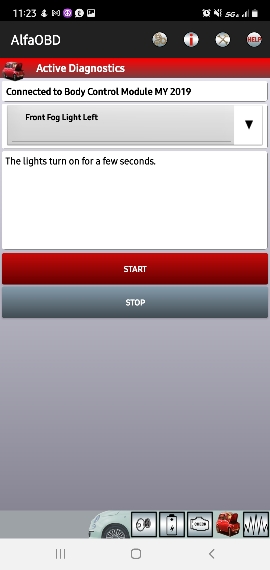
For the item you selected, the only option is to start the process, which turns them on for a few seconds, as the text states.

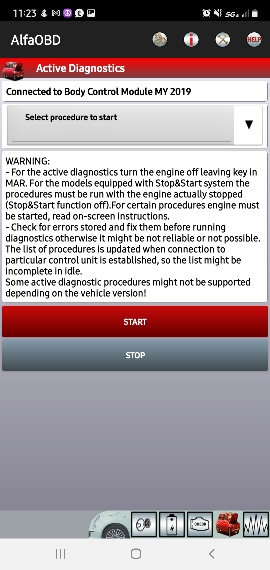
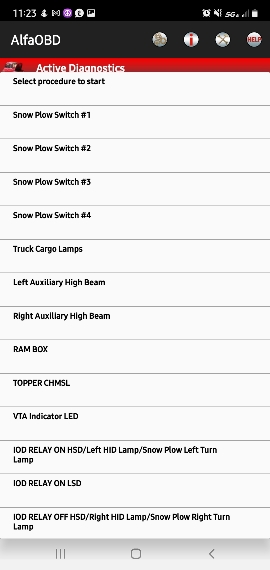
But if you scroll all the way to the bottom of the list you show in the middle screenshot, you'll see Car Configuration Change, which will get you where I was referring.
 
You're in the right spot.

For the item you selected, the only option is to start the process, which turns them on for a few seconds, as the text states.

But if you scroll all the way to the bottom of the list you show in the middle screenshot, you'll see Car Configuration Change, which will get you where I was referring.
Thanks. Feel kinda stupid.... what's new.

Sent from my SM-N975U using Tapatalk
 
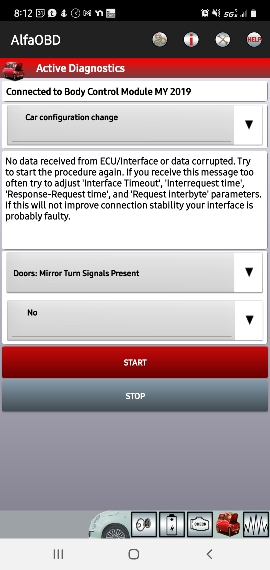
More issues... when I attempt to iniate a change it gives me an error.

Read the last couple line of the picture.

Is this because I do not have the SGW bypass installed yet?
876d244352fe8be4f903a5024f6003f8.jpg


Sent from my SM-N975U using Tapatalk
 
The truck cycles through a "reset" hard to describe but I hear the speakers "energize" and the cluster restarts each time but continues to spit out...

"No Control Unit confirmation received for the write request"

Sent from my SM-N975U using Tapatalk
 
The truck cycles through a "reset" hard to describe but I hear the speakers "energize" and the cluster restarts each time but continues to spit out...

"No Control Unit confirmation received for the write request"

Sent from my SM-N975U using Tapatalk
Yes, that error indicates the security module is doing its job. You'll need to wait for the bypass cable to get past it.
 
Just so background info..I currently have security bypass cable for my Tazer. I ordered the SGW bypass but am waiting on it to come in tomorrow.

I have the OBDlink plugged into the second obd that the Tazer cable gives you.

2019 Ram 3500 Laramie Level2

Sent from my SM-N975U using Tapatalk
The truck cycles through a "reset" hard to describe but I hear the speakers "energize" and the cluster restarts each time but continues to spit out...

"No Control Unit confirmation received for the write request"

Sent from my SM-N975U using Tapatalk
If you have the bypass cable for the tazer, and it’s installed correctly, then you don’t need any other SGW bypass, and you should have full use of AlfaOBD.
 
If you have the bypass cable for the tazer, and it’s installed correctly, then you don’t need any other SGW bypass, and you should have full use of AlfaOBD.
I do and I believe it is. The tazer works fine. Any other advice @Jimmy07 would be much appreciated.

Sent from my SM-N975U using Tapatalk
 
I do and I believe it is. The tazer works fine. Any other advice @Jimmy07 would be much appreciated.

Sent from my SM-N975U using Tapatalk
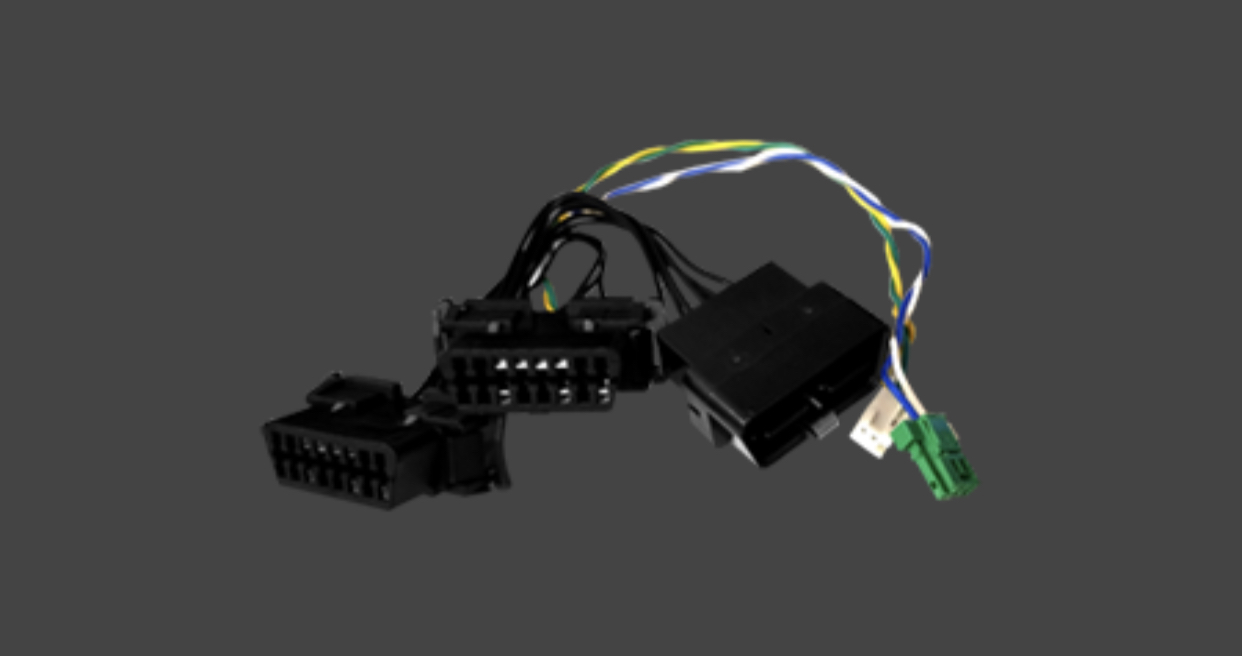
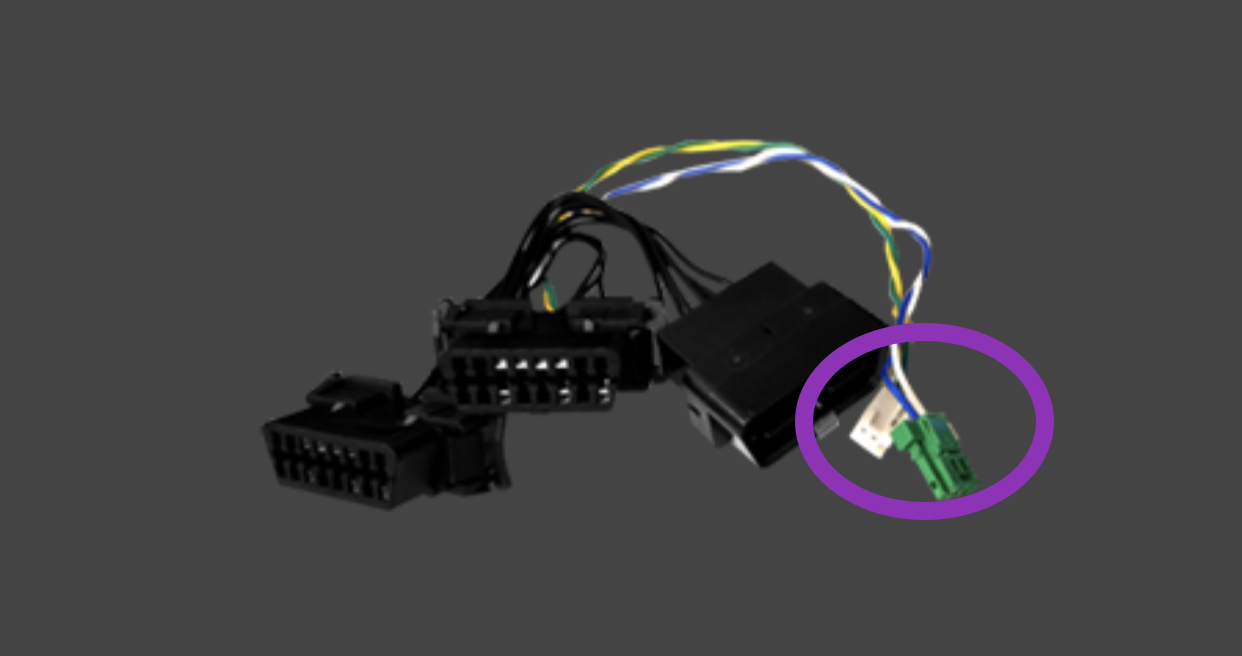
I’m not sure which style bypass tazer is including with the product, but guessing it’s something like this one?
kTGWR97.jpg

If you have the MX+ plugged into one of the splitters, and AlfaOBD is connecting to your truck, then the bypass is installed correctly. Try something simple, and follow these exact steps:
- select truck
- select body computer
- select MY2020 (or 2019, doesn’t matter)
- connect, once connected, select car with open hood
- drop down menu, scroll all the way to bottom, select car configuration change
- drop down menu, scroll down and select Doors: Mirror Turn Signals Present.
- select no
- select start (the description box will now tell you what that setting is currently set to)
- select next
- wait for procedure complete
- select start again (this will verify in the description that the setting changed)
- change the setting back to what it was before
 
I’m not sure which style bypass tazer is including with the product, but guessing it’s something like this one?
kTGWR97.jpg

If you have the MX+ plugged into one of the splitters, and AlfaOBD is connecting to your truck, then the bypass is installed correctly. Try something simple, and follow these exact steps:
- select truck
- select body computer
- select MY2020 (or 2019, doesn’t matter)
- connect, once connected, select car with open hood
- drop down menu, scroll all the way to bottom, select car configuration change
- drop down menu, scroll down and select Doors: Mirror Turn Signals Present.
- select no
- select start (the description box will now tell you what that setting is currently set to)
- select next
- wait for procedure complete
- select start again (this will verify in the description that the setting changed)
- change the setting back to what it was before
That is the bypass cable I have. I will follow those step and let you know. Thanks for the help.

Sent from my SM-N975U using Tapatalk
 
That is the bypass cable I have. I will follow those step and let you know. Thanks for the help.

Sent from my SM-N975U using Tapatalk
Same issue.... see below.
8c8170526308c51c2168f7f5a9415c02.jpg


Sent from my SM-N975U using Tapatalk
 
Same issue.... see below.
8c8170526308c51c2168f7f5a9415c02.jpg


Sent from my SM-N975U using Tapatalk
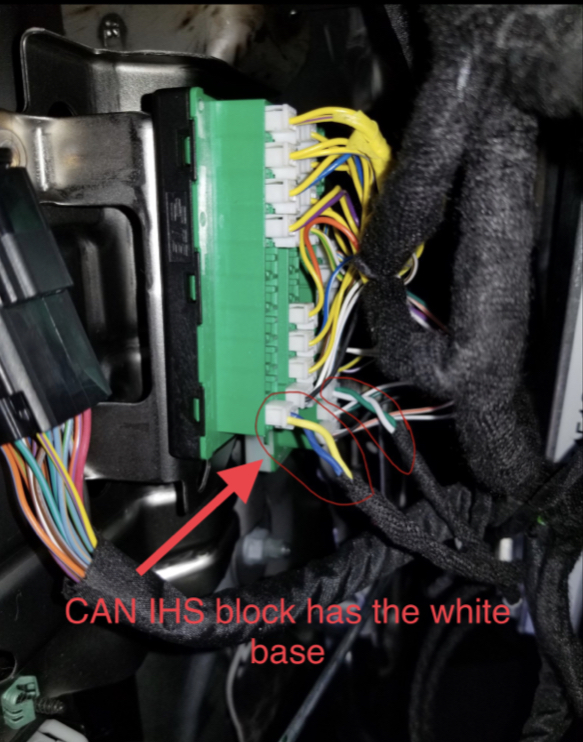
Do you have the two small connectors plugged into the correct canbus junction blocks behind the headlight switch? Yours should have two white connectors instead of white and green-
K335gGw.jpg

There are two junction blocks, one is green with a black base, the other is green with a white base. One of those white connectors gets plugged into the green/white block, and the other white connector plugs into the green/black block. It DOES matter which one gets plugged into which block, I just can’t tell you which ones without seeing the wire colors and wire positions on the OBD plugs.
LlRcheH.jpg
 
To change TPMS thresholds with AlfaOBD on a 2021 model, is it correct that I just need to change the Update Pressure Thresholds values and that it is no longer necessary to do the RF-Hub reset which required a PIN?
 
To change TPMS thresholds with AlfaOBD on a 2021 model, is it correct that I just need to change the Update Pressure Thresholds values and that it is no longer necessary to do the RF-Hub reset which required a PIN?
Correct
 
Jimmy07,

Can you say how to adjust TPMS using Windows? All I see is android or iPhone. Much appreciated.


Sent from my iPhone using Tapatalk
 
I know there is some mixed results on the forward facing trail camera, but has anyone succesfully activated the "off road page" function? i have it on my jeep JT and it's a cool feature. Just curious if anyone had success enabling it?
 
I know there is some mixed results on the forward facing trail camera, but has anyone succesfully activated the "off road page" function? i have it on my jeep JT and it's a cool feature. Just curious if anyone had success enabling it?
That’s going to be a tricky one. You would first need 12” radio with software 20.29.13. There’s a few of us actively working at this, and one of us got a new radio module with the new software, but there’s more involved than just enabling the off road pages. First off, the pages seem to be tied to Sirius guardian, so you can’t have guardian, otherwise they won’t push the pages app to your radio because in their eyes, your VIN doesn’t support it. Second, the theory is, once guardian is cancelled, the radio module will have to be installed into a 2021 truck that currently has off road pages, so the app can be forced onto your radio module, then reinstalled in your truck. Then, if that even works, it’s questionable whether or not the BCM firmware will support the off road pages, and broadcast the truck info to them.
 
Back
Top