What's new
Ram Heavy Duty Forum

Register a free account today to become a member! Once signed in, you'll be able to participate on this site by adding your own topics and posts, as well as connect with other members through your own private inbox!

Jump Seat to Console Swap Process

Anyone have any part numbers for the console wiring harness? The one that runs from the dash to the back of the console. It looks like there's 100 different versions of it. TIA
 
It didn’t get added. The two extra spots are for the ventilated seats buttons on a 1500, since they share those parts.
This got me thinking... I was trying to figure out a good way to add ventilated seats to my rear seats. This has given me a little more hope. Originally I was considering putting the front seat bags and blowers on the rear seats then doing some custom wiring with a switch near the rear heated seats switches to enable this, or maybe adding a switch to the rear heated seats wiring to be able to switch the same circuit to send the power to the heating elements or blowers. Kind of just fizzled out with the brainstorming.

Would it be a massive PITA to add the 1500 wiring to this to achieve it? Or Frankenstein the 2 somehow?
 
Would it be a massive PITA to add the 1500 wiring to this to achieve it? Or Frankenstein the 2 somehow?
The wiring is the easy part. The 2500 rear comfort module doesn’t have ventilation capability, and won’t recognize the 1500 rear comfort module messages.
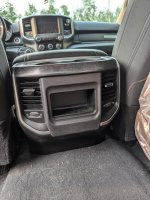
 
The wiring is the easy part. The 2500 rear comfort module doesn’t have ventilation capability, and won’t recognize the 1500 rear comfort module messages.
Would it cause too many issues to add a switch to the heating circuit to send power to a ventilation blower instead? Possibly even use the ventilated seats buttons from the 1500?
 
So 5th generation Ram 1500s can have vented rear seats?

Did any of the 4th generation Ram 1500s have vented the rear seat option?
 
For anyone with a center console that's looking to just add the rear heated seat buttons and USB/115v plugs and heated seat buttons, comparing the picture in Post 73 to my original console end cap, both pictured below, you can see what needs to be changed. Center trim piece with the one that has the spots for all of it, appropriate buttons/plugs, and the wiring. I'm likely going the route of replacing the center console harness so I have all the OEM wires and connectors. I'll add part numbers once I have them.

1000001203.jpg
1000001202.jpg
 
Last edited:
For anyone with a center console that's looking to just add the rear USB/110v plugs and heated seat buttons, comparing the picture in Post 73 to my original console end cap pictured below you can see what you'll need to change. You'll need to replace the center trim piece with the one that has the spots for all of it, and you'll also need the appropriate wiring. I'm likely going the route of replacing the center console harness so I have all the OEM wires and connectors. I'll add part numbers once I have them.

View attachment 86348
View attachment 86349
Did you find the part number for the harness to power usb/110?
 
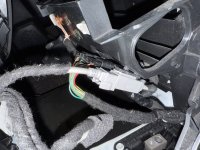
The wiring harness from the dash to under the drivers seat, that's the jumpseat harness.

In OEM Center console trucks, they came with a 12" jumper harness from the console to the dash plug.
Do you happen to know the part number for the jumper harness?
 
Did you find the part number for the harness to power usb/110?
Haven't tackled this project yet, but will update when I have.
Do you happen to know the part number for the jumper harness?
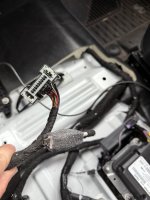
If noone else chimes in, I can take a look at mine next time I have my console slid back or when I do finally tackle this.
 
Plugged things in to check function before I start cutting. I did not have time to try to troubleshoot, other than tried activating the wireless charger in alfaOBD (unsuccessful)

I rerouted the H connector that the jump seat plugged which was under the driver seat, back towards the center console. I plugged it into the H connector on the front of the new console. My OE media hub had a grey multipin connector, a grey usb, and a black usb. I plugged the grey USB from these into the grey usb connector on center console next to the H connector. I also have a USB that is from the H connector harness, but I did not plug that one in.

The front USB Hub works, CarPlay works.

The front 115v plug works

The front wireless charger does NOT work

The rear USB Hub does NOT work

The rear charge-only USB in the armrest works

The rear 115V plug works.


I don’t care about the wireless charger, but I’d really like the rear USBs to work. Reading thru this thread again, sounds like others had issues with the rear USBs as well, unfortunately. I didn’t see if there was a resolution?

I tried activating wireless charger in alfaOBD but that didn’t seem to do anything.

Front of console: H connector, grey usb from center console/old media hub
IMG_8076.jpeg

H connector from under seat, has USB attached to it. May try this one, as well as try the black USB from the center console
IMG_8085.jpeg
 
I need some help. I have a '23 Tradesman that I'm attempting to swap the jump seat out for a full console from a '22 Bighorn.

The Tradesman has -
- USB/ 1 aux port on the dash panel
- 110v outlet on the dash panel
- usb port in the arm rest
- no rear ports for the back seat.

Bighorn console has -
- usb/aux ports at the dash
- usb in the arm rest
- front 110v outlet in the console
- rear usb ports
- rear 110v outlet

I got the "H" connector from under the driver seat rerouted and moved to the front with room length to spare. I removed the cubby, the lower panel on the drivers side and the radio stack. Cut all the cable ties and freed up the usb cable and the square connector harness that went to the hub and rerouted and got some extra length. Plugged in the "H" connector, the usb out of the dash to the port beside it and left the square plug unplugged for testing because it has to be extended because my console has the offset right usb ports.

Here is where things go very wrong... when I hit the start button to see if it had power, the console (female) usb port instantly went up in smoke?? I killed power and unplugged it but the female port is toast. The dash side cable is looking rough but works fine. My question is what would cause it?
 
Seems like there is a lot of misinformation, and I think it’s due to variances in trim levels, model years, etc.
Here’s what worked for me. YMMV.

My truck:
2019 Power Wagon, Level 1: manual transfer case, 8.4” screen, CD player under jump seat, 115V outlet on dash.

Donor console:
From a 2021 Laramie* has Ram Charger wireless charger, 115V AC outlets front and rear, rear charge only USB, and rear seat heater switches.
*it was a Laramie but looking up the VIN to see what packages, it was actually a Chrsyler test truck, and the parts were a bit mismatched colors and manufacture date. Kinda unique.

Purchased Parts:


QuantityItem DescriptionPart Number
1Console Bracket Front68291157AC
1Console Bracket Rear68366628AA
2Screw - Front Bracket To Dash6505069AA
2Hex Head Bolt w/ Washer - Rear Bracket To Floor6104386AA
4Hex Head Bolt w/ Washer - Console to Brackets6508182AA
2Snap-in Nut (Front Bracket)6511163AA
1Instrument Panel Closeout Panel, Right6QB50TX7AA
1Instrument Panel Closeout Panel, Left6QY39TX7AA

I also bought filler panels for the rear heated seat switches, since my truck doesn’t have rear heated seats. Unfortunately they are not available as a discreet part number from Mopar, but you can either keep your eyes on EBay (what I did) or there are some people selling 3D printed fillers. Or just leave them.
Wiring:
I re-routed the harness from under the drivers seat to the center dash area. I had to remove one plastic retainer clip, and the ground wire was not long enough, so I moved the ground to a stud just forward of shifter(I sanded the paint around it a bit to ensure good bond connection). I also had to loosen the H connector tree clip on the console side to get some extra slack.

I connected only the H connector, and the Grey USB from the original dashboard media hub into the console on the Drivers side. This meant I left these disconnected from my dashboard media hub black USB, grey media hub power connector, dashboard 115V AC connector.

Everything works EXCEPT the REAR USBs and the Wireless Charger. Front media hub works, USB in the armrest works, LED light under arm rest works, front and rear 115V AC plugs work.

Not sure if the Wireless Charger will need wiring or if it can be enabled in AlfaOBD. Rear USBs it sounds like others have struggled to enable as well. I would like them to work so I’ll probably fiddle with that more in the future.

Transfer case shifter:
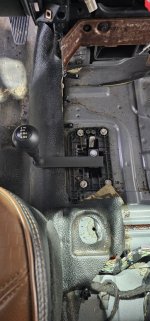
The Manual transfer case was definitely the big hurdle for me. The factory shifter would go up right thru the HVAC ducting for rear vents and thru the middle of the console.
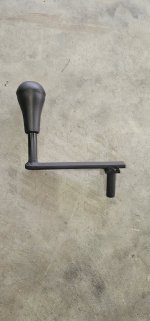
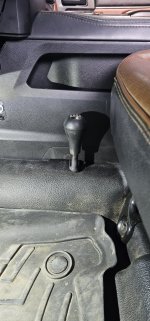
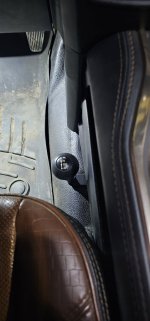
I custom made an offset transfer case shifter, by cutting off the solid rod shifter, welding about 5.5” long piece of 1”x1/4” flat bar on, and then welding the shift lever rod back on, about 4.5” C-C from the original location. I wanted to keep the shifter about the same height, I used the factory bends to get a bit more clearance from the console. 4Hi is a bit close to the seat, and could be an issue if you have seat too far forward.

IMG_2652.jpegIMG_2651.jpegIMG_2649.jpeg

Custom shifter:
IMG_2612.jpegIMG_2617.jpeg
IMG_2615.jpeg
Rerouted the ground wire to this stud. Sanded a bit to get good bond.
IMG_2634.jpeg
Only 2 connectors I used, grey USB from media hub and H-connector.
IMG_2637.jpeg
 
Back
Top