What's new
Ram Heavy Duty Forum

Register a free account today to become a member! Once signed in, you'll be able to participate on this site by adding your own topics and posts, as well as connect with other members through your own private inbox!

JScan Sticky

Brutal_HO

The Mad Irishman
Staff member
Messages
14,233
Reaction score
26,523
Points
113
Location
Douglas County, CO
JScan Sticky

Here is the what is needed to use it on 2019 and newer HD Rams:
  1. The JScan Android app from google play store, or the iOS app from the App Store
  2. A Bluetooth interface such as OBDLink MX+ or OBDLink LX (cheaper than the MX+ if you don't need iOS support or use on Ford or GM (MX+ comes with a choice))
    • or vgate vLinker MC or MC+ works as well as the OBDLink and is half the cost.
  3. And a bypass harness to bypass the security gateway module so changes can be made:


Pic of the KAOdTECH (or similar) bypass cable connections:

White/Green wire to WHITE base connector (CANBUS-IHS) CLOSEST TO THE FIREWALL, 1 row of connectors
Yellow/Blue wire to BLACK base connector (CANBUS-C) CLOSEST TO THE HEADLIGHT SWITCH/DASH, 2 rows of connectors
(FYI, the Infotainment bypass cable comes clearly marked CAN-C, CAN-IHS )
https://hdrams.com/forum/index.php?...module-location-for-programmer.440/post-26099
index.php


Another angle; from the dash looking towards the firewall:

View attachment 83350

A 2024 looking up from the floor; notice the same block colors (cables are inserted improperly):
View attachment 83351

 
Last edited:
Save/Restore: Connect to your truck then tap the gear icon on the top right, from that menu go to "Trace & Restore Adaptations"

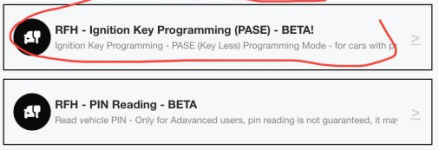
Programming a FOB: (need to validate/confirm steps)
Relocate factory FOB in a faraday pouch or out of range.​
Navigate to RFH - PIN Reading and pull the 5 digit PIN​
Navigate to Ignition Key Programming and follow the steps to input the PIN and program the FOB​

1745824147712.png

 
Last edited:
Not sure why nobody is adding their Jscan info but we gotta start somewhere so….

-Change splash screen graphic in evic upon startup-
Adaptation > Vehicle user settings > Splash screen on instrument cluster > select choice from drop-down menu (not sure if all work but I changed from “2500” to “Laramie” on mine)

-Seat belt chime off -
Adaptation > Vehicle user settings > Seatbelt alert On/Off > select “deactivated” from the drop-down menu

-Actual gear displayed in cluster -
Adaptation > Miscellaneous Settings > Actual Gear for Display > select “active” from drop-down menu

-Fogs on with high beams -
Adaptation > Vehicle user settings > Front Fog Lamp Dropout > select “deactivated” from drop-down menu

-Adding factory bed lights -
Adaptation > Cargo/Bed Settings > Bed Light Switch Input Present > select “Active” from the drop-down menu
And then there seems to be a mislabeling in Jscan for the second part so instead of “Bed Lighting Present (pinA5)” go to…
Search “Pin 6” and you’ll find “Headlamp Washer Ctrl Output Present” . This needs to be set to “active”. I believe you can find it in - modules> security bypass modules but I searched because I knew which pin was needed. I believe Jscan just carried over the 1500 settings so “Bed Lighting Present” didn’t work.

- Change tire pressure settings to avoid tire light-
Adaptation > TPMS > Max Load Inflation Pressure Front (or Rear) Tire > select desired pressure from drop-down menu
 
Adding OEM LED REFLECTOR Headlights

Adaption- Led light settings

- front turn lamps present -on
- led low beam lamps present -on
- led high beam lamps present-on
-led front park/ marker lamp present -on


modules- Body controller-configuration

- search for a5 select set
- search for a7 select set ( i had to search signature to find it when i did it)
- search signature light - select signature light present select present.
 
Last edited:
Got that pesky TPMS, fog lights on with high beams, seat belts chimes turned off today. Wow. I’m disappointed I waited so long. Next up is gear display. Much appreciate the info here!!!


Sent from me
 
I may have had to do this also, I remember it took a few attempts. I just kept changing and cycling, suddenly it worked.
I set my 2023 to ”on”. Towed my camper down to the Keys for two weeks. Honked every time I got out while running. I just turned it off and the three blast alert is finally gone. No idea WHY it worked, but happy it did!
 
Looking for how to set to mirror rear guidance lights to stay on in reverse (for california vehicle). Or is this only available in alphaOBD?
 
I have a couple of questions regarding JScan. I got the fog/driving lights not to drop out with high beans correctly. I wanted to show the gear position. I go into JScan and change it and it never takes. I sent an email to the developer asking for guidance, he said it doesn’t work for all displays, I asked him how to tell the displays apart and he never responded. I have a 2020 Limited, how do I figure out if it is the display or I am doing something wrong. Also is there a more complete document showing what everything means that shows up in Jscan? I will be adding a Ram 50 gal fuel tank in shortly and will need to update fuel tank size.
 
Interesting

I have the small display in my dashboard on my 2020. I used JScan to set my gear(s) to display without any issues.

It did take two tries for me to get my fog lights to stay on with my high beams. It might be worth trying it again.
 
Interesting

I have the small display in my dashboard on my 2020. I used JScan to set my gear(s) to display without any issues.

It did take two tries for me to get my fog lights to stay on with my high beams. It might be worth trying it again.
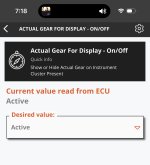
I have tried setting it 6-7 times. Here is how it shows up in Jscan.
IMG_0145.jpeg
 
Back
Top