What's new
Ram Heavy Duty Forum

Register a free account today to become a member! Once signed in, you'll be able to participate on this site by adding your own topics and posts, as well as connect with other members through your own private inbox!

Halogen to OEM LED swap

do i select 13'-17' truck? or have they done an update that includes newer trucks?

There is an update that includes 2018, 2019, and 2020 selections.

and do i need the kaodtech security bypass harness to do this thru alfaobd?

You definitely need the Koadtech bypass cable and, of course, an ELM327 OBDII adapter to write anything to the BCM.
 
Is there any software or hardware changes between oem reflector leds and projector leds? Is there a noticeable difference anyone has experience with between those?
 
Is there any software or hardware changes between oem reflector leds and projector leds? Is there a noticeable difference anyone has experience with between those?
The projector LEDs are adaptive, and all the hardware is contained in the housings. To go from reflector LEDs to the Projector AFL housings, you need different connectors for the lights, and you need to add some wires from the BCM. Also, a few settings need to be changed. Not too bad at all.
 
you'll need the bypass to do anything.
 
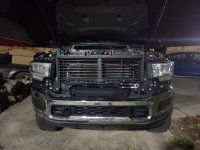
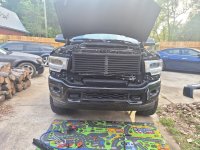
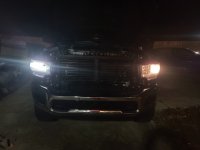
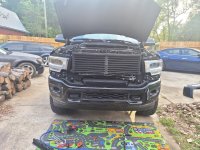
pictures of my halogen to oem led swap. using obdlink mx+, alfaobd app, and koadtech security bypass harness with setting changed listed in pictures. thanks everyone. works 100% enjoy
 

Attachments

  • 20200717_211256.jpg
    20200717_211256.jpg
    398.5 KB · Views: 283
  • 20200719_183224.jpg
    20200719_183224.jpg
    742.6 KB · Views: 256
  • 20200717_211557.jpg
    20200717_211557.jpg
    260.8 KB · Views: 255
  • 20200717_211515.jpg
    20200717_211515.jpg
    260.1 KB · Views: 253
  • 20200719_183224.jpg
    20200719_183224.jpg
    742.6 KB · Views: 260
  • 20200721_140359.jpg
    20200721_140359.jpg
    990.5 KB · Views: 282
  • 20200721_151104.jpg
    20200721_151104.jpg
    751.9 KB · Views: 347
  • Screenshot_20200718-102936_Chrome.jpg
    Screenshot_20200718-102936_Chrome.jpg
    166.5 KB · Views: 380
  • 20200719_223323.jpg
    20200719_223323.jpg
    353.8 KB · Views: 354
Anyone have part numbers for the factory LED (non adaptive) headlamps?

I looked at a Mopar parts site for a 2020 Laramie but found mostly related screws and components and not the assembly.
 
My reply earlier only pertains to the LED headlamps. If you are ADDING fog lamps because you don’t have them from factory, then you need to add the harness and headlamp switch for them and enable a few more settings in AlfaOBD. If you have halogen factory fogs, and are swapping them for factory LED fogs, it is a direct plug n play swap, but you have to enable the LED fog lamp setting. The LED tail lamps have a 12-way connector on them, whereas the base tail lamps have a 6-way connector, so you’ll have to build little conversion harnesses for them using about $20 in parts. You’ll also need to enable the LED tail light settings for those.
EDIT: Since you already have AlfaOBD, you might as well just get the LED tails with blind spot sensors, and enable that feature too. It’s only a few wires that need to be added and is fairly simple.

Can you just buy the OEM LED wire jumper harness to make this work? I am going to do the same but figured just to keep everything OEM to get the wire harness too? The part number is 68396013AB. Then use ALPHAODB to enable the LED.
 
Can you just buy the OEM LED wire jumper harness to make this work? I am going to do the same but figured just to keep everything OEM to get the wire harness too? The part number is 68396013AB. Then use ALPHAODB to enable the LED.
Yes, that’ll work.
 
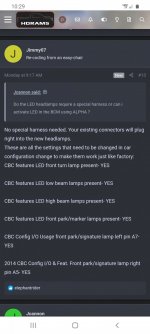
No special harness needed. Your existing connectors will plug right into the new headlamps.
These are all the settings that need to be changed in car configuration change to make them work just like factory:
CBC features LED front turn lamp present- YES

CBC features LED low beam lamps present- YES

CBC features LED high beam lamps present- YES

CBC features LED front park/marker lamps present- YES

CBC Config I/O Usage front park/signature lamp left pin A7- YES

2014 CBC Config I/O & Feat. Front park/signature lamp right pin A5- YES
after u change the setting in the log and save is there anything else you have to do specifically? like turn the key off then back to run or something. i’ve made the changes on the log and when i read the system i’d again the changes weren’t made. any tips would be greatly appreciated. doing this from my pc if that makes a difference
 
after u change the setting in the log and save is there anything else you have to do specifically? like turn the key off then back to run or something. i’ve made the changes on the log and when i read the system i’d again the changes weren’t made. any tips would be greatly appreciated. doing this from my pc if that makes a difference
Make sure you’re looking at the correct log. Each time you read the system ID, it is added as a running list, so you have to scroll down further each time to get to the most recent log.
 
Make sure you’re looking at the correct log. Each time you read the system ID, it is added as a running list, so you have to scroll down further each time to get to the most recent log.
for sure at least in the pc when your click the system is it just refreshes completely but nothing i have done saves the changes made on the log. would i know if it makes a difference if i type Yes vs YES. and obviously i’m assuming i just delete the No and replace it with a Yes. i kinda regret going pc now lol haven’t seen one video or anyone doing it on pc
 
for sure at least in the pc when your click the system is it just refreshes completely but nothing i have done saves the changes made on the log. would i know if it makes a difference if i type Yes vs YES. and obviously i’m assuming i just delete the No and replace it with a Yes. i kinda regret going pc now lol haven’t seen one video or anyone doing it on pc
Hang on...are you trying to “make the settings changes” by typing them into your system ID log?
 
Hang on...are you trying to “make the settings changes” by typing them into your system ID log?
mayyyybeeee. i didn’t see any drop menus like the how it looks on android. and on the pc the little car at the bottom is there. i’m hella dumb ain’t i lol.
 
mayyyybeeee. i didn’t see any drop menus like the how it looks on android. and on the pc the little car at the bottom is there. i’m hella dumb ain’t i lol.
Connect to your body computer. Click on active diagnostics tab up top. Drop down top menu and select car configuration change. Then drop down the option menu below and start finding those settings and changing them.
 
Connect to your body computer. Click on active diagnostics tab up top. Drop down top menu and select car configuration change. Then drop down the option menu below and start finding those settings and changing them.
bro!!! if all goes well as it looks like. send me ur venmo or cash app bro ima shoot u a $20! no lie.
 
Back
Top