What's new
Ram Heavy Duty Forum

Register a free account today to become a member! Once signed in, you'll be able to participate on this site by adding your own topics and posts, as well as connect with other members through your own private inbox!

Gear indicator option in gauge cluster?

Strange everyone doesn't have this option. I just cycle the - to show the gear it's in then cycle the + right up to 8th gear and it stays on until the truck is shut off or out of D i can't remember which. You would thing a simple option like that would be on all models.
We are talking about a setting that would display the current gear without going through all that monkey business at every start, or every time you move the shifter.
 
Strange everyone doesn't have this option. I just cycle the - to show the gear it's in then cycle the + right up to 8th gear and it stays on until the truck is shut off or out of D i can't remember which. You would thing a simple option like that would be on all models.

Well, yes, the gears are indicated if you select the - for gear lockout.

As I read the first post, that's not what I believe was being asked. It was more along the lines of displaying the gear regardless.

FWIW, If I press + too many times (once again past top gear), it cancels the lockout. Any gear selector change cancels it.
 
I think this pertains to the 8 speed 6.4 tranny


Sent from my iPhone using Tapatalk
 
I can confirm the option is not available on the 6.4/8sp either. It also does not display if I change settings in AlfaOBD. I spent a good hour screwing with it before I gave up.
 
That was a screenshot of the version I downloaded from the Ram web pages for my truck. As I said before, the paper version is pretty useless...

So you downloaded the User Guide vs the Owner's Manual?
If it is the Owner's Manual, wonder why it is different....
 
So you downloaded the User Guide vs the Owner's Manual?
If it is the Owner's Manual, wonder why it is different....
I have the Owner's Manual, the User Guide and the Diesel supplement all downloaded. The "Current Gear" option is only discussed in the Owner's Manual. The only thing in the Guide that discusses "Setup" is the Uconnect screen. The diesel supplement does list "Screen Setup" in the instrument panel display, but doesn't discuss any of the screen setup options. Given all of this, I would expect that the "authoritative" User Manual to have the final word. Alas, it is the truck itself that does. It's a small thing, but since they go into detail in describing the "Current Gear" option, you would think that it did come out of thin air, but maybe it did. I have to admit that it can be nice to have "smart" systems, but that makes it even more imperative that the documentation match the system. While the "Current Gear" option would be nice to have, it isn't essential. But it begs the question: what else is missing/wrong in the documentation?
 
I tried a few options using AlphaOBD and wasn't able to get it to display.
I would half expect the gear indicator to show where it is when you do gear lockout.

I just turned this on in the EVIC screen setup.

In AlfaOBD

Car configuration change: ECUConfig 4-Actual Gear Display: Yes


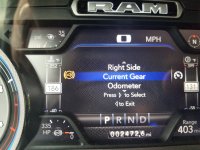
Scroll to The screen setup option in your EVIC and scroll up/down until you see Current Gear.
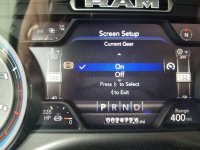
Press the right arrow and scroll up to On.
Press the right arrow to set.
Press the left arrow to exit, press left arrow to exit setup.

20200806_180652.jpg

20200806_181406.jpg

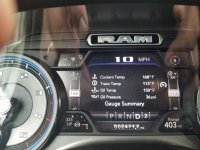
20200806_181659.jpg

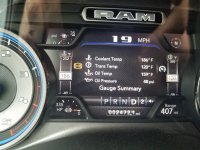
20200806_181000.jpg

20200806_181135.jpg


I had enabled this prior in AlphaOBD using (I think) the setting below, but never looked at the EVIC display setup after. Sticks between key cycles and doesn't change the use of the lockout indications.
 
Last edited:
I like seeing this, been ordering the parts to setup the ttpms, and when I have it all I'll order AlpaOBD and the OBDLink MX+, and tackle this as well! Thanks brutal!
 
I just turned this on in the EVIC screen setup.

View attachment 6330


View attachment 6331

View attachment 6334

View attachment 6332

View attachment 6333


I had enabled this prior in AlphaOBD using (I think) the setting below, but never looked at the EVIC display setup after. Sticks between key cycles and doesn't change the use of the lockout indications.

Car configuration change: Actual Gear Display: ' NO ' -> '1 '

ECUConfig 4:
Actual Gear Display: Yes

Well would you look at that. I never thought to check the settings afterwards.
 
Well would you look at that. I never thought to check the settings afterwards.

I know right?

Now I just need to get that forward facing camera showing...

I enabled it again tonight and it is the overhead surround view that goes away. Going to check it in the morning, but also have an email out to get the PC version of AlphaOBD.
 
Hi guys. Is this something (enabling the gear display) that a dealer could do? After all, the option is described in the Owners Manual, but appears to be disabled so that a mere mortal can't even see it. I don't have an OBDI reader, nor the bypass cable nor AlphaOBD nor an Android device. Acquiring all of this just to be able to see the selected gear (without having to go through the gear lock sequence) is a bit overkill... Or is there a really good reason why FCA didn't enable this?
 
Hi guys. Is this something (enabling the gear display) that a dealer could do? After all, the option is described in the Owners Manual, but appears to be disabled so that a mere mortal can't even see it. I don't have an OBDI reader, nor the bypass cable nor AlphaOBD nor an Android device. Acquiring all of this just to be able to see the selected gear (without having to go through the gear lock sequence) is a bit overkill... Or is there a really good reason why FCA didn't enable this?

Maybe there's an enthusiast nearby that could hook you up?

Put a WTT in the for sale section and trade some recode work for beer. :) There's also the 5thgenrams forums where your odds of finding someone might improve. The only issue there might be most 1500 guys using the other bypass brick instead of the Koadtech cable.
 
Back
Top