
Using a plastic automotive pry tool (amazon has cheap multi-sized kits) gently pry off the Infotainment screen, the lower panel with the switch bank has detent recessed plastic springy tabs…spring action achieved by the nature of the cantilevered tabs, so don’t over work them . Use the small headed pry tool to press in the tab against the detent to release from the retaining bump locking it in place. Should pull straight out…the wires behind are tight, so you’ll have little room to work with behind—midget hands required.I guess I have to take it apart again and stare at it some more........need to get the wiring and if there is a 2024 specific switch panel....
Ram Heavy Duty Forum
You are using an out of date browser. It may not display this or other websites correctly.
You should upgrade or use an alternative browser.
You should upgrade or use an alternative browser.
Aux Switches
- Thread starter EEBTTF
- Start date

mjb765
Member
- Messages
- 90
- Reaction score
- 26
- Points
- 18
Thanks....I got the new switch panel in...just trying to locate the wires that were already in the connector behind the stack. Where do they go from there?? A bunch of connectors under the dash. Does it make more sense to de-pin the existing wires at the switch panel and insert the new PDC wiring that I just ran?? Or splice then in at the connector??Using a plastic automotive pry tool (amazon has cheap multi-sized kits) gently pry off the Infotainment screen, the lower panel with the switch bank has detent recessed plastic springy tabs…spring action achieved by the nature of the cantilevered tabs, so don’t over work them . Use the small headed pry tool to press in the tab against the detent to release from the retaining bump locking it in place. Should pull straight out…the wires behind are tight, so you’ll have little room to work with behind—midget hands required.

Those wires run to XY125 under the steering column. It has a wrap of yellow tape around the wire bundle.Thanks....I got the new switch panel in...just trying to locate the wires that were already in the connector behind the stack. Where do they go from there?? A bunch of connectors under the dash. Does it make more sense to de-pin the existing wires at the switch panel and insert the new PDC wiring that I just ran?? Or splice then in at the connector??
mjb765
Member
- Messages
- 90
- Reaction score
- 26
- Points
- 18
Thanks...I will look for it.Those wires run to XY125 under the steering column. It has a wrap of yellow tape around the wire bundle.
DidThanks....I got the new switch panel in...just trying to locate the wires that were already in the connector behind the stack. Where do they go from there?? A bunch of connectors under the dash. Does it make more sense to de-pin the existing wires at the switch panel and insert the new PDC wiring that I just ran?? Or splice then in at the connector??
Do you have the commercial setting in the display to assign each switch?Thanks....I got the new switch panel in...just trying to locate the wires that were already in the connector behind the stack. Where do they go from there?? A bunch of connectors under the dash. Does it make more sense to de-pin the existing wires at the switch panel and insert the new PDC wiring that I just ran?? Or splice then in at the connector??
mjb765
Member
- Messages
- 90
- Reaction score
- 26
- Points
- 18
Not yet..I haven't gotten that far. I am still wiring everything up. Had to take a brake for a few weeks due to the excessive heat in the area. it was just too damn hot to work outside..and since this is an add on and I don't NEED it right now there is no rush.Do you have the commercial setting in the display to assign each switch?

RHD_Godzilla
Active Member
Once you use AlfaOBD or similar to activate the option on the BCM then you should have the commercial settings menu on the gauge cluster. You can program each switch depending on how you need it to function (momentary, battery or key on etc).Did
Do you have the commercial setting in the display to assign each switch?
mjb765
Member
- Messages
- 90
- Reaction score
- 26
- Points
- 18
Thanks...but I know that.....I never asked about programming the switches. It was a wiring question in the dash harness. Apologies if that answer was not for me.Once you use AlfaOBD or similar to activate the option on the BCM then you should have the commercial settings menu on the gauge cluster. You can program each switch depending on how you need it to function (momentary, battery or key on etc).
RHD_Godzilla
Active Member
Sorry that was for @RamjackThanks...but I know that.....I never asked about programming the switches. It was a wiring question in the dash harness. Apologies if that answer was not for me.
mjb765
Member
- Messages
- 90
- Reaction score
- 26
- Points
- 18
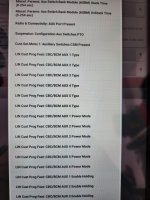
Finally got around to re-pinning the connector behind the radio for the switches and everything there is good. Now----how do I enable programming from the menu in the dahs?? I tried searching for "commercial settings" in Alpha and could not find anything. it looks like the switches are only programmed through AlphaOBD...see my screenshot of options. Am I missing something here??? All the forums say to enable commercial settings, but I cant find that option. I did enable the 6 aux switches in Alpha. But what is "Auxiliary Switches CSM Present" mean? That's also in the screenshot. Also--do I need to enable them BEFORE connecting the power wire from the aux fuse box to the battery terminal?
Attachments
RHD_Godzilla
Active Member
if you're talking about activating the switched through AlfaOBD initially I would take a look at Harrisons Garage video on YouTube. At the end he shows you exactly what to do to program them. I cant remember off the top of my head exactly what the settings were.Finally got around to re-pinning the connector behind the radio for the switches and everything there is good. Now----how do I enable programming from the menu in the dahs?? I tried searching for "commercial settings" in Alpha and could not find anything. it looks like the switches are only programmed through AlphaOBD...see my screenshot of options. Am I missing something here??? All the forums say to enable commercial settings, but I cant find that option. I did enable the 6 aux switches in Alpha. But what is "Auxiliary Switches CSM Present" mean? That's also in the screenshot. Also--do I need to enable them BEFORE connecting the power wire from the aux fuse box to the battery terminal?
RHD_Godzilla
Active Member
Finally got around to re-pinning the connector behind the radio for the switches and everything there is good. Now----how do I enable programming from the menu in the dahs?? I tried searching for "commercial settings" in Alpha and could not find anything. it looks like the switches are only programmed through AlphaOBD...see my screenshot of options. Am I missing something here??? All the forums say to enable commercial settings, but I cant find that option. I did enable the 6 aux switches in Alpha. But what is "Auxiliary Switches CSM Present" mean? That's also in the screenshot. Also--do I need to enable them BEFORE connecting the power wire from the aux fuse box to the battery terminal?
go to about the 29 min mark in the video
Also I plan on doing a similar video on the entire install soon so subscribe to my channel if you want. Hoping to get it done in the next month. RHD_Godzilla
mjb765
Member
- Messages
- 90
- Reaction score
- 26
- Points
- 18
Searched and found the video--looks like that is what I needed. Also I do have to program the "CSM present" option.....I guess that is tomorrow's evening adventure.if you're talking about activating the switched through AlfaOBD initially I would take a look at Harrisons Garage video on YouTube. At the end he shows you exactly what to do to program them. I cant remember off the top of my head exactly what the settings were.
Thanks for the info.

mjb765
Member
- Messages
- 90
- Reaction score
- 26
- Points
- 18
So I will connect the positive battery lead from the Aux PDC...thanksDefinitely need to have everything hooked up, plugged in, pinned before getting into Alfa settings.

Finally got around to re-pinning the connector behind the radio for the switches and everything there is good. Now----how do I enable programming from the menu in the dahs?? I tried searching for "commercial settings" in Alpha and could not find anything. it looks like the switches are only programmed through AlphaOBD...see my screenshot of options. Am I missing something here??? All the forums say to enable commercial settings, but I cant find that option. I did enable the 6 aux switches in Alpha. But what is "Auxiliary Switches CSM Present" mean? That's also in the screenshot. Also--do I need to enable them BEFORE connecting the power wire from the aux fuse box to the battery terminal?
CSM is Customer Settings Menu.
mjb765
Member
- Messages
- 90
- Reaction score
- 26
- Points
- 18
Now for the next step. I plugged one wire in and i'm not getting any power out of the aux switches but they do light up. I see a spot for a ground coming out of the distribution box.Do I need to hook that up?Or does the device get grounded on its own which is what I thought. Attached is a picture of the inside of my PDC. Are those the fuses or is something missing , which is causing my problem?
Attachments
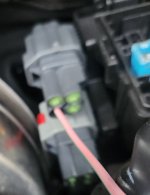


to add...I am getting no power from the outputs of the grey connectors--does the bottom connector top right wire need to be grounded?? Z907 shown in pic??
You need a ground. Is it possible you don't have the AUX PDC or other kit wiring grounded properly?
You can use that ground, or a chassis ground if it's installed as intended.
mjb765
Member
- Messages
- 90
- Reaction score
- 26
- Points
- 18
Exactly what I was wondering......I have the large positive cable connected, but there was no separate ground for the Aux PDC. I will add that ground and see if that works.You need a ground. Is it possible you don't have the AUX PDC or other kit wiring grounded properly?
You can use that ground, or a chassis ground if it's installed as intended.
I am so close....switches are active, commercial settings menu enabled.....just need power out of one of the wires. I have some time tomorrow after work to add that ground.
Thanks!!!