What's new
Ram Heavy Duty Forum

Register a free account today to become a member! Once signed in, you'll be able to participate on this site by adding your own topics and posts, as well as connect with other members through your own private inbox!

Aux Switches

Finished the harness work and install.

Whoever tapes these wiring harnesses up must get paid by the mile! Man that was a lot of tape.

The harness I used was the cheapest I could find with the aux PDC, part number 68623211AA, which best I can tell comparing the wiring to the Upfitters diagrams is from a 2024 chassis cab with the Hemi and no PTO, as it didn’t have the electric heater relays, but it had the PTO jumper connector with only two wires. Interestingly it also had a Pink with Yellow stripe wire bundled with the passthrough wires that I traced back and found was spliced to the run relay, so I have an ignition hot available in the engine compartment without having to modify the under-dash upfitter plug.

Here’s what I ended up with after removing everything I didn’t need and re-wrapping it in Tesa tape.

View attachment 81794

For getting the wiring in I initially attempted to use the clutch block off plate, drilling a hole in that and then using a 3/4” cable gland, but because it is further up and towards the center of the truck the wires going to the PDC and the wires going down to XY920 for the rear frame hot and run wouldn’t reach. I ended up going through the additional opening in the main wiring harness pass through. It’s basically a nipple adjust below and to the outside of where the main harness passes through the firewall. It was an extremely tight fit, so I ended up wrapping my harness temporarily in electrical tape and then using some cable pulling lube on it. After it was pulled through I removed the electrical tape wrap and all the mess went with that, leaving the Tesa tape underneath clean and dry. You can see the passthrough in this picture circled in red.

View attachment 81797

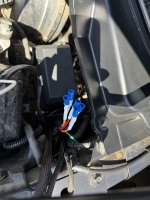
Connector XY920 (the connector with the blue latch in the below photo) was a pain to get to, and I ended up removing the drivers side wheel and popping the wheel well cover off a bit so I could get access. The wires popped right in no problem, and I was able to verify that the other side of the connector had the run and hot wires already populated.

View attachment 81799

The hardest part was getting the actual signal wires into XY125A under the dashboard. The HK amplifier is mounted in the worst possible spot to get to anything around it. It doesn’t help that the factory leaves all their zip ties cut like razor blades. My hands look like I’ve been fighting with a cat.

I did come up with what I think may be the reason they don’t offer the winch and aux switches from the factory. It’s a terrible reason, but here’s my best guess. They both use the same post on the positive terminal strip. I had to pull the winch connection off and reshape the lug so it would fit on top of the aux switch power. You can’t use any of the other posts as they’re different sized and those two lugs won’t fit over them. It’s a dumb idea, but it makes as much sense as some of the other decisions they make on these things.

View attachment 81800

Anyway, it took me about 4 hours to trim down the harness to what I needed, an hour to re-tape it cleanly, and about 8 hours to install, with some of the install time being wasted with my failed attempt to go through the clutch block plate. That wasn’t a total waste though, as I’ll use that cable gland for radio antenna wiring.

I did have a huge panic at the end of the project. I hooked the battery back up and the wipers started going; but everything in the truck was dark and non-functional. Thankfully I discovered that I hadn’t latched one of the under dash connectors back together all the way. After correcting that I hooked my air compressor power wire to auxiliary 6 and tested each port. They all work as expected!

All in all it was a lot of work, but worth it for a clean and factory-like install.
Really excellent work. Man that’s a labor of love. I enjoyed reading it. I opted for the Garmin 6 station Power Switch. Very small form factor, 6x 30A aux connections, (+) only terminals, I added a small blue sea (-) bus bar & a small external 4-position relay block (for future expansion options), battery cable has in-line 125A fuse, has 2 programmable 3-12v trigger
inputs, its bluetooth so no firewall gymnastics, runs off the Garmin outdoor app ecosystem & compatible w/ apple carplay, so my aux switches are available remotely outside the vehicle and in the infotainment screen. The closest thing I can find to a clean factory look for the ‘24’s.
 
Really excellent work. Man that’s a labor of love. I enjoyed reading it. I opted for the Garmin 6 station Power Switch. Very small form factor, 6x 30A aux connections, (+) only terminals, I added a small blue sea (-) bus bar & a small external 4-position relay block (for future expansion options), battery cable has in-line 125A fuse, has 2 programmable 3-12v trigger
inputs, its bluetooth so no firewall gymnastics, runs off the Garmin outdoor app ecosystem & compatible w/ apple carplay, so my aux switches are available remotely outside the vehicle and in the infotainment screen. The closest thing I can find to a clean factory look for the ‘24’s.
Garmin stuff is nice. Good choice.

I certainly wouldn’t recommend the route I took to someone unless they absolutely have to have it look and operate like factory. It’s not easy or anywhere near the most affordable option. I wanted that factory-like operation, and I enjoy electrical work, so it was a nice few days for me.
 
I have a limited, and it came with the trailer steering controller. It also has “aux switch prep” as an option.
There is no way to add aux switches, with that steering controller.


I am looking at the Garmin PowerSwitch, but I am told S-pod is coming out with a switch that works with CarPlay.

My other option is to buy a ram 4WD controller, and add switches into it.
That control is where EB, T/H and traction control should be, from the factory…
 
I have a limited, and it came with the trailer steering controller. It also has “aux switch prep” as an option.
There is no way to add aux switches, with that steering controller.


I am looking at the Garmin PowerSwitch, but I am told S-pod is coming out with a switch that works with CarPlay.

My other option is to buy a ram 4WD controller, and add switches into it.
That control is where EB, T/H and traction control should be, from the factory…
How would you add switches to the 4wd button area?
 
IMG_8449.jpegMounted this bully BS-100 however, I’m too illiterate to know what tapping into a ACC is. Feeling like I am overthinking this. I’m just trying to find a live wire that works when it is in aCC. Correct? I connected to just the positive and the ground and the switch panel does not work so I’m assuming I need to figure out. Where to tap into the acc.
 
Odd question -

Going to be installing switches to my '22 2500 gasser. I do not have an Aux PDC currently. These switches are going to be used in conjunction with a Whelen Core, which is a whole vehicle lighting control system.

The Core is already installed, and it has spaces for digital inputs to trigger events rather than having a control head mounted (use these all the time with Fords and GM's). These are relay inputs and pull less than 2a each, if even that (I've just always fused them at 2a in the past).

If going this route, do I even need to install an AUX PDC, or can I just run the cables from the switch panel to the controller? The controller is already installed and properly fused as needed.
 
The aux switches are ground switch, not positive switch, but yes, you should be able to use them directly as long as you can make that work.
 
The aux switches are ground switch, not positive switch, but yes, you should be able to use them directly as long as you can make that work.
Thank you. I can program the inputs to be either ground or positive switching so we’re all good there
 
Hi All,

I've been reading and rereading this thread for a while and wanted to save my input until after I finished adding the Aux switches to try and make everything a little easier to understand. A huge thank you to member Atty who was great at helping me answer a few questions I had at the get go. I put together the following video and loaded it to my YouTube channel for anyone who wants to follow along on what I did. I included the part numbers for most everything I could think of in the description of the video - hope this helps!


If you have any questions for me on what I did, feel free to shoot me a message.
Nothing like bringing up a 3yr old post. I'm getting ready to upgrade my AUX switches pretty much exactly as you did. I noticed on the new switch panel the tow and exhaust brake are reversed from what I have. was this the case with yours? did you have any issues? 2022 2500 Larmie. This my current switch configuration: 1740584011512.jpeg
 
Nothing like bringing up a 3yr old post. I'm getting ready to upgrade my AUX switches pretty much exactly as you did. I noticed on the new switch panel the tow and exhaust brake are reversed from what I have. was this the case with yours? did you have any issues? 2022 2500 Larmie. This my current switch configuration: View attachment 82916
The order of them doesn’t matter, as long as you get a panel with the right switches on it.

My traction control and tow/haul switched places between my original “piano” switches and the new aux switches I installed.
 
The order of them doesn’t matter, as long as you get a panel with the right switches on it.

My traction control and tow/haul switched places between my original “piano” switches and the new aux switches I installed.
Thanks! Just wanted to make sure hitting the tow button wouldn't kick on the exhaust brake
 
Ordered up my Aux switches tonight (2/27) from a dealer in Florida. Hopefully there is no problem getting them. @Florotory I saw you made a post about DIY wiring for getting everything wired up. Has anything changed since then to make it better? Do you know if anyone makes a ready to go harness yet? I have a 22 2500 with the Deisel so I already have the PDC under the hood. I'm guessing I'll just need a bunch of Relays and Fuses outside of the actual wires and connectors? I was planning to take a look at what Is actually inside the PDC this weekend and get everything that I need so the truck won't be out of commission for too long once I start the conversion.

2/28 update: got an email form the dealer, "Sorry, but we have had to cancel your order because the part is on national backorder with no ETA. You are welcome to email back later to check availability".

Anyone have any leads on somewhere that might have one in stock? This is the second one I ordered in a week that was canceled. Tow/ Exhaust Brake/ Fr&Rr Park sensors 2500 Laramie 6.7 Diesel. @Brutal_HO @jsalbre ?
PN: 68596339AA
 
Last edited:
Hi all,

Just adding my installation for my 2020 Power Wagon. This thread has been very helpful! I had to design a custom Aux PDC since PWs don't have the Aux PDC. Please forgive me, this post was originally written to a Facebook group so a lot of the info is redundant for this thread. I was elaborating there for people that may not be as familiar with what's involved. This thread is fairly long, so it might serve as a type of summary for new readers I guess.

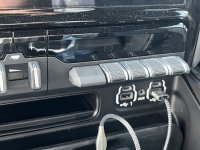
  • Starting with the switch panel itself (pics 1-3), the install is pretty easy. The exact part number for any given truck can vary, depending on which switches you need in the panel you are replacing, and some cosmetic differences (glossy vs matte). You need to locate the correct part number and I've lost the reference I had somewhere from another thread were someone detailed it. There is a "decoder" for the part number in the thread above I think but many report that it didn't work for them. I did not use the decoder.
  • (Of note, both my screen and my trailer tow switch stopped working after being disconnected. I have no explanation for that and do not attribute it to anything with installing the switches itself, maybe they were going bad (the screen had gone blank before at times).
  • With the new switch installed you need to add the wiring for them. There is existing wiring in the harness that wires all six switches to the body xy125 connector in the footwell area on the driver's side. These dead end there with no wires going out of the mating connector into the engine bay (for trucks without the auxiliary PDC which I believe is not an option on Power Wagons). The first option is to pick up the wiring on the mating xy125 connector by obtaining the correct terminals crimping them onto your wires and inserting them into the appropriate unpopulated mating connector. I was originally going to do this as it's perhaps the "cleanest" approach. The problem is that connector already has a lot going through it and I didn't want to mess with it and break something. It's also hard to get to and requires 2 different terminals for using all 6 switches. (I purchased both needed and have them unused).
  • The option I went with is wiring directly into the connector at the back of the switches. (See pics 4-6). This means unpinning the dead ended wires there and putting in your own. For the switches I used a 6 conductor wire with 6, 20 gauge circuits which worked well. I originally tried 18 gauge but found the wires troublesome to seat into the factory connector. I drilled a hole in the unused plastic blanking plate for the clutch pedal, installed a strain relief fitting, and ran the wires into the engine bay.
  • With the switches installed, you will need to use AlfaOBD or something that lets you change the configuration for the truck. There are 3 options I think I enabled, these are covered in the thread above. Done correctly, you will have the commercial settings option in your EVIC. This lets you change the configuration of each switch on how it's powered, latching vs momentary, and retain last setting. This really cool feature is what really makes using the factory switches better than any aftermarket options, aside from everything looking oem.
  • Now the Auxiliary PDC itself. My truck did not have a factory aux PDC like the diesels have, and not sure if PWs can even be ordered with them (at least in 2020). So I set out to design my own. I ordered the parts I thought would work best, basically a 6 relay / fuse box, a power distribution block, and a ground distribution block. I designed the bracket to hold everything from 3/16" aluminum plate using Fusion360 sheet metal design and sent it off to OsH Cut laser cutting and bending service. Great service, and for $100 delivered, I had a very strong bracket. (See pics 7 - 10). In the end I had a fairly compact, very strong bracket that had 2, 4 gauge wires for the power and ground, 6 pig tails capable of 30 amps for each output, and a 6 pin connector for the switch bank grounding inputs.
  • For the 6 pin multi connector switch inputs, I used Deutsch connectors which I found really great and easy to assemble. I would use them again for all low voltage / low amp connections in vehicles.
  • I made sure to ground the bracket itself since it's conductive, and the main ground runs directly to the battery negative. The power feed goes directly to one of the unused power posts in the battery connector through a 200 amp fuse connector. You generally want the fuse as close to the battery as possible. I had to cut the plastic shield a little to use the fuse and the connector sticks out a little, but has it's own protective cap.
  • I'm pretty happy with how it turned out. There are some things I would change if I had it do over. Accessing the pig tails will be a bit of a pain as they are short and tucked under the cowl. I would have made them a bit longer Clearance for the relay box cover and cowl is tight, and accessing the clips to remove it is a pain but doable. I would redesign it to move it closer to the battery and/or angle it forward for easier access. It's all tucked in pretty nicely though in the factory location, and testing shows it all works as intended.

I have another 10 pics or so related to the installed PDC but didn't add them since I am limited to 10 pics on one post. If anyone wants those as well, I'd be happy to post them.
Where did you actually mount the relay box in the truck? Can you post a pic of that please?
 
I couldn't find a decoder for the newer trucks. Buddy just got a 24 PW. It would be 68596337AA, but it needs HDC as the first button. Any help? Thanks @Jimmy07 any insight?
What is HDC? And this is the exact switches I need for mine. This backorder thing is getting ridiculous.
 
Where did you actually mount the relay box in the truck? Can you post a pic of that please?
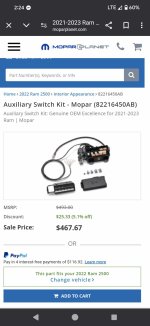
You know you can get the factory aux kit minus the proper switches.... Should be easier that trying to wire and mount some third party stuff.
 
Here is the kit. I've been told it's pretty easy
 

Attachments

  • Messenger_creation_acef1db9-5e2d-49a5-b756-d23c7dab7157.jpg
    Messenger_creation_acef1db9-5e2d-49a5-b756-d23c7dab7157.jpg
    86.9 KB · Views: 47
Back
Top