What's new
Ram Heavy Duty Forum

Register a free account today to become a member! Once signed in, you'll be able to participate on this site by adding your own topics and posts, as well as connect with other members through your own private inbox!

AlfaOBD

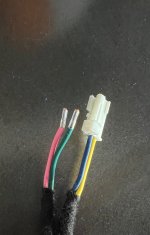
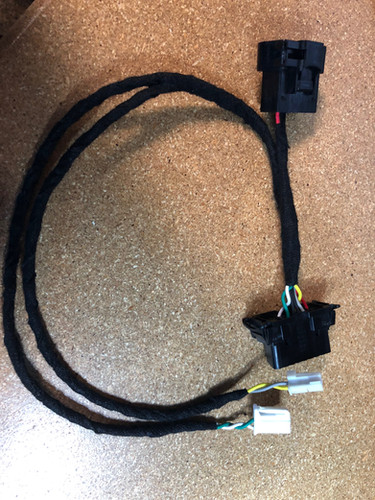
Well I broke my bypass cable. Cable was hooked up to the CAN BUSS, and after taking for a test drive set the parking brake. Cable got caught and tore the male plug off. Does anyone know if the plug is something I can find at the parts department or auto part store?
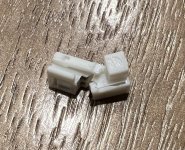
IMG_0480.jpeg
 

Attachments

  • IMG_0532.jpg
    IMG_0532.jpg
    343.5 KB · Views: 24
Last edited:
Hey guys so I’m reprogramming my tire size utilizing AlfaOBD on windows. I’ve done the ABS initialization procedures about 20 times now but still getting codes and flashing lights. Am I missing something?

2022 Power Wagon
 
Well I broke my bypass cable. Cable was hooked up to the CAN BUSS, and after taking for a test drive set the parking brake. Cable got caught and tore the male plug off. Is this something I can fix on my own from a local auto part store?

View attachment 53483
I don't think you can fix that reliably. I'd see if they'd hook you up with a replacement, just explain what happened and see what they say.. you might get lucky.
 
Hey guys so I’m reprogramming my tire size utilizing AlfaOBD on windows. I’ve done the ABS initialization procedures about 20 times now but still getting codes and flashing lights. Am I missing something?

2022 Power Wagon

This is from the Common Alfa settings thread...

Program Tire Size Google doc (from Google Drive link above)
One of the better videos I've found here (just make sure you're using the correct MY):
Run the ABS INIT procedures shown in this post/image. The ABS INIT doesn't do anythign so the option is greyed out. Just do the steps: https://hdrams.com/forum/index.php?...-and-common-alfaobd-settings.3468/post-223855
 
This is from the Common Alfa settings thread...

Program Tire Size Google doc (from Google Drive link above)
One of the better videos I've found here (just make sure you're using the correct MY):
Run the ABS INIT procedures shown in this post/image. The ABS INIT doesn't do anythign so the option is greyed out. Just do the steps: https://hdrams.com/forum/index.php?...-and-common-alfaobd-settings.3468/post-223855
So I followed that video to the “T” and I’m still having issues. I used that video the first time I adjusted a few days ago and I’m just dialing it in since I was off a few mph. Not sure what the issue is now. I’m doing the exact same steps.

Update: after running through the steps another 7 times it finally took. I hate electronics sometimes.
 
Last edited:
2023 Ram Alfa OBD -

I successfully connected to my 23' today thanks to @DeadEnd for the patch so I could mess with this on a Sunday and connector from M. Mougherty on FB.

I have lots I want to play with but so far have added the power side running board by following outline from: https://hdrams.com/forum/index.php?threads/mopar-power-deployable-running-boards.1632/page-4

I am interested in learning about more changes people make to their 2023's. I still need to update my tires size and thresholds.
 
Well I broke my bypass cable. Cable was hooked up to the CAN BUSS, and after taking for a test drive set the parking brake. Cable got caught and tore the male plug off. Does anyone know if the plug is something I can find at the parts department or auto part store?

View attachment 53483
I just did the same thing this morning and broke both of them. I need to ziptie a carabiner or something to it so it doesn’t fall.
 
I just did the same thing this morning and broke both of them. I need to ziptie a carabiner or something to it so it doesn’t fall.
What a pain.

I emailed KAODtech multiple times and zero responses. I use streak for Gmail which lets you know if an email was opened, and all of them were opened and no response. Pretty disappointing. Even if he had told me he couldn't help or send out replacement ends I still would have sent him another $55.... which I ultimately did. Waiting for the replacement to get delivered.

Has anyone else had any luck getting a response from KAODtech?
 
Had the same thing with AlfaOBD. Had questions about my heated steering wheel not working. They asked me to send them my original log and the new one. Never heard from them again. I waited about 3-4 days and sent another email just seeing if they had looked at it and nothing.

Seems to be the new norm with most companies. Even dealerships don’t call back or respond to emails but, then again they think they out here doing gods work.


Sent from my iPhone using Tapatalk
 
So really Basic question after reading the first 30 pages of this thread and giving up…..

I have an old laptop with no Bluetooth…. Will the obdlink mx+ or lx kaotech bypass cable and my laptop with Wi-Fi work for alfaobd
You just need the obdlink EX version, and a windows computer with the KAODtech bypass cable
 
So really Basic question after reading the first 30 pages of this thread and giving up…..

I have an old laptop with no Bluetooth…. Will the obdlink mx+ or lx kaotech bypass cable and my laptop with Wi-Fi work for alfaobd

In other words, is Bluetooth required? Thanks

You just need the obdlink EX version, and a windows computer with the KAODtech bypass cable

To add, the EX cable is a USB-OBDC cable.
 
Does the current version in the Google Play store work with 2023? I'm not seeing 23 as an option, so I selected 22 instead. But I get errors saying things like "ECU verification failed" and "Connected. Device model not determined"

Screenshot_20230327-141853.pngScreenshot_20230327-141947.pngScreenshot_20230327-141954.png

It's my first time trying to use AlfaOBD, and I'm not sure if this is the problem or if I'm doing something else wrong.
 
Does the current version in the Google Play store work with 2023? I'm not seeing 23 as an option, so I selected 22 instead. But I get errors saying things like "ECU verification failed" and "Connected. Device model not determined"

View attachment 54117View attachment 54118View attachment 54119

It's my first time trying to use AlfaOBD, and I'm not sure if this is the problem or if I'm doing something else wrong.
I am getting the same issue
 
Does the current version in the Google Play store work with 2023? I'm not seeing 23 as an option, so I selected 22 instead. But I get errors saying things like "ECU verification failed" and "Connected. Device model not determined"

View attachment 54117View attachment 54118View attachment 54119

It's my first time trying to use AlfaOBD, and I'm not sure if this is the problem or if I'm doing something else wrong.

I am getting the same issue
Until he does the next update, you guys will have to email the developer and ask for a patch with DJ MY2023. He’s done it for other 23 owners here.
 
Until he does the next update, you guys will have to email the developer and ask for a patch with DJ MY2023. He’s done it for other 23 owners here.
Thank you. Since I had never used AlfaOBD before I wasn't sure if these errors were from my setup or the app. I'll email the developer and see what he has to say.
 
Thank you. Since I had never used AlfaOBD before I wasn't sure if these errors were from my setup or the app. I'll email the developer and see what he has to say.
I got a reply back from the developer with a link to an apk of a beta version. Work IT policies wouldn't allow me to install it on my phone, so I had to borrow an old android device. It was slightly buggy, but worked with my truck!
 
I am going to get Alfaodb but not sure what parts I need. What I think I need is

The Alfaodb SW

A bypass module

And an interface

Or this one

do I have this right? Are there better options?
 
Back
Top