What's new
Ram Heavy Duty Forum

Register a free account today to become a member! Once signed in, you'll be able to participate on this site by adding your own topics and posts, as well as connect with other members through your own private inbox!

AlfaOBD

Good evening, I have searched and seen this question asked many times, but I have yet to find a clear answer.

I cannot get my obdlink mx+ to connect to even do a simple DTC code read.

It says it’s connected, but when I try to perform a function, it tries to connect 4 times and then fails.

Any ideas?

Thanks
 
I think I might have figured it out. It will only connect under body computer.

I was trying to connect under tire control as I am only trying to adjust tire pressures ‍♂️
 
I think I might have figured it out. It will only connect under body computer.

I was trying to connect under tire control as I am only trying to adjust tire pressures ‍♂️
Do you have SGW bypass cable installed?
 
Did anyone get the trailer light check to work on the 2020 trucks? There was a bunch of posts and then it went quiet so I assume not
 
Did anyone get the trailer light check to work on the 2020 trucks? There was a bunch of posts and then it went quiet so I assume not
Turn your truck’s lights on. Turn the flashers on. Walk around the rig.

Trailers have combo turn/stop lights so you will check all your lights this way
 
I see from my new PCM update there is a new diagnositic we could add (if possible) to Alpha OBD:

• Enabling wiTECH Particulate Matter (PM) Sensor Regeneration Test in PCM “Misc Functions”.

Don't think we had this before?
 
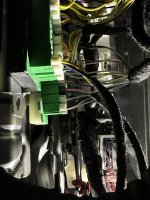
I'm trying to change tire pressure thresholds. I have the MX+ and Kaodtech bypass installed. But OBDLink, AlfaOBD and JScan all give me errors when connected to the bypass. Alfa says CAN ERROR Connect Failed, JSCAN says the Module - Connection Test False when running the ELM327 identification. Am I missing something or is this just a bad bypass cable? They all talk to the truck fine without the bypass.
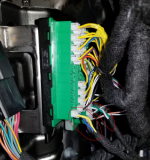
 
I'm trying to change tire pressure thresholds. I have the MX+ and Kaodtech bypass installed. But OBDLink, AlfaOBD and JScan all give me errors when connected to the bypass. Alfa says CAN ERROR Connect Failed, JSCAN says the Module - Connection Test False when running the ELM327 identification. Am I missing something or is this just a bad bypass cable? They all talk to the truck fine without the bypass.
Try swapping the two leads that hook into the bypass and see if that works.
 
Just finished flipping through all the pics in this thread. Think I have the wrong harness. But the plugs work. There are no white/green black/green labels like I saw in a previous post.

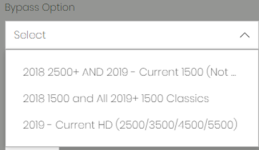
I ordered the 2019 - Current HD:

1693926368059.png

0827231946a.jpg
 
Just finished flipping through all the pics in this thread. Think I have the wrong harness. But the plugs work. There are no white/green black/green labels like I saw in a previous post.

I ordered the 2019 - Current HD:

View attachment 62151

View attachment 62150
Swap them around. The black connector should go in the white base terminal and the white connector should go in the black.
 

Attachments

  • IMG_1226.jpeg
    IMG_1226.jpeg
    409.3 KB · Views: 58
Just finished flipping through all the pics in this thread. Think I have the wrong harness. But the plugs work. There are no white/green black/green labels like I saw in a previous post.

I ordered the 2019 - Current HD:

View attachment 62151

View attachment 62150
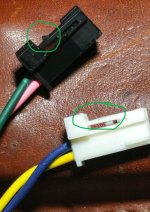
The yellow/blue is the key, as @HWTG said, swap the connectors.

I don't know why on earth he would put the black plug on the green wire and not the other way round.
1693932180273.png
 
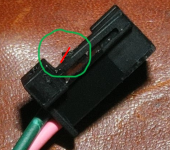
Thanks for the help fellas, all working. The take away is yellow/blue to the black base. And as I've seen mentioned here if you prefer not leaving the bypass installed then shave the clip on the plug to make it easily removable. Stubborn plugs to remove if you're not familiar with them.
0906231905a.jpg
 
Did you completely shave off the triangle/wedge piece off of the tab? Looks that way on the white connector but black looks to be in tact. Did you just use a razor blade and carefully trim away?

Would like mine to be temporary (only connected when I want to make changes). From reading these posts, seems this cable can be a PITA to remove because of these clips. But don't want to destroy my new cable by cutting it incorrectly.
 
On mine, I didn't remove the clip completely, just took the sharp edge off at the opposite angle leaving a sort of small bump so it provides some grip, but not so much that I can't just pull them out. I'd guess it wouldn't matter if it was completely shaved off.

1694584143898.png
 
Back
Top