
Regular auto dim- 68325128AAOkay, so one more part number… for the right mirror with auto dim (not for headlights) but the mirror itself…
Sent from my iPhone using Tapatalk
Ram Heavy Duty Forum
You are using an out of date browser. It may not display this or other websites correctly.
You should upgrade or use an alternative browser.
You should upgrade or use an alternative browser.
Adding adaptive cruise
- Thread starter Bd2022Ram
- Start date

@Jimmy07 - just got the 68526611AC screen in. It has both the lane departure and traction control buttons on it. Is that correct for the 2500? I wasn't expecting the traction button.68526611AB if you have a Cummins
68526610AB if you have a Hemi
**Note for others about these part numbers**
Those screen part numbers are only for 2022, and won’t work on 2019-2021.
If you have a Cummins, there is no traction control button on the lower switch bank under the screen, so that’s why it’s at the top of the screen.@Jimmy07 - just got the 68526611AC screen in. It has both the lane departure and traction control buttons on it. Is that correct for the 2500? I wasn't expecting the traction button.
If you have a Hemi, the traction control button is in the lower switch bank under the screen, so there doesn’t need to be one integrated at the top of the 12” screen.
I’m not too sure on that. The screen itself should work fine, I’m just not sure if there would be a communication conflict with having two buttons and neither end up working. I guess you’ll be the first to find out.I see, will the Cummins screen part work in a Hemi and you'll just have duplicate buttons?

Alright, almost done. So I decided to do it right and sent the center console for the Cummins back in exchange for the Hemi version and no traction control button. As for the rest, not too bad of an ordeal. I just wish AlphaODB could knock this DASM out of plant mode!!

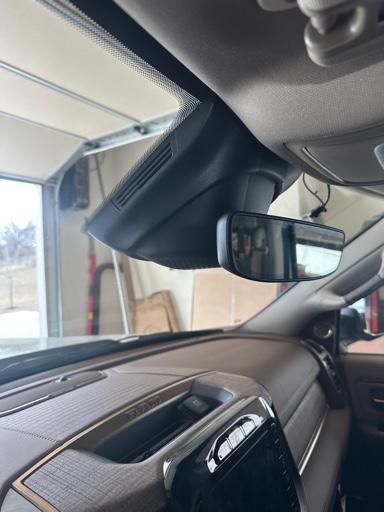
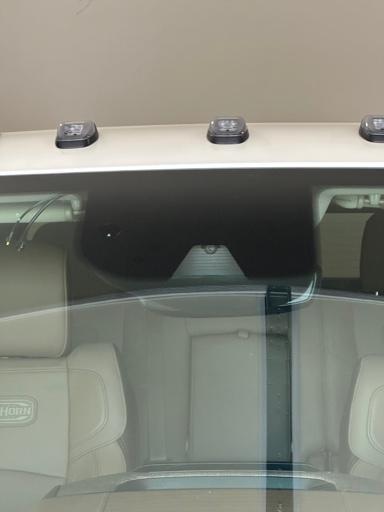
Are you referring to the dealer’s scan tool- micropod2?@Jimmy07 Can the Starscan take the DASM out of plant mode by chance?
If so, yes, it is part of the calibration procedure.
I highly doubt it. That tool hasn’t been supported in a long time.I think the Micropod II replaced or is replacing the Chrysler Star-Mobile tool, just wonder if it still worked on new models
No. As of now, the dealership is the only way to calibrate a virgin DASM.Okay, and none of the Snap-on or Autel devices that regular shops will do either?
Sent from my iPhone using Tapatalk
Okay, I came across a (NOT SO) great deal on a Drew Tech CarDAQ-Plus 3 and couldn't pass because I really wanted to do this myself. I poked around long enough to figure out how to get an aftermarket WiTech 2.0 subscription and wa-la! DASM out of plant mode and calibrated without the dealer. I was also able to swap out the screen with the correct LKA button for the HEMI and that is working as well. Only thing that is no wonky is the auto dim headlights don't function. Show acvailable in the programming and on the screen under vehicle settings it is on but the lights do not dim. Any thoughts?
Attachments
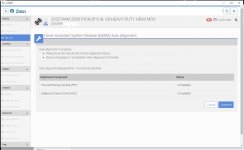
Yup, the drew tech is one of their approved J2534 pass-throughs. Usually, those are more expensive than a new micropod2 though lol.Okay, I came across a (NOT SO) great deal on a Drew Tech CarDAQ-Plus 3 and couldn't pass because I really wanted to do this myself. I poked around long enough to figure out how to get an aftermarket WiTech 2.0 subscription and wa-la! DASM out of plant mode and calibrated without the dealer. I was also able to swap out the screen with the correct LKA button for the HEMI and that is working as well. Only thing that is no wonky is the auto dim headlights don't function. Show acvailable in the programming and on the screen under vehicle settings it is on but the lights do not dim. Any thoughts?
For your auto high beams, you need to change 2014 CBC Config I/O & Feat: Auto High Beam Module Location to “IRCM”.
Yeah, I got he BT version too so a few bucks more but I figure it can work across lots of Makes. Anyone in the DFW area in need, come on by! I really didn't want to involve the local dealership on a brand new truck with some mods. 
Can these settings be done within WiTech or do I still need to use Alpha?
Can these settings be done within WiTech or do I still need to use Alpha?
Yeah, I just ended up biting the bullet on a used micropod when I calibrated mine.Yeah, I got he BT version too so a few bucks more but I figure it can work across lots of Makes. Anyone in the DFW area in need, come on by! I really didn't want to involve the local dealership on a brand new truck with some mods.
Can these settings be done within WiTech or do I still need to use Alpha?
WiTECH can’t do it. You’ll have to use AlfaOBD.
That fixed it perfectly! Thank you.For your auto high beams, you need to change 2014 CBC Config I/O & Feat: Auto High Beam Module Location to “IRCM”.

Caleyvtwin
Active Member
- Messages
- 100
- Reaction score
- 77
- Points
- 28
Did you ever install and get the traction control to work properly?I see, will the Cummins screen part work in a Hemi and you'll just have duplicate buttons?
Did you ever install and get the traction control to work properly?
My truck already had traction control, it is a Hemi so the button was in the lower switch bank. The question at had was if I could use the Cummins screen that also had a traction button. I did not end up installing that screen so that answer remains unknown. I was able to add the screen with LDW and it works.
Now the question is… do I try the Comma 3 self driving system

Sent from my iPhone using Tapatalk