dalton1091
New Member
- Messages
- 8
- Reaction score
- 0
- Points
- 1
just registered on this forum for help with this exact issue. when i run static ecu initialization it the procedure fails. im now stuck with abs and engine lights also 4wd snad speedo are inop. any ideas at all? im attempting to download the windows version and use advanced mode but this laptop is pretty dated and doesnt want to run the program. any chance on resolving this with the android app or is it broken?@Brav - not sure if you did this, but there are a few additional inputs you need to do in Alfaobd when you change the tire size. I have included the procedure I used and have zero faults or inability to use back-up cameras, etc. See the attached PDF file.
Basically, right after you enter the tire size circumference and press "start" (cycle to off, wait a minute, and then back to run) - you need to go back into Alfaobd and select:
Note - you're going to get a bunch of flashing lights and alarms - the following will clear them up.
When I entered the circumference for my new tire size, I used the actual measured size from the manufacturer. For example - I have 37" tires, but they actually measure 36.54". I used the tire size calculator in the Alfaobd thread on the other Ram Forum and came up with the correct number to enter...and it worked!
- Your truck model
- ABS
ABS Ate/Continental
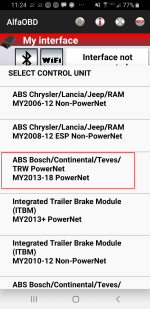
This is now ABS Bosch/Continental/Teves/TRW PowerNet MY2019+ PowerNet (or MY2013-18 PowerNet)- Click the "hood open" icon at the bottom
- Select "ABS Initialization" from the drop down (read the instructions)
- Press Start
- Back to the drop down and select "Static ECU Initialization"
- Press Start
- Click on the "check engine" icon at the bottom
- Select "Clear Faults"
- Cycle the key to off and then back to run
- Click back on the "hood open" icon
- Select "Clearing Rolls Information" from the drop down (should be at the bottom of the list)
- Cycle key again
- Although it doesn't say it, I would click on the "check engine" icon one more time and clear faults
- Turn key off and disconnect everything (OBDII connector, etc.)
- Start your truck up and take it for a spin
Hope this helps!
any help at all is greatly appreciated