
Nick
Well-Known Member
Went to my dealer the other day and asked about updating my GPS . He told me $ 300 I thought that was really high and passed . Have any others had this done without being robbed .

Depends what year your truck is. If it’s 2019-2021, you have to pay for the update, and you can get it here and do it yourself:Went to my dealer the other day and asked about updating my GPS . He told me $ 300 I thought that was really high and passed . Have any others had this done without being robbed .
 chryslergroup.navigation.com

Pretty normal. Haven’t paid for a gps upgrade with various vehicles in over 10 years. That’s what Waze, google maps and others are for imo.Went to my dealer the other day and asked about updating my GPS . He told me $ 300 I thought that was really high and passed . Have any others had this done without being robbed .
Well that's good to know. Thanks for adding the link.If your truck is 2022+, they are free, and you can download and install them yourself, and there is a new update every quarter from here:

I am having the same problem that you are. It seems the truck is not recognizing the USB. I have no idea why it is not. I reformatted and tried again, but still had the same behavior.So I downloaded and extracted to thumb drive without incident. Went to my truck, set the truck to 'run' but didn't start it. Inserted the drive in the USB port and it flashed once or twice. Waited a while but nothing further happened.
I removed the drive, started the truck and inserted the drive. It flashed once or twice but nothing further happened.
I scrolled through several menus but didn't see anything helpful.
I checked the website and the instruction details say the radio must be on and the installation will start automagically. Naturally my "radio" was on, but it was Sirius rather than OTA signal. But I can't really see how that would make a difference. Additionally, even though Sirius was "on" I wasn't getting a signal because the truck was inside the carport.
I'm looking for some guidance from somebody that has successfully updated their 12" 5.0 with Nav. Thanks!
Yes.Are you unzipping the file?
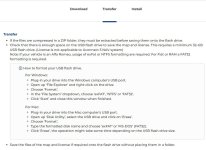
The install tab on this website says to start the engine and then install and says it will take about an hour and the radio must be left on - do you need the engine running for this or just leave it in ACC mode?I may have figured out the problem. My thumb drive is 64GB and exFAT or NTFS are the only choices to format it in Windows 11. Ram U5 requires FAT32. I downloaded RUFUS and formatted my thumb drive to FAT32 and am now copying the files over to the drive one more time.
If this doesn't work, I'll be going to WalMart today and will pick up a 32GB thumb drive to try.
View attachment 79387
Regardless of what anyone else says (it might be luck that it took under 30 minutes), always make sure the engine is running when doing a map update.The install tab on this website says to start the engine and then install and says it will take about an hour and the radio must be left on - do you need the engine running for this or just leave it in ACC mode?
During the install you can still drive the truck, you just won't have any Nav functions available. I drove to a store about 45 minutes away but the install completed before I even got there.The install tab on this website says to start the engine and then install and says it will take about an hour and the radio must be left on - do you need the engine running for this or just leave it in ACC mode?
