
Ram Heavy Duty Forum
You are using an out of date browser. It may not display this or other websites correctly.
You should upgrade or use an alternative browser.
You should upgrade or use an alternative browser.
TPMS (TIS) sensors for trailer (SOLVED - see 1st post) aka TTPMS - Trailer TPMS
- Thread starter ghaynes754
- Start date


1FastHemi
Well-Known Member
- Messages
- 410
- Reaction score
- 324
- Points
- 63
Does anyone have the actual part numbers for the RAM TTPMS? I ask the dealer parts person to looking if it was available yet and if it could be put on to my 2020 Ram 2500. They said they could not find anything on it. Appreciate if anyone has anything on this.
Here are some pictures with part numbers for your trailer tires. These were in the back seat area of my truck when it was delivered. If your truck didn't come with the (TTPMS XG9) option when it was built, there is a thread here somewhere detailing everything you need and how to do it. I just cant remember where it is, May be someone will post a link for you. I hope this will help you out.
Attachments

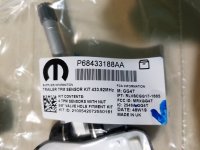
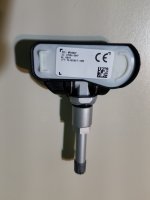


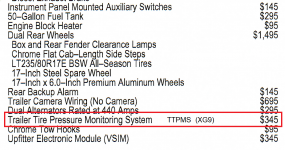

Does anyone have the actual part numbers for the RAM TTPMS? I ask the dealer parts person to looking if it was available yet and if it could be put on to my 2020 Ram 2500. They said they could not find anything on it. Appreciate if anyone has anything on this.
I put (edited) all the details in the first post in this thread.

TPMS (TIS) sensors for trailer (SOLVED - see 1st post) aka TTPMS - Trailer TPMS
Has anyone bought/installed the tire pressure sensors on a towed trailer that can be viewed on the driver information center after being configured in the UConnect? Specifically for the 3500. I am looking for the part number for the sensor. I've tried a couple of dealers and yesterday chatted...
 hdrams.com
mlink
Active Member
My factory installed TTPMS failed to configure.
Over many attempts, I was only able to get the left front sensor on my 38' Fifth Wheel to register. Suspecting a "range" issue, I thought perhaps it needs a stronger signal for initially registering, but then it might still have enough signal when monitoring. I finally removed the wheels from the trailer and moved them 3 ft. closer to the truck - and then each of them were recognized at around 103psi and the configuration completed successfully. Then, I refilled each tire back to 110psi. Upon replacing the wheels back onto the trailer, the sensors again didn't seem to be communicating with the TTPMS - as the increase in tire pressure didn't re-display on the dashboard. Now, after turning the truck off and back on, I only have red -- lines for each tire pressure.
I measured that the tires are only 19 to 22 feet from the truck's rear bumper area. It seems like a factory system should have more range than that.
Has anyone had this "range" issue? If your TTPMS configured successfully, how long is your trailer (ie. how far back are your trailer axles from your truck's rear bumper area?).
Any ideas or suggestions appreciated...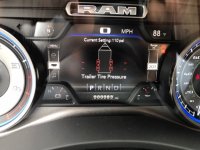
Over many attempts, I was only able to get the left front sensor on my 38' Fifth Wheel to register. Suspecting a "range" issue, I thought perhaps it needs a stronger signal for initially registering, but then it might still have enough signal when monitoring. I finally removed the wheels from the trailer and moved them 3 ft. closer to the truck - and then each of them were recognized at around 103psi and the configuration completed successfully. Then, I refilled each tire back to 110psi. Upon replacing the wheels back onto the trailer, the sensors again didn't seem to be communicating with the TTPMS - as the increase in tire pressure didn't re-display on the dashboard. Now, after turning the truck off and back on, I only have red -- lines for each tire pressure.
I measured that the tires are only 19 to 22 feet from the truck's rear bumper area. It seems like a factory system should have more range than that.
Has anyone had this "range" issue? If your TTPMS configured successfully, how long is your trailer (ie. how far back are your trailer axles from your truck's rear bumper area?).
Any ideas or suggestions appreciated...
My fiver is 35' long. I was able to program each tire literally pine right after another. After I would release 3-5 psi, it would instantly chirp at me. I was totally blown away hoe well it worked with all the negative reviews I had read. Also when ever we hook up to leave, my psis will not pop up just sitting there, I have to move just a bit then they will pop up. Work great while traveling. I also set my tire psi standard higher I evic than what I acutely have them at so the low tire warning will come on sooner
My factory installed TTPMS failed to configure.
Over many attempts, I was only able to get the left front sensor on my 38' Fifth Wheel to register. Suspecting a "range" issue, I thought perhaps it needs a stronger signal for initially registering, but then it might still have enough signal when monitoring. I finally removed the wheels from the trailer and moved them 3 ft. closer to the truck - and then each of them were recognized at around 103psi and the configuration completed successfully. Then, I refilled each tire back to 110psi. Upon replacing the wheels back onto the trailer, the sensors again didn't seem to be communicating with the TTPMS - as the increase in tire pressure didn't re-display on the dashboard. Now, after turning the truck off and back on, I only have red -- lines for each tire pressure.
I measured that the tires are only 19 to 22 feet from the truck's rear bumper area. It seems like a factory system should have more range than that.
Has anyone had this "range" issue? If your TTPMS configured successfully, how long is your trailer (ie. how far back are your trailer axles from your truck's rear bumper area?).
Any ideas or suggestions appreciated... View attachment 6629
Check the connection for the sensor behind the bumper.
Just an FYI food for thought note that Ford extends their sensor on the harness to the trailer.
mlink
Active Member
Brutal,
Yes, I saw that awhile back when I was hunting for a better camera than RAM's and noticed that the Fords have the same 12-pin Aux Camera connectors on their F350s. And the install kit they use refers to Aux Camera/TTPMS system where they use the spare wires in our 12-pin Aux Camera connectors for their TTPMS.
I think I will next try to extend the receiver cabling further back until I get good behavior out of it. It's similar to adding a signal booster to the aftermarket TTPMS systems when you have a long trailer.
Yes, I saw that awhile back when I was hunting for a better camera than RAM's and noticed that the Fords have the same 12-pin Aux Camera connectors on their F350s. And the install kit they use refers to Aux Camera/TTPMS system where they use the spare wires in our 12-pin Aux Camera connectors for their TTPMS.
I think I will next try to extend the receiver cabling further back until I get good behavior out of it. It's similar to adding a signal booster to the aftermarket TTPMS systems when you have a long trailer.
Brutal,
Yes, I saw that awhile back when I was hunting for a better camera than RAM's and noticed that the Fords have the same 12-pin Aux Camera connectors on their F350s. And the install kit they use refers to Aux Camera/TTPMS system where they use the spare wires in our 12-pin Aux Camera connectors for their TTPMS.
I think I will next try to extend the receiver cabling further back until I get good behavior out of it. It's similar to adding a signal booster to the aftermarket TTPMS systems when you have a long trailer.
That's probably what I would do.
After all the effort and trouble, of helping figure out this TTPMS add-on, I've decided I'll just stick with the TireMinder system I already had. I have a repeater mounted midships on my 5th to get the boat trailer tires, and I can put it in "disconnect" mode if I don't have the boat.
I would like to thank everyone who contributed to this thread and a thank you very much to Phil T for his excellent installation PDF.
I was able to get this activated this evening on my truck which has an 8.4" display.
View attachment 5753View attachment 5754
I had to fall back to AlfaOBD ver. 2.1.8.0 because the latest windows version would not save the change for some reason.
I can connect and see "trailer TPM present" but I keep getting, "connect failed. verify that key is in MAR" when selecting trailer TPM value to yes. I'm using ver 2.2.2.0 for windows, where can I find version 2.1.8.0 for windows?
I can connect and see "trailer TPM present" but I keep getting, "connect failed. verify that key is in MAR" when selecting trailer TPM value to yes. I'm using ver 2.2.2.0 for windows, where can I find version 2.1.8.0 for windows?
What year truck?
If 2019, you have to use advanced to force 2020 BCM.
I think AlphOBD has a link to older (Windows) versions on their pages somewhere.
What year truck?
If 2019, you have to use advanced to force 2020 BCM.
I think AlphOBD has a link to older (Windows) versions on their pages somewhere.
Truck is 2019 and I'm using 2020 in advanced mode as Phil's document shows, everything works perfectly up to activating TPM then it errors out.
What Bluetooth interface are you using? When you go to make the change, does the upper left of the screen say “connected”, or “idle”? Sometimes, when connected as a different year BCM, it will disconnect in the middle of a change.Truck is 2019 and I'm using 2020 in advanced mode as Phil's document shows, everything works perfectly up to activating TPM then it errors out.
What Bluetooth interface are you using? When you go to make the change, does the upper left of the screen say “connected”, or “idle”? Sometimes, when connected as a different year BCM, it will disconnect in the middle of a change.
OBDKey, yes it shows connected by Bluetooth and I can navigate the menu's ok. When I make the change to yes to enable TPM it errors out and disconnects. I should note that the USB software key that came with the USBKey kit was empty so now I suspect that the windows 10 drivers are not good enough to maintain the connection. I emailed USBKey to get the software since it looks like they don't provide it online.
Which OBD interface are you using?OBDKey, yes it shows connected by Bluetooth and I can navigate the menu's ok. When I make the change to yes to enable TPM it errors out and disconnects. I should note that the USB software key that came with the USBKey kit was empty so now I suspect that the windows 10 drivers are not good enough to maintain the connection. I emailed USBKey to get the software since it looks like they don't provide it online.
Which OBD interface are you using?
OBDKey Bluetooth. I received the missing software from them but no change, same error. I'm trying to get a copy of the older version but running out of ideas. Last resort is to try another computer I have which doesn't have Bluetooth so I will need to get an adapter.
mlink
Active Member
Still working on factory TTPMS "range issue" causing config failure with long 5th Wheel...
After removing the receiver from my truck, I found that my receiver Part#: 68375990AB has been superseded to 68375990AC.
Can't find any info as to why, but I ordered one anyway because they're cheap. Possible the newer model will resolve the issue.
If not, I will be relocating the receiver from behind license plate to underneath trailer closer to the axles ala the Ford TTPMS solution which uses same equipment & connectors - except it actually works!
After removing the receiver from my truck, I found that my receiver Part#: 68375990AB has been superseded to 68375990AC.
Can't find any info as to why, but I ordered one anyway because they're cheap. Possible the newer model will resolve the issue.
If not, I will be relocating the receiver from behind license plate to underneath trailer closer to the axles ala the Ford TTPMS solution which uses same equipment & connectors - except it actually works!

sainthalo65
New Member
- Messages
- 24
- Reaction score
- 5
- Points
- 3
Interesting read fellas, great info. I’ve a 2500 HD on order that I ordered specifically with trailer package specifically with factory pre wired for camera and ttpms, simple question ahead Does the truck arrive from the factory with at least 4 trailer sensors that I can install,or do I need to buy them. I know by the read the camera is not included. The reading suggests that 4 sensors come with package and you can add more. I’ve new tires for my TT arriving and don’t want to mount them until I have the sensors. Hopefully after reading all this post they work. My TT is 32 footer. Not sure if I’ll need to adjust sensor length too so keep up the post with any solutions that sort this out!!! Much appreciated
Sent from my iPhone using Tapatalk
Sent from my iPhone using Tapatalk
They worked fine on my 30 foot TT. I added the package with the help and research of all of the guys here and there was no issue with the pairing. Since my truck didn't come equipped with TTPMS from the factory, I had to buy a set. You may have them when the truck arrives sometime in the next century. I would just buy a set and get them installed now. If you get them, sell them to someone here.
They came with my new build in a bag with tool and instructions. My fiver is 35'. They work awesomeInteresting read fellas, great info. I’ve a 2500 HD on order that I ordered specifically with trailer package specifically with factory pre wired for camera and ttpms, simple question ahead Does the truck arrive from the factory with at least 4 trailer sensors that I can install,or do I need to buy them. I know by the read the camera is not included. The reading suggests that 4 sensors come with package and you can add more. I’ve new tires for my TT arriving and don’t want to mount them until I have the sensors. Hopefully after reading all this post they work. My TT is 32 footer. Not sure if I’ll need to adjust sensor length too so keep up the post with any solutions that sort this out!!! Much appreciated
Sent from my iPhone using Tapatalk