What's new
Ram Heavy Duty Forum

Register a free account today to become a member! Once signed in, you'll be able to participate on this site by adding your own topics and posts, as well as connect with other members through your own private inbox!

TPMS (TIS) sensors for trailer (SOLVED - see 1st post) aka TTPMS - Trailer TPMS

The first thing you should do is make a backup file.

Also Read System ID and save that base log file.

I don't recall anything you need to do in the TIM. The settings to enable it are in the BCM.
If I don’t see the body computer for the current year that I have do I click on the my 2023+ powernet and go with that ?
I have a 2024 RAM 3500
Or am I supposed to specifically only click on the “body computer my 2020 powernet” ?
 
If I don’t see the body computer for the current year that I have do I click on the my 2023+ powernet and go with that ?
I have a 2024 RAM 3500
Or am I supposed to specifically only click on the “body computer my 2020 powernet” ?

I'd expect 2023+ will work but unless you have set the option to force MY, it should auto-detect the correct BCM anyway. I don't see BCM 2023+, only BCM 2022+ and 2023.

I'll stress again, make the backup file and do it before making any changes.

Instructions:
For the backup file:

Connect to body computer, then click the car with hood open, drop down the menu box and scroll all the way to the bottom just under car configuration change, and choose create backup file
Uploading System ID (BCM) Information:
To upload your System ID (BCM) config use the "Tools" icon in the upper right corner. Select "Upload to Google Drive," and link your Google Drive to AlfaOBD. Select "Upload to Google Drive" and "Upload Faults and Status Log". Select "Body_Chrysler_Info".
 
I'd expect 2023+ will work but unless you have set the option to force MY, it should auto-detect the correct BCM anyway. I don't see BCM 2023+, only BCM 2022+ and 2023.

I'll stress again, make the backup file and do it before making any changes.

Instructions:
For the backup file:

Connect to body computer, then click the car with hood open, drop down the menu box and scroll all the way to the bottom just under car configuration change, and choose create backup file
Uploading System ID (BCM) Information:
To upload your System ID (BCM) config use the "Tools" icon in the upper right corner. Select "Upload to Google Drive," and link your Google Drive to AlfaOBD. Select "Upload to Google Drive" and "Upload Faults and Status Log". Select "Body_Chrysler_Info".
I got it backed up first before I did anything else and saved it to a file on my desktop. Now I gotta do is pray this old laptop doesn’t die as the dog attacked the door as I was trying to walk through out the back door of the house 110 pound European Dobie got tangled up and all the power cords and through the computer and the mouse and everything all over the back porch. What a way to start…
Got it all back together in the truck. Everything has fumbled my way through it. I used the 2023+ and it seemed to work OK I’ve just disconnected and waiting to cycle back on and see if the stuff is on the screen on the dash or not. I’ll let you know here shortly.
 
I had none of my trouble so far I did manage to get the body module computer programmed, and I do see the tire pressure system on the screen on the dash that’s not the problem anymore.
I parked in my truck underneath the gooseneck of this 40 foot long PJ flatbed 40 footer. It wouldn’t read the first tire after just sitting there holding the valve and wide open it timed out.
So I decided to move the truck alongside the trailer just to kind of cheat and get the system up and going, and then I could do something later about the difference of length.
So park the truck with the right side of the truck to the left side of the trailer with the tail end of the truck near the trailer axles.
I get through tire number one number two number three number four and then run around the other side of the trailer to start 5 pounds or whatever out of number five and I get two horn beeps in it times out and everything limits out times out resets nothing saved gotta start all over.
After trying this with the truck and a couple different positions five or six times I’m out of air.
Now I need to drag air hoses out from the shop all the way out to the middle of the yard where the trailer is.. but of course today is the day that both of my air chucks want to take a crap. So I guess I’m off to the Juan’s Chinese store Harbor freight to buy another one and then throw it in the trash.
To be continued…..

Thanks to all the guys that have helped me bump my head to this whole project. Sorry I’m blindfolded and the cave is completely dark but thanks for the guidance. I’ll get it sooner or later I guess.
 
On a note of distance from sensor behind the bumper to eight sensors on a 40 foot flatbed gooseneck trailer…..

I have read that someone else had to make an extension from the harness under the bumper all the way back, maybe 20 feet or more back underneath the trailer to put that sensor that goes under the bumper actually under the trailer close to the front trailer axle so it could pick up all the tire sensors.
When I first started this behemoth of a project I accidentally purchased parts for a 2019 and up. That purchase included a 10 foot OEM wiring harness. I’m wondering does anybody know if that particular OEM wiring harness WOULD WORK to relocate the receiver module on the bumper behind the license plate ?

Thanks again and Thanks in advance
 
2024 RAM 3500
GOT IT INSTALL, UP & GOING

Just issues with I think the DISTANCE between number recover module and the eight sensors waaaaaay back under a 40ft PJ gooseneck flat bed trailer.
I could get the horn to chirp for tires on the left side of the trailer 1,2,3,4 but the system times out every time when trying to let air out on tire number 5. It times-out and drops all previous 4 tires paired into the system.

I have had the truck parked along side the left side of the trailer the first 7 tries….
After I go buy another air chuck, I’ll air up all the tires again and THIS time might try backing the truck up to the rear of the 40ft trailer to get the receiver closest to the 8 tires sensors.
what an F’ing project !!!!
Glad those dealerships are there to do more then pull the money from our hands and say thank you deal done & complete, end of relationship. Zero help after the cash purchase.
 

Attachments

  • IMG_8172.jpeg
    IMG_8172.jpeg
    799.4 KB · Views: 14
My dealer was useless. I ended up building my own extension cable to place the receiver near the trailer axles and has been working like a charm for four years. I did buy an extra receiver that I connect to the truck to avoid getting error messages
 
My dealer was useless. I ended up building my own extension cable to place the receiver near the trailer axles and has been working like a charm for four years. I did buy an extra receiver that I connect to the truck to avoid getting error messages
The cable consists of a negative and positive power and a twisted pair. Mine was about 30 feet long. The problem is that the TPMS sensors in the trailer do not have a strong enough signal.
 
I’ve got everything installed, hardware, software, and it’s up and running. But….
There’s one of two things going on….
The connectivity is extremely sketchy.
I am dragging a 40ft PJ Gooseneck trailer where the axles are back away from the truck around 28-30ft(not 100% sure on the distance. I’ll unroll a tap measure on it an FO)
I think there’s so much metal between the receiver behind the bumper / license plate and the tire sensors it’s creating interference.
If you’re laying under the truck looking up at the wifi receiver, it’s mounted off center to your right or just to the left(driver side ) of center.
This last week on a load run from Austin Tx, to Albuquerque, New Mexico I noticed that all tires at some point did pop up and register on the dash screen. The two that 98% of the time that didn’t show up were the two right outside tire sensors. By a straight line where the sensor is and those two outside tires seems to be the most congested obstruction.
I really do not want to run a 15 or 30 ft jumper under the trailer. I’d have to plug the receiver back into the main harness everytime I switched trailers. Or get a dash error…
I’m going to attempt to relocate that receiver to the bottom of the bumper or possibly outside the bumper next to the plate right above it.
Gonna see IF I can find a location that allows a more efficient constant signal.
Trying to avoid ab extra long relocation cable if I can.
RAM should of addressed this with a booster over the last four years.

Any help or suggestions appreciated.

Thanks in advance.

Pray for Texas ✝️✝️
 
I have an aftermarket heavy steel bumper on my 2022 dually. I pull a 41' 5th wheel RV.
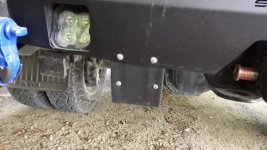
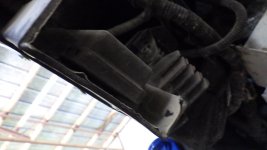
I made a small bracket with some 1/8" ABS plastic and mounted the receiver to it. There was just enough of the wiring harness to get it mounted like the attached pictures.
My rear axles on the trailer are about 25' from the bumper.
It worked with my setup, can't say it would work for all.
A $2.00 piece of 1/8" ABS bent into a "C" shape with a heat gun and 4 bolts is what it took.
I still agree with "CdnHO", using the cable is a guarantee.
 

Attachments

  • RIMG2419.JPG
    RIMG2419.JPG
    344.4 KB · Views: 20
  • RIMG2421.JPG
    RIMG2421.JPG
    228.4 KB · Views: 20
I also did put my trailer on jack stands, remove all 4 wheels, and then sync the tires to the truck with them removed.
I then let the air out of the tires while they were at the rear of the truck to sync, then remounted the 4 wheels, and everything worked from that time on, about 3 years now.
 
I have an aftermarket heavy steel bumper on my 2022 dually. I pull a 41' 5th wheel RV.
I made a small bracket with some 1/8" ABS plastic and mounted the receiver to it. There was just enough of the wiring harness to get it mounted like the attached pictures.
My rear axles on the trailer are about 25' from the bumper.
It worked with my setup, can't say it would work for all.
A $2.00 piece of 1/8" ABS bent into a "C" shape with a heat gun and 4 bolts is what it took.
I still agree with "CdnHO", using the cable is a guarantee.
So it did help getting it out from behind the bumper and allowed for a better direct line of sight possibility… ok
I’m gonna have to try something.
RAM should of tested this better for sure.
 
I also did put my trailer on jack stands, remove all 4 wheels, and then sync the tires to the truck with them removed.
I then let the air out of the tires while they were at the rear of the truck to sync, then remounted the 4 wheels, and everything worked from that time on, about 3 years now.
I did exactly that with eight tires…
Four tires at the left and four tires at the right side to sync them up, then reinstalled them.
Just dealing with distance and steel structure obstruction between the receiver and sensors.
 
I’ve got everything installed, hardware, software, and it’s up and running. But….
There’s one of two things going on….
The connectivity is extremely sketchy.
I am dragging a 40ft PJ Gooseneck trailer where the axles are back away from the truck around 28-30ft(not 100% sure on the distance. I’ll unroll a tap measure on it an FO)
I think there’s so much metal between the receiver behind the bumper / license plate and the tire sensors it’s creating interference.
If you’re laying under the truck looking up at the wifi receiver, it’s mounted off center to your right or just to the left(driver side ) of center.
This last week on a load run from Austin Tx, to Albuquerque, New Mexico I noticed that all tires at some point did pop up and register on the dash screen. The two that 98% of the time that didn’t show up were the two right outside tire sensors. By a straight line where the sensor is and those two outside tires seems to be the most congested obstruction.
I really do not want to run a 15 or 30 ft jumper under the trailer. I’d have to plug the receiver back into the main harness everytime I switched trailers. Or get a dash error…
I’m going to attempt to relocate that receiver to the bottom of the bumper or possibly outside the bumper next to the plate right above it.
Gonna see IF I can find a location that allows a more efficient constant signal.
Trying to avoid ab extra long relocation cable if I can.
RAM should of addressed this with a booster over the last four years.

Any help or suggestions appreciated.

Thanks in advance.

Pray for Texas ✝️✝️

If any axle is further than 30 feet you will probably need a signal booster. See here:

 
If any axle is further than 30 feet you will probably need a signal booster. See here:

Is there an actual signal booster available?
That definitely would be ideal.
 
Is there an actual signal booster available?
That definitely would be ideal.
Yes that would work. Some aftermarket TPMS systems use them. I had one on my last truck and worked great. Unfortunately, the engineers at Ram are rather dumb and haven't thought of it. I believe the TTPMS sensors that Chrysler supplies are intended for cars and have a very limited range.
 
Yes that would work. Some aftermarket TPMS systems use them. I had one on my last truck and worked great. Unfortunately, the engineers at Ram are rather dumb and haven't thought of it. I believe the TTPMS sensors that Chrysler supplies are intended for cars and have a very limited range.
The tire sensors I purchased are the 0 to 150psi trailer tire sensors. They are in packs of four so I bought three packs. Eight trailer tires on the trailer, two newly assembled spare tires/wheel/sensor and the ended up with two spare sensors for the glovebox.
The trailer sensors are different from the truck tire sensors.

Ram should have tested this stuff. At this point after the fact a ‘booster’ is like adding duct tape because there’s a problem.

So… a booster was mentioned, is there such a thing to fix this issue ?
 
TTPMS “TARGET TIRE PTESSURE”
On the big screen I set the target tire pressure to the trailer tires 110 psi operating max.
I noticed each time the system seems to not hold that 110 target psi and it reverts to 50 psi every time. Why ?


It would be great to also obtain some type of original instructions that Ram might of put together for this TTPMS system…
Surly they put something together for those that ordered the feature with the build to order trucks.
 
TTPMS “TARGET TIRE PTESSURE”
On the big screen I set the target tire pressure to the trailer tires 110 psi operating max.
I noticed each time the system seems to not hold that 110 target psi and it reverts to 50 psi every time. Why ?


It would be great to also obtain some type of original instructions that Ram might of put together for this TTPMS system…
Surly they put something together for those that ordered the feature with the build to order trucks.
This is dated 2019 so not sure if there is anything newer. I used it for my 2021. I am not aware of any booster or repeater system.
 

Attachments

TTPMS “TARGET TIRE PTESSURE”
On the big screen I set the target tire pressure to the trailer tires 110 psi operating max.
I noticed each time the system seems to not hold that 110 target psi and it reverts to 50 psi every time. Why ?


It would be great to also obtain some type of original instructions that Ram might of put together for this TTPMS system…
Surly they put something together for those that ordered the feature with the build to order trucks.
This is a glitch that seems to plague people who install the TTPMS after the fact.

I have that same issue and reset the target pressure each time I tow. It doesn't seem to change while the trailer is connected, but once you unhook it reverts to 50psi.

You may also get "TRAILER SYSTEM NOT CONFIGURED". This seems to happen randomly and will sometimes correct itself. But if it doesn't when you go to tow, go in to the trailer settings and select a profile you are not using - make it the active trailer profile. Then go back to the profile you saved the TPMS setting son, make it active and you will be good to go.....another glitch in the Matrix for TTPMS installed after the fact.

I spoke to a MOPAR tech who said there maybe some updates, but since my truck did not have that option from the factory - I am not getting the updates. Trying to see how I can get those....if any...need to talk to my local dealer.
 
Back
Top