
That one will require you to pull out your instrument cluster so i would buy a https://www.kaodtech.com/product-page/security-module-bypass. and what type of phone do you have ? apple or android
Ram Heavy Duty Forum
You are using an out of date browser. It may not display this or other websites correctly.
You should upgrade or use an alternative browser.
You should upgrade or use an alternative browser.
TPMS (TIS) sensors for trailer (SOLVED - see 1st post) aka TTPMS - Trailer TPMS
- Thread starter ghaynes754
- Start date

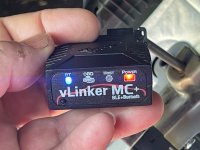
Here are photos of the cable and link I have.
At the moment I don’t have a good laptop with Windows on it.
Wrong cable.

MrRogue1
Member
- Messages
- 49
- Reaction score
- 3
- Points
- 8
It’s the cable Jimmy sent me a link to get off amazon. Wrong ?!?Wrong cable.
What is this cable for then ?
Is the OBD plug in “vLinker MC+” even correct ?
Last edited:
MrRogue1
Member
- Messages
- 49
- Reaction score
- 3
- Points
- 8
I have an iPhone 12pro max (old by today’s standards) I’m looking for a laptop to use with the AlfaOBD. What does the AlfaOBD cost ?That one will require you to pull out your instrument cluster so i would buy a https://www.kaodtech.com/product-page/security-module-bypass. and what type of phone do you have ? apple or android
MrRogue1
Member
- Messages
- 49
- Reaction score
- 3
- Points
- 8
I have the 2024 Ram 3500 dually.Unless you got a KAOdTECH style bypass cable, you got the wrong one. If you have a 12+8 "y-cable" that's for 5th gen 1500 trucks.
You're mixing metaphors so to speak. We don't plug into the BCM (which is not located behind the dash cluster), we bypass the SGM (which is). You do that by plugging a cable into the CAN-C and CAN-IHS bus blocks that are on the driver side kick panel above the emergency brake and can be seen behind the headlight switch bezel ounce you pull it.
Has anyone played with AlfaOBD on their 2019 HD's yet? I'm curious if anything is accessible to "change" and if it just works. There is lots of different info out there on other forums, but i haven't found anything in regards to the 2019's.
EDIT: AlfaOBD does work, here is the what is needed to use it on 2019 and newer HD Rams:
- The Android app from google play store, or windows download from AlfaOBD.com. (Windows version strongly recommended) (AlfaOBD is Windows/Android only)
- A Bluetooth interface such as OBDLink MX+ or OBDLink LX (cheaper than the MX+ if you don't need iOS support...

MrRogue1
Member
- Messages
- 49
- Reaction score
- 3
- Points
- 8
Do I need to get the standard length cable ? Or the longer version..?That one will require you to pull out your instrument cluster so i would buy a https://www.kaodtech.com/product-page/security-module-bypass. and what type of phone do you have ? apple or android

CdnHO
Well-Known Member
StandardDo I need to get the standard length cable ? Or the longer version..?
MrRogue1
Member
- Messages
- 49
- Reaction score
- 3
- Points
- 8
ORDEREDStandard
Correct info is king. Thank you !!
Not sure what I’ll do with this other Y shaped cable(red ends)
Just to clarify:It’s the cable Jimmy sent me a link to get off amazon. Wrong ?!?
What is this cable for then ?
Is the OBD plug in “vLinker MC+” even correct ?
It’s not the “wrong” cable. It’s just not the “preferred” cable.
When I made this recommendation to you back in February, the preferred kaodtech cable was out of stock for a while, and I couldn’t source the parts to build one like this. So, I made the recommendation for the red Amazon one.
It still works to bypass the gateway, just like the other bypasses. The only thing that makes it not the preferred cable for Heavy Duty Rams is because you have to plug it in behind the instrument cluster. There are plenty of videos out there how to do this.
If you have an iPhone, but no laptop, then get the JScan app on your iPhone, instead of using alfaobd.
With everything that you currently have (Amazon bypass, vlinker MC+, and an iPhone), you can have this feature programmed, and done and over with in an hour.
MrRogue1
Member
- Messages
- 49
- Reaction score
- 3
- Points
- 8
I did order the second cable.(kaodtech)Just to clarify:
It’s not the “wrong” cable. It’s just not the “preferred” cable.
When I made this recommendation to you back in February, the preferred kaodtech cable was out of stock for a while, and I couldn’t source the parts to build one like this. So, I made the recommendation for the red Amazon one.
It still works to bypass the gateway, just like the other bypasses. The only thing that makes it not the preferred cable for Heavy Duty Rams is because you have to plug it in behind the instrument cluster. There are plenty of videos out there how to do this.
If you have an iPhone, but no laptop, then get the JScan app on your iPhone, instead of using alfaobd.
With everything that you currently have (Amazon bypass, vlinker MC+, and an iPhone), you can have this feature programmed, and done and over with in an hour.
It should be here in a couple days.
I also already have a cable that is made to plug-in to the unit behind the dash cluster and drop that connection down around the steering wheel so you just have to get down on the floorboard and look up and there it is you don’t ever have to pull the cluster out again Everything can be done from there.
I forgot what it’s called, but I did buy that from infotainment. So once that’s installed, I’ll never have to go back in there again. For whatever reason, I just don’t like the idea of pulling that basil out and unbolting and bringing out the cluster.
So I’ll avoid that after the first time in and out.
I have not looked at the J scan
What does it cost? Does anybody know? Is it a one time use or is it something you have to sign up for monthly?

The problem with the cable that requires pulling the cluster is that you'll have to do it again if you take the truck to the dealership for work, and then again when you get it back.I did order the second cable.(kaodtech)
It should be here in a couple days.
I also already have a cable that is made to plug-in to the unit behind the dash cluster and drop that connection down around the steering wheel so you just have to get down on the floorboard and look up and there it is you don’t ever have to pull the cluster out again Everything can be done from there.
I forgot what it’s called, but I did buy that from infotainment. So once that’s installed, I’ll never have to go back in there again. For whatever reason, I just don’t like the idea of pulling that basil out and unbolting and bringing out the cluster.
So I’ll avoid that after the first time in and out.
I have not looked at the J scan
What does it cost? Does anybody know? Is it a one time use or is it something you have to sign up for monthly?
I did order the second cable.(kaodtech)
It should be here in a couple days.
I also already have a cable that is made to plug-in to the unit behind the dash cluster and drop that connection down around the steering wheel so you just have to get down on the floorboard and look up and there it is you don’t ever have to pull the cluster out again Everything can be done from there.
I forgot what it’s called, but I did buy that from infotainment. So once that’s installed, I’ll never have to go back in there again. For whatever reason, I just don’t like the idea of pulling that basil out and unbolting and bringing out the cluster.
So I’ll avoid that after the first time in and out.
I have not looked at the J scan
What does it cost? Does anybody know? Is it a one time use or is it something you have to sign up for monthly?
JScan is one time purchase per VIN. I paid $24 in 2023 for android.
So now you’ll have all three types of bypasses, when only one is needed. You already had the Amazon one initially, and this all could have been done long ago with that one…I also already have a cable that is made to plug-in to the unit behind the dash cluster and drop that connection down around the steering wheel so you just have to get down on the floorboard and look up and there it is you don’t ever have to pull the cluster out again Everything can be done from there.
I forgot what it’s called, but I did buy that from infotainment
MrRogue1
Member
- Messages
- 49
- Reaction score
- 3
- Points
- 8
Shouldn’t need to do that cluster removal more then once. The cable I have is for relocating that access point to down around the steering column so no one has to go back behind the cluster again.The problem with the cable that requires pulling the cluster is that you'll have to do it again if you take the truck to the dealership for work, and then again when you get it back.
It just changes the access location to easier accessible.
Trailer TPMS install
I Installed all the parts from post one in my 2024 Ram 3500 and Its populated in screen and setup is there as supposed to in the screen.
My question is i have two bags of sensors out of two of my other trucks, wondering if either will work or if both kits will work as i need 6 sensors in total for one trailer.
2021 ram 1500 came with 68433188aa-will they work with 2024?
2025 ram 1500 came with 68600218aa-will they work with 2024?
I Installed all the parts from post one in my 2024 Ram 3500 and Its populated in screen and setup is there as supposed to in the screen.
My question is i have two bags of sensors out of two of my other trucks, wondering if either will work or if both kits will work as i need 6 sensors in total for one trailer.
2021 ram 1500 came with 68433188aa-will they work with 2024?
2025 ram 1500 came with 68600218aa-will they work with 2024?
Last edited:
Hey, is part number 68516743AA, the only sensors that will work on 2022 and up ram 3500? Im having issues paring my sensors and I'm using part number 68600218aa. I have a 2024 3500 and i have done appropriate alfa programming.Has anyone bought/installed the tire pressure sensors on a towed trailer that can be viewed on the driver information center after being configured in the UConnect? Specifically for the 3500. I am looking for the part number for the sensor.
I've tried a couple of dealers and yesterday chatted and then emailed Mopar support. Chat referred me to email. Email sent me a totally useless reply. "After doing some research, I found that I only have part information for those that come equipped with a particular vehicle or that are compatible with a vehicle. I would suggest that you speak with an authorized Ram dealer for the part number for the Tire Pressure Sensors that would be used by the trailer towed by your truck. "
This being my first non GM truck after 40 years I am surprised that FCA support doesn't have part numbers. Seems like a black hole.
Mod [Brutal_HO] Edit: OP hasn't been seen in a while so I'm posting a summary update here regarding the TTPMS (Trailer TPMS):
Through diligence and hard work on the part of several members, the parts and process to add TTPMS has been discovered. There are several good summaries and instructions posted throughout the thread that I will attempt to cover below.
The parts required, discovered by several contributors and posted throughout the thread, was initially summarized by @thestuarts HERE.
PARTS REQUIRED TO ADD TTPMS to 2019+ RAM HD TRUCKS:
- TTPMS bumper receiver: 68375990AC (Avg cost ~$70)
- 2022 UC5 trucks require 68526635AB
- TIM headliner module: 68404893AB (Avg cost ~$70)
- TIM Pigtail cable: 68412666AA (Avg cost ~$9)
- The kit for the TPMS sensors (4) for trailer wheels is
68433188AA68516743AA (best price I've seen posted not too far back in the thread @ $146)
- Optional single sensors available as part #68375992AA (old part #)
- Proof here what comes in the TTPMS (XG9) sales code "kit" for dealers that lose the sensors: https://www.ramtrucks.com/BodyBuilder/service/Image?imageId=MtQrP/FqLY5r/est8MtGjGgHzAHGUTU0WB3rWuqSY7YmQ2vEhuBWBEl2LeIN5MYE
As of 6-21-20 You may find some of these parts, particularly the TIM module and jumper cable, currently out of stock everywhere, partly thanks to this thread.
You will need to install the hard parts. @Phil T excellent instructions pdf HERE.
The hardest part of this is pulling down the headliner (easier on 2020) to remove a dummy plug jumper and install the TIM and jumper cable.
TIM and jumper location: (photo credit to @Phil T)
View attachment 58792
TOOLS REQUIRED:
- AlfaOBD for Windows or Android (2020 trucks) ($50) (50% discount on the second license)
- Security bypass cable like the one from KAOdTECH. ($50) or Jimmy ($?)
- Bluetooth OBD-II adapter like the OBDLink MX/MX+ ($80/$120) or Vgate vLinker MC+ Bluetooth ($60) or OBD USB cable
You will need to enable the sales code option for TTPMS using the tools and components listed to "recode" the Body Control Module (BCM). There's a giant AlphOBD thread here if needing a primer. I used an ELM327 compatible OBD2 reader ($22 BAFX) with success but don't recommend these in general as they won't be able to perform all AlfaOBD functions.
Turning on the TTPMS option in the EVIC discovered HERE thanks to @g00fy
VehConfig 8: Trailer TPM

For the 2019 trucks, you may need to use the Windows version and select the MY2020 under advanced - also thanks to @g00fy
(ETA: AlphaOBD has been updated to include MY2019 TTPMS settings and the ability to override the BCM MY in the Android version as well as Windows)
An excellent writeup using AlphaOBD Windows for a 2019 written by @Phil T HERE
"The TTPM sends the information to the TIM via the Controller Area Network-Chassis (CAN-C) to be transmitted to the IPC."
ETA: P/T Chassis Net: TTPM must be enabled.
It may take several key cycles or time, or even overnight for the Tire Pressure options to show up in the U-Connect Trailer Settings once TTPMS is enabled.
@1FastHemi excellent post on adding the wheel sensors HERE:
I was unable to pair non-MOPAR sensors (external TireMinder) to the system. I don't believe anyone has been successful pairing non-MOPAR sensors.
Lastly, much of this could not have been possible without guidance and input and PARTS from @Jimmy07
- 68526635AB
- 68404893AB
- 68412666AA
MrRogue1
Member
- Messages
- 49
- Reaction score
- 3
- Points
- 8
Hi Jimmy,So now you’ll have all three types of bypasses, when only one is needed. You already had the Amazon one initially, and this all could have been done long ago with that one…
I’m finally getting this connected to attempt the programming of the TTPMS (TIM).
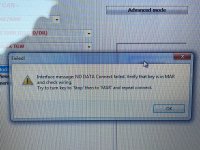
VLinker is blinking, laptop has Bluetooth now, running the AlfaOBDII software, KaoDTECH cable plugged in…
I found the TRAIER INTERFACE MODULE in the drop down… but having issues connecting or getting past this one process.
Question: what is the “MAR” reference?
Attachments

MrRogue1
Member
- Messages
- 49
- Reaction score
- 3
- Points
- 8
So now you’ll have all three types of bypasses, when only one is needed. You already had the Amazon one initially, and this all could have been done long ago with that one…
Ok I GOT it “CONNECTED”. “MAR” run position.Hi Jimmy,
I’m finally getting this connected to attempt the programming of the TTPMS (TIM).
VLinker is blinking, laptop has Bluetooth now, running the AlfaOBDII software, KaoDTECH cable plugged in…
I found the TRAIER INTERFACE MODULE in the drop down… but having issues connecting or getting past this one process.
Question: what is the “MAR” reference?
I don’t remember what I was supposed to do after I’m connected.
Not randomly flipping switches.
Attachments

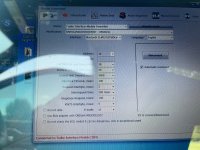
Ok I GOT it “CONNECTED”. “MAR” run position.
I don’t remember what I was supposed to do after I’m connected.
Not randomly flipping switches.
The first thing you should do is make a backup file.
Also Read System ID and save that base log file.
I don't recall anything you need to do in the TIM. The settings to enable it are in the BCM.
There's only 2 settings in the BCM you need to enable.
VehConfig 8: Trailer TPM Enabled
P/T Chassis Net: TTPM Enabled
VehConfig 8: Trailer TPM Enabled
P/T Chassis Net: TTPM Enabled
Has anyone bought/installed the tire pressure sensors on a towed trailer that can be viewed on the driver information center after being configured in the UConnect? Specifically for the 3500. I am looking for the part number for the sensor.
I've tried a couple of dealers and yesterday chatted and then emailed Mopar support. Chat referred me to email. Email sent me a totally useless reply. "After doing some research, I found that I only have part information for those that come equipped with a particular vehicle or that are compatible with a vehicle. I would suggest that you speak...
I've tried a couple of dealers and yesterday chatted and then emailed Mopar support. Chat referred me to email. Email sent me a totally useless reply. "After doing some research, I found that I only have part information for those that come equipped with a particular vehicle or that are compatible with a vehicle. I would suggest that you speak...
- ghaynes754
- Replies: 1,596
- Forum: Modifications and Accessories