What's new
Ram Heavy Duty Forum

Register a free account today to become a member! Once signed in, you'll be able to participate on this site by adding your own topics and posts, as well as connect with other members through your own private inbox!

Surround Camera Install on a 2019 2500 Laramie

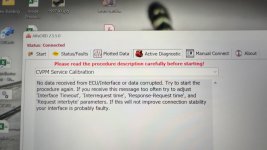
When it comes time to Calibrate the cameras - that setting is (from the start page in Alfa) in the Radio module, then you select CVPM... (see pic), then switch to the active diagnostic tab, select the options I have in the pic. On your radio, select surround cameras - then start driving at approx 2-8 mph.. then press Start on the test... Your screeen will go green and show a series of arrows, a speedometer, and a steering wheel.. be patient, it takes a minute of driving... Do each camera in sequence. You migh thave to Disconnect/Connect from the CVPM each time.View attachment 68214View attachment 68215


Thank you. I have looked and looked and could not find any information on performing the calibration.

I assume the LED light portion of the CHMSL is plug and play?
 
Really great Thread. Thank you all. I have a fairly good idea on how to add the 360 cameras. I have one thing that I am not sure of. I would also like to add the digital reaview mirror. Is there any changes i have to make. The CHMSL. is in both of the installs and I am not quite sure which one to get. The idea being when I tow I want to use the rearview mirror with a camera on the back of my Travel trailer. I have a 2022 Ram 3500. Hopefully I am not way off the mark here.

Thanks Mike.
 
I have switched my truck from UC4 to UC5. Original and new are the 12” screen. Already had all cameras and surround view. I changed the CVPM module to 56029967AF to match the new radio.

I have been trying and trying to calibrate the front, rear, left and right cameras following the steps in this thread. I get a successful calibration on most of the cameras but it doesn’t seem to get saved. Not only do I get a “success” on alpha obd but also get the green check mark on the radio screen at the end of the test. When I move on to the next camera, the last camera tested is not green on the radio. Is there something I am not doing right?
 
Only do one camera at a time, and then go back through and clear any error codes on the CPM disconnect and reconnect in the software and then calibrate the next camera
 
I cannot get the error codes for the CHMSL camera to clear. I clear the codes. Then rescan and they are still there.
 
I cannot get the error codes for the CHMSL camera to clear. I clear the codes. Then rescan and they are still there.
You will never get that one to clear but it's the ones for the calibration that have to be cleared
 
Ok. I assume you mean the one that says last calibration failed.

I’ll change the location where I do the calibration and see if that works. And try to get the codes to clear.

Thanks for your help.
 
Hi all,

I am working on doing this conversion on a 2022 Ram 2500. Also using this opportunity to delete chrome. These forums have been a huge help. I think I have all parts figured out except the side mirrors. I need black, power folding, with 360 view cameras, and fits a 2022. Anyone have part numbers for these? Thanks in advance.
 
I have 68361479AC and 68361478AC in my notes for black, 360 surround cameras, power fold, heated, power spotter mirror, spotter lamp mirrors for my 2022. I haven't ordered them yet however.
 
Thanks, gprguy. I found those parts in the forums as well, but allmoparparts.com says the left (68361479AC) won't fit a 2022 2500, though it says the right (68361478AC) will. Could be an error on allmoparparts.com bc they appear to be consecutive part numbers.
 
I am about ready to purchase all the parts for this upgrade. I had a question on the cameras. What cameras should I use. 68144068AD or 68417514AA. I am seeing both part numbers depending on what forum I read. Thanks
2022 Ram 3500.
 
I did the 23+ mirror swap on my 2019, which already has surround view cameras, and everything worked when I swapped it over, but they aren’t perfectly aligned. I’m trying to run the calibration and I have an OBDlinkEX cable, running it through windows and also having the same error on android with AlfaOBD. It connects to the module just fine, but cannot successfully run the calibration on any camera. I get the same error on windows or android:
IMG_7814.jpeg

The cable seems to be fine, Alfa is up-to-date as far as I know, and I have the security bypass module in place. Which, obviously all that has to be true to be able to connect the module, but just confirming for the sake of clarity. Anybody got any idea what might be going on?
 
Hello, are door modules needed? I do not see them on your list, but I have seen them on others who did a similar mod. I just ordered all the parts for this upgrade. I am feeling a little overwhelmed, but I think I can get it done. Any additional pictures of wire runs would be helpful.
 
I have switched my truck from UC4 to UC5. Original and new are the 12” screen. Already had all cameras and surround view. I changed the CVPM module to 56029967AF to match the new radio.

I have been trying and trying to calibrate the front, rear, left and right cameras following the steps in this thread. I get a successful calibration on most of the cameras but it doesn’t seem to get saved. Not only do I get a “success” on alpha obd but also get the green check mark on the radio screen at the end of the test. When I move on to the next camera, the last camera tested is not green on the radio. Is there something I am not doing right?
Do you have the cvpm from your 2021 still?
 
Hello, are door modules needed? I do not see them on your list, but I have seen them on others who did a similar mod. I just ordered all the parts for this upgrade. I am feeling a little overwhelmed, but I think I can get it done. Any additional pictures of wire runs would be helpful.
Door modules I believe would be for if you are adding power fold mirrors. I have installed the new mirrors but haven’t finished wiring in the power fold feature.
 
Has anyone done this, but added the digital rear view mirror camera side mirrors as well?
 
Back
Top