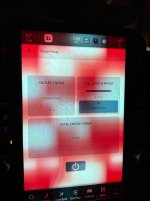
Maybe hit the power button on that screen too?
From the owners manual:
The vehicle must not display a low fuel warning.
● The vehicle battery has a good percent state of
charge.
● The vehicle can deliver up to 2.4 kW of power.
● The vehicle must be in PARK with the
engine running. The On-Board Power Panel will
automatically shut off if the vehicle is shifted out of
Park. It cannot be used while the vehicle is in DRIVE.
● After engine start-up, the vehicle may take up to two
minutes for warm-up. The On-Board Power Panel will
not be ready until this period is complete. A message
will appear in the On-Board Power Panel app if the
system is not yet ready.
● The brake pedal must not be pressed when turning
on the On-Board Power Panel.
● To prioritize power delivery, non-essential features
such as air conditioning, heated seats, heated
steering wheel, interior power outlets and power
inverter, etc are temporarily disabled while the On-
Board Power Panel is active.
Troubleshooting the On-Board Power
Panel
If an overcurrent condition or ground fault occurs, the
On-Board Power Panel may shut down automatically.
Follow the steps below to reset the system:
1. Ensure the vehicle is in PARK.
2. Unplug all devices from the On-Board Power Panel
outlet.
3. Turn off the vehicle completely and wait
approximately ten seconds.
4. Restart the vehicle with the engine running. Allow
up to two minutes after engine restart for the On-
Board Power Panel to become available.
5. Navigate to the Power Management App or press
the physical On-Board Power Panel button located
on the truck bed outlet.
6. Turn the On-Board Power Panel back on, then
reconnect your devices.
If the On-Board Power Panel does not turn back on,
repeat the steps above.