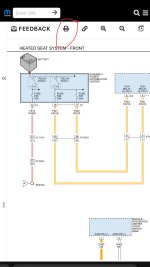
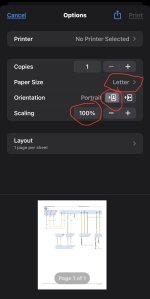
I’m not sure if these same options are in Mac as I only grab schematics on my iPhone, but this is what I do to print to pdf (screenshots don’t really work out because zooming in doesn’t magnify the clarity of the schematic).
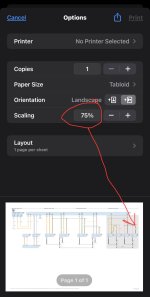
I set rhe letter size to tabloid, toggle it from portrait to landscape, then long press (click on) the image to generate the PDF. If the schematic is too wide, I scale down to 75% so the generated pdf grabs the whole width of the schematic.
View attachment 69543
View attachment 69544
View attachment 69545
View attachment 69546
Then this is the pdf it generates, and after I save it, I can zoom all the way in anywhere on that pdf, and the numbers and words magnify along with the zoom:
View attachment 69547