What's new
Ram Heavy Duty Forum

Register a free account today to become a member! Once signed in, you'll be able to participate on this site by adding your own topics and posts, as well as connect with other members through your own private inbox!

Mopar Service Library

CdnHO

Well-Known Member
Messages
2,147
Reaction score
2,715
Points
113
Location
South Ontario and South Texas
I have a three day subscription to the Mopar Service library. I am in process of downloading wiring diagrams and well as some service data. Is there a trick to downloading? Or is the only way to resize and download each page, one at a time?
 
I have a three day subscription to the Mopar Service library. I am in process of downloading wiring diagrams and well as some service data. Is there a trick to downloading? Or is the only way to resize and download each page, one at a time?
Is PDF format available for download ?
 
That is how I am downloading them. Through the print menu on my Mac
Have no idea about mac but on my PC I have no problem downloading them and manipulating them later, can you download
them to a file folder on your mac , it might be better than doing though the printer menu,
but like I said I have no experience with mac.
 
Have no idea about mac but on my PC I have no problem downloading them and manipulating them later, can you download
them to a file folder on your mac , it might be better than doing though the printer menu,
but like I said I have no experience with mac.
Basically you "print" the file to a pdf. Have to make sure that then entire image is showing (by zooming in or out) or you miss a part of the page. Too bad you can no longer get the old paper manuals or manuals on CD. Was hoping someone on here had an easier way.
 
Have no idea about mac but on my PC I have no problem downloading them and manipulating them later, can you download
them to a file folder on your mac , it might be better than doing though the printer menu,
but like I said I have no experience with mac.
I only see a "print" button. If there is a "download button, I am missing it.
 
I use a Mac. The only way I have found is to either hit the print button and then save to PDF in the print dialog, or take screenshots. For wiring diagrams where they extend far horizontally I tend to go the screenshot route.
 
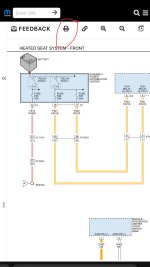
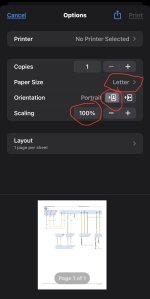
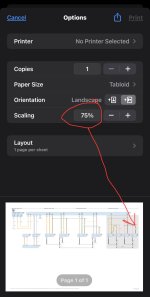
I’m not sure if these same options are in Mac as I only grab schematics on my iPhone, but this is what I do to print to pdf (screenshots don’t really work out because zooming in doesn’t magnify the clarity of the schematic).
I set rhe letter size to tabloid, toggle it from portrait to landscape, then long press (click on) the image to generate the PDF. If the schematic is too wide, I scale down to 75% so the generated pdf grabs the whole width of the schematic.
IMG_0384.jpeg
IMG_0385.jpeg
IMG_0386.jpeg
IMG_0387.jpeg
Then this is the pdf it generates, and after I save it, I can zoom all the way in anywhere on that pdf, and the numbers and words magnify along with the zoom:
IMG_0389.jpeg
 
I’m not sure if these same options are in Mac as I only grab schematics on my iPhone, but this is what I do to print to pdf (screenshots don’t really work out because zooming in doesn’t magnify the clarity of the schematic).
I set rhe letter size to tabloid, toggle it from portrait to landscape, then long press (click on) the image to generate the PDF. If the schematic is too wide, I scale down to 75% so the generated pdf grabs the whole width of the schematic.
View attachment 69543
View attachment 69544
View attachment 69545
View attachment 69546
Then this is the pdf it generates, and after I save it, I can zoom all the way in anywhere on that pdf, and the numbers and words magnify along with the zoom:
View attachment 69547

Menu is identical and that is pretty well how I am doing it. Printing to a pdf allows me to zoom in without loss of quality. A pain for sure. I think I am about half way through the schematics. I had hoped I was missing something. LOL
 
Menu is identical and that is pretty well how I am doing it. Printing to a pdf allows me to zoom in without loss of quality. A pain for sure. I think I am about half way through the schematics. I had hoped I was missing something. LOL
It used to be easy, but they’re constantly updating the service library to make it more cumbersome to do it.
 
Anyone willing to share their painfully acquired pdf library?
 
Back
Top