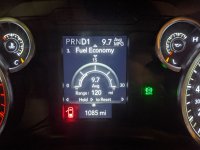
Alright everybody. Not sure if they did an update to mine or not but today on my way to big o tires to get a trailer tire replaced, I decided to give the little button shift a try on the steering column. I hit the minus button one time and it went from drive to 6th gear. When i did this, it then showed the selected gear on the right ( obviously 6th) and to the left of that number was the actual gear that's active, and that number changed as I went back and forth through the gears automatically. Is this what everyone had been trying to get activated or is there something more to it. I didn't change any settings on evic.
Ram Heavy Duty Forum
You are using an out of date browser. It may not display this or other websites correctly.
You should upgrade or use an alternative browser.
You should upgrade or use an alternative browser.
Gear indicator option in gauge cluster?
- Thread starter Randy M
- Start date

Dr__Bob
Active Member
That's the "standard" gear limiting mode. Had you done that while traveling slower, it would have limited your max gear to whatever gear you were in. And, it only works until you switch off.Alright everybody. Not sure if they did an update to mine or not but today on my way to big o tires to get a trailer tire replaced, I decided to give the little button shift a try on the steering column. I hit the minus button one time and it went from drive to 6th gear. When i did this, it then showed the selected gear on the right ( obviously 6th) and to the left of that number was the actual gear that's active, and that number changed as I went back and forth through the gears automatically. Is this what everyone had been trying to get activated or is there something more to it. I didn't change any settings on evic.
The version that I (and others) are looking for is actually set in the options in the EVIC display (as described in the manual). It should be available as an option, but, at least on my truck, it isn't there.
yeah, i know that it will limit your gear if you want to use it as a sort of paddle shifters, but I just selected 6th and the number on the left showed me going up through the gears and then down through the gears, changing on its own with each gear changeThat's the "standard" gear limiting mode. Had you done that while traveling slower, it would have limited your max gear to whatever gear you were in. And, it only works until you switch off.
The version that I (and others) are looking for is actually set in the options in the EVIC display (as described in the manual). It should be available as an option, but, at least on my truck, it isn't there.

Gondul
Prince of Pintops
- Messages
- 1,738
- Reaction score
- 1,614
- Points
- 113
yeah, i know that it will limit your gear if you want to use it as a sort of paddle shifters, but I just selected 6th and the number on the left showed me going up through the gears and then down through the gears, changing on its own with each gear change
Yes, if you set it to the highest gear, it will go up and down those set gears... set it 4th and it will go no higher than 4th, bu that is not what we are looking for...
Ass @Dr__Bob mentioned, we should be able to enable what is described in the Manual... I know it works because I enabled it on my 1500, no reason why it should not work on the HDs.
Also using the gear limiter disables ECO and MDS... (which I don't mind using if I'm on the highway).
My bad, sorry guys, thought i may have hit on somethingYes, if you set it to the highest gear, it will go up and down those set gears... set it 4th and it will go no higher than 4th, bu that is not what we are looking for...
Ass @Dr__Bob mentioned, we should be able to enable what is described in the Manual... I know it works because I enabled it on my 1500, no reason why it should not work on the HDs.
Also using the gear limiter disables ECO and MDS... (which I don't mind using if I'm on the highway).
Just dug up this thread to turn on this feature in my 2500 AND the 5500 delivery truck, thank you guys for finding the BCM option and sharing it. It blows my mind they disable this option from the factory, in the 2500 I get somebody could maybe make a weak argument why they would disable the option. However in the 5500 I don't see any reason why the Option should be disabled from the factory, a 5500 is a purpose built work truck chassis and any information the driver wants should be made available if possible.
It works on the smaller evic also. Did it on the 5500 at my shop.I am assuming that this can only be done on the large EVIC display with the left and right sides. Mine has the smaller display with only top and bottom and I did the upgrade in AlfaObd but did not find it added to my EVIC options.
Thanks, will give it another try. This time I'll use the windows version and not the Android version.It works on the smaller evic also. Did it on the 5500 at my shop.
The Android version does the trick, but your only enabling the option through alfa. After you do that you have to find the option in the evic and turn it on.Thanks, will give it another try. This time I'll use the windows version and not the Android version.

Correct. You have to go into the EVIC settings to turn it on after enabling the feature in AlfaOBD.The Android version does the trick, but your only enabling the option through alfa. After you do that you have to find the option in the evic and turn it on.
Did you go into the screen setup?


Rockcrawlindude
a rock crawlin’ dude
Jesus! I paid $39,101 for my lvl2it is easy to pass off responsibility for stuff not working the way you (FCA) state it is, but the bottom line is for $70,000 somebody needs to QC these trucks BEFORE they sell them
delmoniCO
Member
I'll admit I also cant find the option on the screen setup after I enabled this in Alfa.

BULLSANDBUCKSHUNTER
Active Member
- Messages
- 152
- Reaction score
- 124
- Points
- 43
Yep, same here i even reset defaults on menu and we have same trucks! But in unrelated issue i still only have been able to disable the right signature light...so i am obviously struggling in alfa lol!I'll admit I also cant find the option on the screen setup after I enabled this in Alfa.
I have a level 2 tradesman with the 3.5" cluster (and the UConnect 5") and enabled this setting in AlfaOBD and do not see the setting in the "Screen Set Up" menu. I'm wondering if this setting only works on the 7" cluster...maybe another reason to justify that upgrade.
Again... this does work with the smaller evic... This time with pictures from the bare bones, base line uconnect (no touch screen at all) ram 5500.I have a level 2 tradesman with the 3.5" cluster (and the UConnect 5") and enabled this setting in AlfaOBD and do not see the setting in the "Screen Set Up" menu. I'm wondering if this setting only works on the 7" cluster...maybe another reason to justify that upgrade.


And here's how it displays when it's on..