

That makes sense. Thanks for the technical explanation. I’m what I’d like to call an “advanced tinkerer”, but I haven’t quite gotten to the point of sending data on the CAN directly. Of course, I’ve never had a need to.I haven’t compared the entire BCM configurations with each other because I was only concerned about the CustSetMenu 3 settings, since those are the only settings that make those features work.
When you create a backup file with AlfaOBD, what you are seeing is all of the message ID’s for each group of settings (VehConfig 1, VehConfig 2, CustSetMenu 1, etc), followed by all the bytes for how the settings are set.
That backup file is exactly the same as the one that the wiTECH server uses when the dealer restores the configuration to the BCM.
In my case, I only changed the bytes in my CustSetMenu 3 section to match yours exactly, but my BCM isn’t capable of broadcasting some of those bytes, so I had to spoof them.
Here’s an example. In your backup file, you’ll notice a line item that shows 62014E88D040CF80000170
62 means to read the request code. 014E is the CustSetMenu 3 section. The rest are the 8 bytes containing all of the actual settings within CustSetMenu 3. For example, the last two digits (70) means that tire fill alert, power side step, and trailer length blind spot are all set to yes, and the other 5 settings in that byte are set to no.
Somewhere in the section “D040CF80” are the two camera settings talked about in this thread.
I can change those values in my backup file, and restore my BCM with them, and they will be read as such, but when I put a can logger on my BCM, it is still broadcasting all zeros for those bytes (all of those settings set to no), hence the reason I have to spoof them with an arduino.
But, even though a few of your bytes in that section are a little different between all of your configurations, I can spoof each of yours on my truck, and the turn cameras work with any of them.
Ram Heavy Duty Forum
You are using an out of date browser. It may not display this or other websites correctly.
You should upgrade or use an alternative browser.
You should upgrade or use an alternative browser.
Front camera
- Thread starter Savage99ss
- Start date
Nope. This is the same that mine does.Did you guys ever get your blind spot camera to come up? I just picked up my truck and mine also does not work (verified setting is ON).
The park sense camera does work though.
Hello,I'm sorry for your loss, I've been there and it's rough.
It looks like I'm the only one with busted blind spot cameras.
When looking under safety and driving assistance, there is not a setting for front end detect. It has auto emergency braking, Lane sense, rear park sense vol, blind spot alert, trailer length for blind spot, hill and tire full assist.
Still no blind spot cameras.
Thanks,
Scott

Lbjjbj
Member
- Messages
- 32
- Reaction score
- 49
- Points
- 18
same boatDid you guys ever get your blind spot camera to come up? I just picked up my truck and mine also does not work (verified setting is ON).
The park sense camera does work though.
Still no luck. I’m going to try to get into the dealer this week.Did you guys ever get your blind spot camera to come up? I just picked up my truck and mine also does not work (verified setting is ON).
The park sense camera does work though.
Keep us
Keep us posted! I just picked mine up so wanted to wait for a full shakedown before bringing it in.Still no luck. I’m going to try to get into the dealer this week.
Did some more testing before I clean up the wiring and mount the arduino somewhere. Took a quick video of how it functions.Still no luck. I’m going to try to get into the dealer this week.
There are two others that did the exact same thing as me- 2022 UC5’s updated to T25.48, one is a 2018, other is a 2015, and this doesn’t work for them either. It has to be radio software issues that some experience and some don’t.
I can’t find any star cases about this issue, so it’s probably gonna take as many official complaints as possible for them to release an update with a fix for this.
T
Thanks Jimmy. I’ll take that video to the dealer with me.Did some more testing before I clean up the wiring and mount the arduino somewhere. Took a quick video of how it functions.
There are two others that did the exact same thing as me- 2022 UC5’s updated to T25.48, one is a 2018, other is a 2015, and this doesn’t work for them either. It has to be radio software issues that some experience and some don’t.
I can’t find any star cases about this issue, so it’s probably gonna take as many official complaints as possible for them to release an update with a fix for this.

sstoner911
Well-Known Member
- Messages
- 1,586
- Reaction score
- 951
- Points
- 113
Mine does not work either. I will make an appointment I guess to get the issue out there.


Joints4Sale
New Member
- Messages
- 18
- Reaction score
- 12
- Points
- 3
My front camera comes on but not as soon as I would like, it would be nice if it came on as soon as Parksense activates. My Blindspot mirror cameras don't come on with either "on" or "trailer only" selected. Took it to the dealer a couple of weeks ago and they couldn't see any issues with any of the modules. Created a Star case but haven't heard back from the dealer. I have AlfaOBD but know just enough to be dangerous. I forgot to create a backup file before I changed a couple of parameters. Successfully adjusted the TPMS to set pressure threshold to 35psi.
sstoner911
Well-Known Member
- Messages
- 1,586
- Reaction score
- 951
- Points
- 113
Alright, so I did a bunch of testing, and I do have the turn signal activated blind spot view working. I don’t have front park sense, so I can’t test the front camera activation.
Here’s what I have, and what I did:
- 2017 Ram 2500 with 2022 BCM, 2022 UC5 radio, and 2022 CVPM.
- I updated the radio software to MY23 T25.48, which made me have to change the model year in the BCM to 2023 in order for certain things to work properly.
- I took liberty with all of your VINs from the spreadsheet, used wiTECH to restore my bench BCM to each of your VINs so I could retrieve your BCM backup files with AlfaOBD. (This is with exception to @COWash VIN in the spreadsheet, because I believe you don’t have that truck?).
- CustSetMenu 3 in AlfaOBD is where these features take place.
I took each one of your CustSetMenu 3 message ID bytes and spoofed them to my radio with the arduino, and the blind spot turn signal activation works for each of your configurations. (Front camera with park sense setting shows up too, but can’t test it).
I am using the “ON” setting for the feature, and this is with the truck idling, in drive, foot on brake, with right turn signal activated:
View attachment 54291
View attachment 54292
Since I’ve got a different radio module, BCM, and CVPM than all of you, and it works for me with each of your configurations, I have to think it’s some issue or glitch with the radio software for those of you that can’t get it to work.
Are all of you on radio build version T25.48?
Jimmy I was wondering what the forward camera button does vs my setup which I can only access the forward camera via the 360 Camera surround button. The front camera does activate wit the from park sense but no guidelines.
That one only shows up when configured for the off road camera. It pulls up the front camera with the yellow tire track gridlines.Jimmy I was wondering what the forward camera button does vs my setup which I can only access the forward camera via the 360 Camera surround button. The front camera does activate wit the from park sense but no guidelines.
sstoner911
Well-Known Member
- Messages
- 1,586
- Reaction score
- 951
- Points
- 113
Has anyone who went to the dealer heard anymore on this ?
I have an appointment on 06/21 for this issue....
I have an appointment on 06/21 for this issue....
I’ve been working with my dealer for several weeks (and they’ve been working with Stellantis Ram Engineering). They haven’t found a solution yet, but @Joints4Sale may have figured out a fix: https://hdrams.com/forum/index.php?threads/blinker-cameras.13877/page-2#post-266372Has anyone who went to the dealer heard anymore on this ?
I have an appointment on 06/21 for this issue....
I haven’t tested it yet so I can’t confirm.
sstoner911
Well-Known Member
- Messages
- 1,586
- Reaction score
- 951
- Points
- 113
I guess that makes sense, I will try to do a factory reset after I get home.I’ve been working with my dealer for several weeks (and they’ve been working with Stellantis Ram Engineering). They haven’t found a solution yet, but @Joints4Sale may have figured out a fix: https://hdrams.com/forum/index.php?threads/blinker-cameras.13877/page-2#post-266372
I haven’t tested it yet so I can’t confirm.
Thanks for the link.
sstoner911
Well-Known Member
- Messages
- 1,586
- Reaction score
- 951
- Points
- 113
So the factory reset did resolve the issue of the blind spot cameras with turn signals.
When you do the factory reset you may notice the camera menu is missing under controls, I shut the truck down went in the store and when I came back out the camera menu came back.
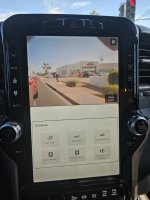
When you do the factory reset you may notice the camera menu is missing under controls, I shut the truck down went in the store and when I came back out the camera menu came back.
Last edited:
