What's new
Ram Heavy Duty Forum

Register a free account today to become a member! Once signed in, you'll be able to participate on this site by adding your own topics and posts, as well as connect with other members through your own private inbox!

Digital Rear View Mirror

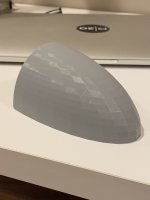
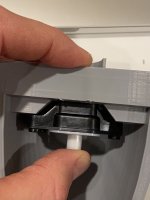
After a successful build last night, the first prototype is completed. Im actually very happy with the fit!! I will need to modify the back lens cover/hood as it is too long and i think i might need to widen the base rim that will sit on the topper so the 3m has more surface area to adhere to, but i think it looks great and hopefully will function as intended when i get my cables in to test.

0C5C6397-1DD3-4846-AB37-E35563BFC5B2.jpeg

89B4E0F9-CF6B-4C05-9304-766566483429.jpeg

27DAF1B8-1995-4EF8-BA21-25D5459D88E7.jpeg

BD23E454-510B-42C1-A91A-20F831EA1180.jpeg
 
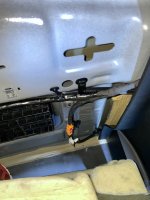
Here’s the location of the jumper where is exits the cab, meets up with the chassis harness, and continues out to the rear bumper tow mode camera connector port. Looks like just below the driver side of the rear seat.
View attachment 28372
It’ll be a white fakra connector. The jumper side is female, so you would need a male to female fakra cable to run to your extra camera. You won’t need a switcher on it because the mirror already switches between the camera in the brake light and the tow mode camera.
View attachment 28373

Hey @Jimmy07 i couldn’t find the cable for the camera. The spot where the diagram shows is not the cam connection. It’s either for the radio or xm or something and it’s orange.

It does exit along the back wall of the cab but it’s not a camera connection because when I unplugged this connection, the rear view mirror camera is still operational.

I might just go a simpler route and connect the cam on the back of the topper to the bumper/trailer camera connection from the rear and by pass the CHMSL altogether. The trailer option gives me more lateral/vertical/rotational camera adjustments via the rear view mirror anyways which is kind of nice.

C24E8247-30E9-4F55-92B2-0595C89FE4A9.jpeg
 
Hey @Jimmy07 i couldn’t find the cable for the camera. The spot where the diagram shows is not the cam connection. It’s either for the radio or xm or something and it’s orange.

It does exit along the back wall of the cab but it’s not a camera connection because when I unplugged this connection, the rear view mirror camera is still operational.

I might just go a simpler route and connect the cam on the back of the topper to the bumper/trailer camera connection from the rear and by pass the CHMSL altogether. The trailer option gives me more lateral/vertical/rotational camera adjustments via the rear view mirror anyways which is kind of nice.

View attachment 29813
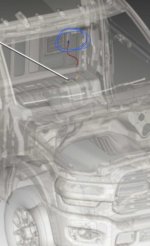
That’s it. The orange connection is circled in blue below, and the white line is pointing to the next (white) in-line connection below the cab above the chassis. ED99E76B-E4E4-48A5-A49B-9886407F883A.jpeg
 
That’s it. The orange connection is circled in blue below, and the white line is pointing to the next (white) in-line connection below the cab above the chassis. View attachment 29814

Ok. I’ll crawl underneath and unplug that white connection under the cab and see what happens! Thx for the fast reply. I knew I wasn’t losing my mind but it was late last night...
 
Edit to add to the above- this cable is not for the camera that is in the CHMSL. It is for the second tow mode camera. That way you can keep the CHMSL 100% in tact, and add a second camera to the rear view mirror without the need for a switcher.
 
Edit to add to the above- this cable is not for the camera that is in the CHMSL. It is for the second tow mode camera. That way you can keep the CHMSL 100% in tact, and add a second camera to the rear view mirror without the need for a switcher.

Gotcha. So basically my thought of just plugging in to the connection behind the bumper (so I don’t have any wires sticking out) is going to do the same thing. I’m ok w that. The amount of times I’ll be switching won’t be too often. If I’m hauling a trailer that has a cam attached, I’ll just have to disconnect the topper cam and reattach it back to the bumper.
 
Gotcha. So basically my thought of just plugging in to the connection behind the bumper (so I don’t have any wires sticking out) is going to do the same thing. I’m ok w that. The amount of times I’ll be switching won’t be too often. If I’m hauling a trailer that has a cam attached, I’ll just have to disconnect the topper cam and reattach it back to the bumper.
Yes, that cable you see with the orange connectors ultimately goes to the tow mode camera port on the driver side of the rear bumper.
 
Need a favor from someone with the digital rear view mirror. I’m doing some testing on the bench with a mirror and a few pre-2021 BCMs. Need to know if the mirror will display the camera image with the ignition in accessory, and with the ignition in run (engine not running)?
 
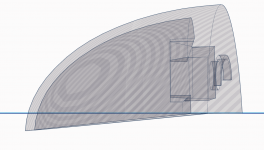
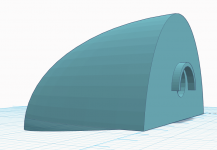
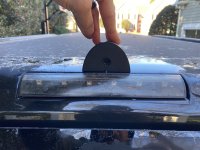
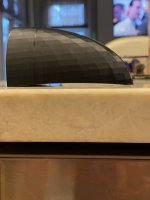
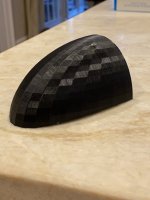
V4 and final version of the topper-mounted digital rear view camera! VERY happy with the final version. It fits like a glove. Actual finished print will be in PETG or ASA. I will spray it to match the black paint of the truck and top coat it with a UV inhibitor. Or maybe ill just leave it matte black since PETG is UV resistant...

The camera and the cable fit snugly inside. It all works and looks great! I will post some pics of the actual mirror display when i get everything else connected and put back together.

I am now taking orders.... :)

IMG_8478D.JPGIMG_8479.JPG

E5C268A5-610B-471E-A7B1-B104E566801A.jpegEA05CE38-447C-402D-BC78-30949C2321EF.jpegDE260735-84CE-477C-A10F-35B21C5C8630.jpegAE328358-0A26-4397-A7FC-3253D0693371.jpeg
 
Last edited:
Edit to add to the above- this cable is not for the camera that is in the CHMSL. It is for the second tow mode camera. That way you can keep the CHMSL 100% in tact, and add a second camera to the rear view mirror without the need for a switcher.
How difficult is it for an amateur to get to this location?
From here how would I push the new wire out into the truck bed? Is there a path to follow?
 
How difficult is it for an amateur to get to this location?
From here how would I push the new wire out into the truck bed? Is there a path to follow?

Its not hard at all actually. Ill take some pics for you as everything is currently disassembled in my truck. If you have a limited megacab like mine with the HK sub, fold the seats flat, lift up the two storage hatches, undo the three bolts holding the entire plastic bin in place, disconnect the sub harness on the bottom of the plastic bin passenger side and it comes out without much fuss. Next, remove three star screws in the latches that hold the back panel that covers the back of the cab and pul it away from the corners. Its pretty simple using a 10mm socket and a star bit (cant remember the size).
 
Its not hard at all actually. Ill take some pics for you as everything is currently disassembled in my truck. If you have a limited megacab like mine with the HK sub, fold the seats flat, lift up the two storage hatches, undo the three bolts holding the entire plastic bin in place, disconnect the sub harness on the bottom of the plastic bin passenger side. Next, remove three star screws in the latches that hold the back panel that covers the back of the cab and pul it away from the corners. Its pretty simple using a 10mm socket and a star bit (cant remember the size).
I've got a 2022 laramie crewcab with the HK audio/sub under the rear seats.
 
I've got a 2022 laramie crewcab with the HK audio/sub under the rear seats.
It will be a different process then. @Jimmy07 will have to help with the location of the cable as it is probably different. I think the easiest solution, at least for me, and probably you as well, is to just tap into the second camera connection point in the bumper. I will be disconnecting mine from the rear of the mount and plugging in the cable from the topper mounted camera and using the rear view mirror to select the camera.
 
V4 and final version of the topper-mounted digital rear view camera! VERY happy with the final version. It fits like a glove. Actual finished print will be in PETG or ASA. I will spray it to match the black paint of the truck and top coat it with a UV inhibitor. Or maybe ill just leave it matte black since PETG is UV resistant...

The camera and the cable fit snugly inside. It all works and looks great! I will post some pics of the actual mirror display when i get everything else connected and put back together.

I am now taking orders.... :)

View attachment 29833View attachment 29834

View attachment 29828View attachment 29829View attachment 29830View attachment 29831

Nice. But WOW it's thick. Is that solid or infill?

If you need help smoothing that, I can maybe swizzle it through Fusion 360 if you want. Maybe publish on thingiverse and send the link via PM? Promise I won't steal sales. LOL.
 
It’s 20% infill. It’s not a thick build at all and just the base plate area is wide. The walls are relatively thin but strong.
 
I'm interested in seeing how it handles in rain/dust/snow. If you deal with any of that I'd be curious how slipstream effects it.
 
Need a favor from someone with the digital rear view mirror. I’m doing some testing on the bench with a mirror and a few pre-2021 BCMs. Need to know if the mirror will display the camera image with the ignition in accessory, and with the ignition in run (engine not running)?
On my 22, the digital rear view does not come on in Accessory, but does power up in Run with the engine off.
 
Back
Top