What's new
Ram Heavy Duty Forum

Register a free account today to become a member! Once signed in, you'll be able to participate on this site by adding your own topics and posts, as well as connect with other members through your own private inbox!

Cargo camera

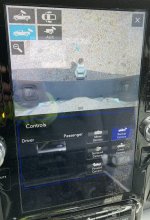
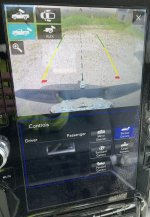
Anyone on here have a Uconnect® 12.0–Inch Display with Navigation that can post photos of it in cargo mode? Dealership is telling me that because their service manager has a 12” display that is blurry like mine, that’s just how the image is.... blurry. Because they compared it to ‘another vehicle’.
 
Anyone on here have a Uconnect® 12.0–Inch Display with Navigation that can post photos of it in cargo mode? Dealership is telling me that because their service manager has a 12” display that is blurry like mine, that’s just how the image is.... blurry. Because they compared it to ‘another vehicle’.
AF606DCB-2B52-4450-929D-2789FF074611.jpeg86C4D14F-3CF6-4A40-AF3C-F35F2E919B35.jpegB5E2B4CD-523B-4641-B5BC-AF5A6050571F.jpeg3A5B4ED2-37DA-40F6-A672-3FC0C39F0C00.jpeg
 
Ordered a 2022 - 3500 Dooley without the cargo cam. Been thinking about getting a mirror mounted dash cam with the back up cam included and put it in the back window and use it as a cargo cam. Has anybody done this, just curious if it would work.
 
My 2019 8.4" screen cargo cam (I did not have the 360° camera package) is much lower resolution than my tailgate mounted backup camera. The tailgate mounted backup is like watching 1080P television while my cargo view cam is more similar to 360P. But it gets the job done to the point that I can see whats going back there. I'll have to take a look at my 2021 Laramie (also just the 2 cameras) and see if on the 12" display it looks similar.

My 2022 will come with the 360° view and the center high mounted cargo view, so based on what you all are saying... it will look really good and crisp.
 
If I buy the backlight with the camera can I simply replace my existing light and is this plug and play?
i have a 2020 3500 with 8.5 inch screen
 
Dealer forgot to calibrate the cargo camera to the CVPM, also. That’s why the centerline is missing. All 5 exterior cameras are the same camera. The cargo camera sits behind a clear acrylic lens in the CHMSL, which may be dirty on the inside.
How do you clean the inside lens? I’m having the same blurry cargo camera only.
 
I have the blurry camera issue when the outside temperature is either very hot (85+), or very cold, (0 or below). Anything in between it is very clear and crisp.
 
The radio modules have three possible analog inputs, and only one digital input. When the surround view system is used, all the cameras are run to a video processing module (CVPM), and the CVPM sends the images to the radio via it’s only digital camera input. Trucks without the surround system still use a digital rear view camera, but when the cargo camera is optioned, the only other inputs that are available are the analog inputs.
I have a 2022 3500 with just the cargo camera and the tailgate camera.
If I understand you correctly, there is nothing I can do to improve the grainy picture sent from the cargo camera since it is an analog signal.
Are the two cameras truly both digital, just that one uses a digital connection to the 8.4" screen and the other uses an analog connection?
Sorry to bother, but it seems you have some knowledge on these cameras.
Thanks
 
Gottoknow
I am new to forum. I have. 2022 3500 with cargo camera and backup but my cargo does not work at all. What’s up?
 
My cargo camera image has degraded to nearly unusable when zoomed. I took everything apart and cleaned the lens and cover and it did not improve.

I'll grab a pic later and update the post when I go use it to move the boat.
 
Back
Top