
What's new
Ram Heavy Duty Forum

Register a free account today to become a member! Once signed in, you'll be able to participate on this site by adding your own topics and posts, as well as connect with other members through your own private inbox!

AlfaOBD

Andriod update helps, good job jimmy07 working to get this done! Playing with it now but the big one for me is fixed

-Signature lighting: "signature lighting present": NO, and they turn off (very important!)
- still cant get gridlines on forward camera(not important)
-got current gear to display finally
And GO BILLS!!!

The signature lighting, is that the accent lights in the headlights? Like seen below in my Limited headlights.
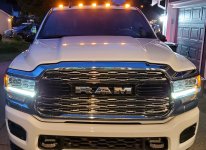
truck2.jpg
 
If someone that has forward collision warning wants to give this a try, these should be the settings to get pedestrian emergency braking working.
VehConfig 8: Pedestrian Emergency Brake Present- YES
CustSetMenu 3: Pedestrian Emergency Brake CSM Present- YES
I can change the settings... not sure I know how/want to test it
 
I can change the settings... not sure I know how/want to test it
If it’s capable, the BCM won’t have any configuration or communication faults stored, and the on/off soft key would work in the radio settings. There would be warnings in the cluster before a pedestrian would be in danger.
 
If it’s capable, the BCM won’t have any configuration or communication faults stored, and the on/off soft key would work in the radio settings. There would be warnings in the cluster before a pedestrian would be in danger.
Ok. I updated the settings...completed a drive cycle. Well see what happens from here.
 
Ok. I updated the settings...completed a drive cycle. Well see what happens from here.
I just started up the truck. I don't see any changes under the Safety & Driving Assistance, Uconnect menu option. More specifically, no additional options under Forward Collision Warning section.

Also, no errors as of yet. I put the truck in gear, with parking brake on and walked (briskly) in front of it. No apparent response.

I'll be driving some tomorrow...will look for changes.
 
The signature lighting, is that the accent lights in the headlights? Like seen below in my Limited headlights.

View attachment 11144
On laramies they go around headlights, limited look differently. Moral of story i start truck (not fob) and NO exterior lights come on unless i turn switch on! Basically enabled the lights OFF swich position...lol
 
If someone that has forward collision warning wants to give this a try, these should be the settings to get pedestrian emergency braking working.
VehConfig 8: Pedestrian Emergency Brake Present- YES
CustSetMenu 3: Pedestrian Emergency Brake CSM Present- YES
What about

P/T Chassis Net: EPPM Electronic Pedestrian Protection

It was set as disabled. Should that also be enabled?
 
What about

P/T Chassis Net: EPPM Electronic Pedestrian Protection

It was set as disabled. Should that also be enabled?
No, that one doesn’t get set on a Ram, because the system doesn’t use its own module- it uses the same module that FCW and ACC uses.
 
I just started up the truck. I don't see any changes under the Safety & Driving Assistance, Uconnect menu option. More specifically, no additional options under Forward Collision Warning section.

Also, no errors as of yet. I put the truck in gear, with parking brake on and walked (briskly) in front of it. No apparent response.

I'll be driving some tomorrow...will look for changes.
I've not seen any functional or menu changes. I also have no errors showing, either in-vehicle or AlfaOBD. So, I'm changing the two setting back to No.

Thanks for idea. I wonder if they do have some additional hardware or logic to make pedestrian braking work.
 
I've not seen any functional or menu changes. I also have no errors showing, either in-vehicle or AlfaOBD. So, I'm changing the two setting back to No.

Thanks for idea. I wonder if they do have some additional hardware or logic to make pedestrian braking work.
There won’t be any additional hardware, since it’s a supplementary feature of forward collision warning. Ram is just holding the feature back on the HDs so it has a new feature to offer (probably next year). I’m waiting on confirmation from a DT owner on where the setting shows up. The owners manual says controls screen, but then references the settings menu, so, I’m not exactly sure if it would show up under controls, apps, or settings. It won’t work in you neutral/parking brake situation because you need to be going at least 3mph.
 
There won’t be any additional hardware, since it’s a supplementary feature of forward collision warning. Ram is just holding the feature back on the HDs so it has a new feature to offer (probably next year). I’m waiting on confirmation from a DT owner on where the setting shows up. The owners manual says controls screen, but then references the settings menu, so, I’m not exactly sure if it would show up under controls, apps, or settings. It won’t work in you neutral/parking brake situation because you need to be going at least 3mph.
Got it, no hardware.
I can definitely confirm, I saw no changes in the Safety and Driving menus in UConnect screens (where the DT 2021 manual seems to show it.) I did not check cluster menus.
 
I went in to try it again. When I searched for Pedestrian in MY2020, User this setting. Think it's relevant?

P/T Chassis Net: EPPM Electronic Pedestrian Protection
Not Enabled/Enabled
 
What about

P/T Chassis Net: EPPM Electronic Pedestrian Protection

It was set as disabled. Should that also be enabled?

No, that one doesn’t get set on a Ram, because the system doesn’t use its own module- it uses the same module that FCW and ACC uses.

I went in to try it again. When I searched for Pedestrian in MY2020, User this setting. Think it's relevant?

P/T Chassis Net: EPPM Electronic Pedestrian Protection
Not Enabled/Enabled
This all sounds so familiar...
 
There won’t be any additional hardware, since it’s a supplementary feature of forward collision warning. Ram is just holding the feature back on the HDs so it has a new feature to offer (probably next year). I’m waiting on confirmation from a DT owner on where the setting shows up. The owners manual says controls screen, but then references the settings menu, so, I’m not exactly sure if it would show up under controls, apps, or settings. It won’t work in you neutral/parking brake situation because you need to be going at least 3mph.
I have to say that by having Jimmy07: part of this form is great . Your knowledge of these trucks is phenomenal to say the least .
 
If someone that has forward collision warning wants to give this a try, these should be the settings to get pedestrian emergency braking working.
VehConfig 8: Pedestrian Emergency Brake Present- YES
CustSetMenu 3: Pedestrian Emergency Brake CSM Present- YES

I need to set that one. In a previous RAM the A-pillar was so wide that while making a left turn it completely obscured a woman in the crosswalk. A near miss. Took me quite a while to stop shaking.


Sent from my iPhone using Tapatalk
 
Is there a way to turn the front camera on automatically below say 10 miles an hour? Or to have the side view cameras automatically come on with related blinkers?

Sent from my SM-N975U using Tapatalk
 
Is there a way to turn the front camera on automatically below say 10 miles an hour? Or to have the side view cameras automatically come on with related blinkers?

Sent from my SM-N975U using Tapatalk

The NAViKS box can do the turn signal mirror cams (optional setting) but it's shown to be really slow because it cycles through the cameras to get there.
 
The NAViKS box can do the turn signal mirror cams (optional setting) but it's shown to be really slow because it cycles through the cameras to get there.
Thanks for the response. Bummer. The front camera would be my #1. Seems to make sense when parking. The mirrors are good enough for the side view.

Sent from my SM-N975U using Tapatalk
 
Back
Top