What's new
Ram Heavy Duty Forum

Register a free account today to become a member! Once signed in, you'll be able to participate on this site by adding your own topics and posts, as well as connect with other members through your own private inbox!

AlfaOBD

Here is my connector...two different sized plugs..
 

Attachments

  • 649123774.jpg
    649123774.jpg
    300.1 KB · Views: 52
  • 649123871.jpg
    649123871.jpg
    148.9 KB · Views: 51
Here is my connector...two different sized plugs..
I didn’t pay attention to “classic” 1500. Yeah, it uses a different connector all together for the CAN IHS. You would need a different bypass, or cut that connector off and put the correct one on. Right now, as long as the other one is plugged into the green block with black base, you should be good for most changes. You just won’t have access to any modules on the IHS bus.
 
I didn’t pay attention to “classic” 1500. Yeah, it uses a different connector all together for the CAN IHS. You would need a different bypass, or cut that connector off and put the correct one on. Right now, as long as the other one is plugged into the green block with black base, you should be good for most changes. You just won’t have access to any modules on the IHS bus.
what would be in that bus I wonder..my lights changes worked...I could find plug and make three plug adapter...wonder if they are generic?
 
what would be in that bus I wonder..my lights changes worked...I could find plug and make three plug adapter...wonder if they are generic?
All the body modules are on that bus- doors, HVAC, blind spot, center stack, etc. The BCM is the master node on both buses, so most settings should work with only the canbus C bypassed, until you come across one that doesn’t.
They are not generic connectors, but if you PM me, I can send you one with two terminals for shipping.
 
OK, so getting a little braver and want to see about changing a few things with the AlphaOBD. Here is a list of things I look at last night in the program. Can someone explain what they do and are they viable changes? I have the program, bypass cable and OBDLink LX. I've changed my tire size and TPMS settings so I know the system works on my truck.

Thanks for any and all input. Still learning here.

2021 75th AE Power Wagon

VehConfig 1-Performance Pages Present

VehConfig 2-ECO Indicator Present

VehConfig 2-Secure Park Feature Present

VehConfig 3-Auto Park Present

VehConfig 5-Seat Belt Reminder Module Present

ECUConfig 4-Actual Gear Display

ECUConfig 14-Acceleration Threshold

ECUConfig 14-Acceleration Factor

CBC Features-Front Fog Lamp Dropout Enabled

Powertrain-ECO Mode Configuration
 
OK, so getting a little braver and want to see about changing a few things with the AlphaOBD. Here is a list of things I look at last night in the program. Can someone explain what they do and are they viable changes? I have the program, bypass cable and OBDLink LX. I've changed my tire size and TPMS settings so I know the system works on my truck.

Thanks for any and all input. Still learning here.

2021 75th AE Power Wagon


ECUConfig 4-Actual Gear Display


CBC Features-Front Fog Lamp Dropout Enabled

First one shows the gear in the EVIC at all times without having to use the gear lockout paddle. After setting this, you have to turn it on in the EVIC - procedure in the link below.

Second one keeps the fogs on with high beams when you set it to NO.

 
Got the gear present and fog lights programmed and working.
Tried the performance page, but couldn't find it anywhere in the uconnect or the EVIC
 
So with the 2022, there is an option for the XH7 Tow-Mode Camera (Wired). Is that something you can possibly activate with AlphaOBD or does the dealer need to flash that? Assuming one already had the safety digital rear view mirror already.
Thanks!
 
How can I back up my stock BCM settings with alphaobd, I don't use google drive. Still waiting on my SMB from Kaodtech, and hope i got the right one 2019+ ram 2500 for my 2021 Ram 2500 Big Horn
 
How can I back up my stock BCM settings with alphaobd, I don't use google drive. Still waiting on my SMB from Kaodtech, and hope i got the right one 2019+ ram 2500 for my 2021 Ram 2500 Big Horn

You don't "back up," but save the log and status files.

Let me see if I can get the sequence right without being connected:

Connect to the BCM
Use the battery icon (bottom)
(these both take a minute or two, keep scrolling down until it doesn't refresh to the top)
Read System ID
Read System Status
Tools Icon
(top)
View faults and Status Log (use your favorite files viewer)
also available in Manage AlfaOBD Files you can copy the files.

BODY_CHRYSLER_info.log is a running log file (unless cleared)
 
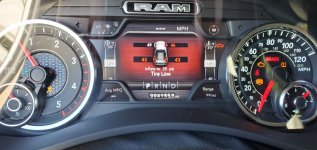
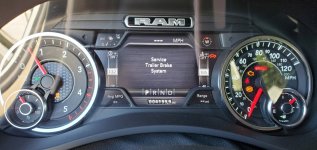
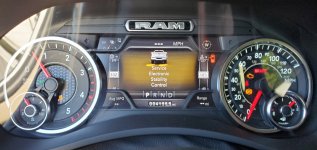
HELP, alfaobd has given me a ton of errors on the dash display.

I installed the kaodtech bypass and OBDLink MX+ OBD2 Bluetooth Scanner on my 2021 2500 CTD and tried playing around with it for the first time.

The dash display is now looks like a Christmas Tree of errors.

Initially, I just wanted to first try to lower the TPMS limit to 25 psi for my new tires. I thought that was successful but apparently not. Next I tried to correct the the tire size. Thought that went OK too. I just selected the 35x12.5r18 Toyo from the drop down menu.

Lastly, I went into the trailer TPMS just to check it out. I do not have the TTPMS option nor any sensors. Again, just wanted to take a look.

I exited alfaobd, restarted the truck and a bunch of warning lights came on. Traction control, 4x4, check engine light, service trailer brake system and other errors are displayed. The display shows the 25 psi limit but all tires had over 40 psi but the numbers are still red in the display.

I tried "hard-reset" in alfaobd but that did not clear things up.

I tried disconnecting the batteries for about an hour and that did not help either.

Can anyone help me un-break my new truck?

Thank you!
 

Attachments

  • 20210808_175804.jpg
    20210808_175804.jpg
    328.8 KB · Views: 77
  • 20210808_175744.jpg
    20210808_175744.jpg
    346.5 KB · Views: 76
  • 20210808_175739.jpg
    20210808_175739.jpg
    329.8 KB · Views: 76
Back
Top