
Ram Heavy Duty Forum
You are using an out of date browser. It may not display this or other websites correctly.
You should upgrade or use an alternative browser.
You should upgrade or use an alternative browser.
AlfaOBD
- Thread starter MEZZ2006
- Start date

Ya, in 4 Low on my gladiator it stays on at least 5 min. If it enable the trail cam on my ram will it also stay on for extended periods in 4wd? I don’t really care for the tire tracks feature but if enabling the function will get it to stay on longer in 4wd it would be worth it.For the gladiator trail cam, it will only stay on indefinitely if you are going under 8mph in 2wd or 4hi, or if you are in 4hi, it will remain on at any speed until you turn it off. Other than that, the trail cam on the gladiator runs like any other FCA vehicle camera- in 2wd or 4hi, it will shut off in 10 seconds or over 8mph.
If you enable the trail cam system on the ram (VehConfig 8 Off Road Camera Present), then you must disable the surround view system (VehConfig 7 full central vision processing present). You can’t have both configurations. That’s if the CVPM that the ram uses is even capable of the off road camera system.Ya, in 4 Low on my gladiator it stays on at least 5 min. If it enable the trail cam on my ram will it also stay on for extended periods in 4wd? I don’t really care for the tire tracks feature but if enabling the function will get it to stay on longer in 4wd it would be worth it.

Skooter76
Well-Known Member
I will try to get one today.Definitely.. @Skooter76 any chance we can get a screenshot of your CVPM info like above?
Skooter76
Well-Known Member
Definitely.. @Skooter76 any chance we can get a screenshot of your CVPM info like above?
@Jimmy07 Here you go.
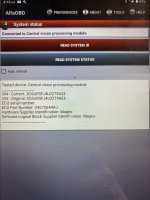

If you enable the trail cam system on the ram (VehConfig 8 Off Road Camera Present), then you must disable the surround view system (VehConfig 7 full central vision processing present). You can’t have both configurations. That’s if the CVPM that the ram uses is even capable of the off road camera system.
I don't understand.
The trucks that have enabled Forward Cam (off road camera) still have working 360.
Unless I'm mistaken about something.
No, I am mistaken. I was thinking short sited this morning, and forgot that power wagons come factory with both VehConfigs. Something about certain truck’s CVPMs do not like both configurations, for some reason, and throw the mismatch fault.I don't understand.
The trucks that have enabled Forward Cam (off road camera) still have working 360.
Unless I'm mistaken about something.
No, I am mistaken. I was thinking short sited this morning, and forgot that power wagons come factory with both VehConfigs. Something about certain truck’s CVPMs do not like both configurations, for some reason, and throw the mismatch fault.
Thinking out loud now...
After checking and clearing any codes,
I might try to disable the surround, enable Off Road until/if it works. Then re-enable surround?
Yes, I would try it that way. If I’m thinking right, if you only have VehConfig 8 off road camera enabled, you “should” have a working backup camera and forward camera, but no overhead view on the left half.Thinking out loud now...
After checking and clearing any codes,
I might try to disable the surround, enable Off Road until/if it works. Then re-enable surround?
I’d say disable VehConfig 7 full central vision processing, check BCM and CVPM for faults, enable VehConfig 8, check for faults etc, and work your way from there.
Skooter76
Well-Known Member
@Jimmy07 @Brutal_HOYes, I would try it that way. If I’m thinking right, if you only have VehConfig 8 off road camera enabled, you “should” have a working backup camera and forward camera, but no overhead view on the left half.
I’d say disable VehConfig 7 full central vision processing, check BCM and CVPM for faults, enable VehConfig 8, check for faults etc, and work your way from there.
When I enabled the Forward Camera as well as the Grid Lines (tire tracks) it took a few days to show up. For a while I had both the Front Facing camera with no Grid Lines and the Forward camera with the Grid Lines. Then driving to the lake on Friday I had the Front Facing camera with the Grid Lines but no Forward camera. Today after I was into the BCM via AlphaOBD I again have the Forward camera with the Tire Tracks but no Front Facing camera. Maybe the two are related somehow? I checked and the Forward camera is still enabled in AlphaOBD.
@Jimmy07 @Brutal_HO
When I enabled the Forward Camera as well as the Grid Lines (tire tracks) it took a few days to show up. For a while I had both the Front Facing camera with no Grid Lines and the Forward camera with the Grid Lines. Then driving to the lake on Friday I had the Front Facing camera with the Grid Lines but no Forward camera. Today after I was into the BCM via AlphaOBD I again have the Forward camera with the Tire Tracks but no Front Facing camera. Maybe the two are related somehow? I checked and the Forward camera is still enabled in AlphaOBD.
I drove mine around for 2-3 days. The surround never came back and the Forward button and CSM Guidelines option showed up on the radio but wouldn't do anything. I suspect now because the "mismatch" MIL/fault in the CVPM module.
I tried to clear it today and fiddle with settings but made zero progress once again. Off-Road on = no surround = fault code. I even tried disabling the trailer aux camera option but no joy. I did NOT wait long or do multiple key cycles for any of this. I can literally toggle the off-road cam on/off and make the 360 come and go.
Clear CVPM fault and the surround pops up for a moment. Then there's a new fault code.
I do have the NAViKS plugged in now but I don't see where that's changed the behavior of any of this.
Same ECU part number on the CVPM as everyone else.
I wonder if the CVPM is also looking for the specific vehicle line. What do we know about everyone that got it working vs not working....2500s work, 3500s don’t work?I drove mine around for 2-3 days. The surround never came back and the Forward button and CSM Guidelines option showed up on the radio but wouldn't do anything. I suspect now because the "mismatch" MIL/fault in the CVPM module.
I tried to clear it today and fiddle with settings but made zero progress once again. Off-Road on = no surround = fault code. I even tried disabling the trailer aux camera option but no joy. I did NOT wait long or do multiple key cycles for any of this. I can literally toggle the off-road cam on/off and make the 360 come and go.
Clear CVPM fault and the surround pops up for a moment. Then there's a new fault code.
I do have the NAViKS plugged in now but I don't see where that's changed the behavior of any of this.
Same ECU part number on the CVPM as everyone else.
Maybe try changing VehConfig 1 vehicle line to DJ?
Well not sure why we didn't think of this before. Quick search and list would seem to indicate it's not working on any 3500 trucks.
jsalbre 2500 Limited working
Skooter76 20 2500 Laramie L2 working
webracin 2500 Limited working
bullsandbuckshunter 20 2500 Laramie L2 working (no gridlines?)
regal2800 3500 Limited mega not working
mezz2006 19 3500 Big Horn 8.4" not working
brutal_ho 20 3500 Limited not working
HORam 19 3500 laramie L2 3500 not working
Steve_Cornell ? 3500 not working
What's the downside/risk to changing the D2 trucks to DJ?
jsalbre 2500 Limited working
Skooter76 20 2500 Laramie L2 working
webracin 2500 Limited working
bullsandbuckshunter 20 2500 Laramie L2 working (no gridlines?)
regal2800 3500 Limited mega not working
mezz2006 19 3500 Big Horn 8.4" not working
brutal_ho 20 3500 Limited not working
HORam 19 3500 laramie L2 3500 not working
Steve_Cornell ? 3500 not working
What's the downside/risk to changing the D2 trucks to DJ?
Let me do some digging on some other module part numbers. It’s possible that the air suspension control module is the same way as far as looking for the vehicle line message, because the behavior is different between the 2500 and 3500. This is probably going to not be worth it unless someone can build a can shield for the CVPM that will constantly broadcast the new vehicle line only to it.Well not sure why we didn't think of this before. Quick search and list would seem to indicate it's not working on any 3500 trucks.
jsalbre 2500 Limited working
Skooter76 20 2500 Laramie L2 working
webracin 2500 Limited working
bullsandbuckshunter 20 2500 Laramie L2 working (no gridlines?)
regal2800 3500 Limited mega not working
mezz2006 19 3500 Big Horn 8.4" not working
brutal_ho 20 3500 Limited not working
HORam 19 3500 laramie L2 3500 not working
Steve_Cornell ? 3500 not working
What's the downside/risk to changing the D2 trucks to DJ?
Let me do some digging on some other module part numbers. It’s possible that the air suspension control module is the same way as far as looking for the vehicle line message, because the behavior is different between the 2500 and 3500. This is probably going to not be worth it unless someone can build a can shield for the CVPM that will constantly broadcast the new vehicle line only to it.
OK, I agree air could be a problem. Don't kill yourself on my account. I've got the NAViKS if needed, I just don't get the cool tire track guidelines.
There may be others without air that could use DJ to get it...

Well not sure why we didn't think of this before. Quick search and list would seem to indicate it's not working on any 3500 trucks.
jsalbre 2500 Limited working
Skooter76 20 2500 Laramie L2 working
webracin 2500 Limited working
bullsandbuckshunter 20 2500 Laramie L2 working (no gridlines?)
regal2800 3500 Limited mega not working
mezz2006 19 3500 Big Horn 8.4" not working
brutal_ho 20 3500 Limited not working
HORam 19 3500 laramie L2 3500 not working
Steve_Cornell ? 3500 not working
What's the downside/risk to changing the D2 trucks to DJ?
I've been scared to try this but this makes me a little more brave.
I've been scared to try this but this makes me a little more brave.
DO IT!
Just make sure you save your original settings before using AlfaOBD if you haven't already.
I have, but in my eagerness, I never went in and verified what was being written out. This one I would be more cautious about.DO IT!
Just make sure you save your original settings before using AlfaOBD if you haven't already.
Ok, I gave the forward facing camera guidelines a whirl. Set VehConfig 8 Off Road Camera Present to yes. No guidelines in forward view and I lost my top view. No errors present. 2021 2500 with Hemi, 12" Uconnect, and offroad package. No option in the camera page of the settings for the forward camera guidelines. I'm going to leave it for a few days and see if magically starts working.
On a power wagon with off road camera, CustSetMenu 3: Forward Facing Camera Gridlines CSM Present is also set to YES. This setting is set to NO on a surround view truck, so make sure you change that setting also. If there are no faults stored in the CVPM, I would think you should be good, as a fault would immediately be thrown if it doesn’t like the VehConfig 8 setting.Ok, I gave the forward facing camera guidelines a whirl. Set VehConfig 8 Off Road Camera Present to yes. No guidelines in forward view and I lost my top view. No errors present. 2021 2500 with Hemi, 12" Uconnect, and offroad package. No option in the camera page of the settings for the forward camera guidelines. I'm going to leave it for a few days and see if magically starts working.