What's new
Ram Heavy Duty Forum

Register a free account today to become a member! Once signed in, you'll be able to participate on this site by adding your own topics and posts, as well as connect with other members through your own private inbox!

360 Trailer Surround Camera Install

Got a situation, need any info about wire( parts or number) from 360 module that send info to the screen all the way to the 12pin plug at the bumper or goose neck in the bed

Basically I’m creating the NX1 option
-I install the 360 module witch now I see all trailers option in my screen but it telling me to plug the trailer,

Systems is install on a 14’x8.5’ v-nose trailer
 

Attachments

  • IMG_8274.jpeg
    IMG_8274.jpeg
    361.2 KB · Views: 68
  • IMG_8273.jpeg
    IMG_8273.jpeg
    448.4 KB · Views: 63
  • IMG_8282.jpeg
    IMG_8282.jpeg
    510 KB · Views: 59
  • IMG_8284.jpeg
    IMG_8284.jpeg
    370.9 KB · Views: 66
  • IMG_8281.jpeg
    IMG_8281.jpeg
    429.1 KB · Views: 66
  • IMG_8278.jpeg
    IMG_8278.jpeg
    185.6 KB · Views: 62
  • IMG_8276.jpeg
    IMG_8276.jpeg
    491.6 KB · Views: 63
  • IMG_8277.jpeg
    IMG_8277.jpeg
    339.6 KB · Views: 67
I hate to be that guy, but are you _sure_ the 12 pin plug is connected solidly? I had the same issue when I tested my camera setup and that plug really needs to be seated well.

 
I hate to be that guy, but are you _sure_ the 12 pin plug is connected solidly? I had the same issue when I tested my camera setup and that plug really needs to be seated well.

Technically, I am creating the option. On the other side of my 12 pins, there is no wire going out. Can you send me a picture or any piece number or any other information regarding the 12 pins behind the bumper. For example, any number on the plastic connector or any mopar number on the wires that are connecting. Thanks!
 
Oh, I didn't realize you were adding it to the truck also. There's a giant thread here with about everything you'd ever need to know:


And a quick FAQ here:


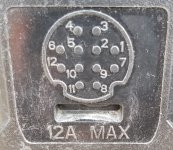
As far as the 12 pin connector pinout, here's what I saved in my notes from the giant thread:

Pin 1 (Red) is common power (Aux #1, Aux #2)
Pin 2 (Open)
Pin 3 (Open)
Pin 4 (Open)
Pin 5 (Open)
Pin 6 (Black) is common ground (Aux #1, Aux #2),
Pin 7 (Brown) is Aux Camera #2
Pin 8 (Grey) is Aux Camera #1 Shield
Pin 9 (Green) is Aux Camera #1 Signal
Pin 10 (White) is Aux Camera #1 Return
Pin 11 (Blue) is Aux Camera #2
Pin 12 (Yellow) is Aux Camera #2

1656626676346.jpeg

All that info is likely credit Jimmy07, I just saved it off as I thought I'd have to add it to my truck as well.
 
Forgot one more thread that'd be useful to you - you'll need the trailer security gateway module installed as well.

 
Forgot one more thread that'd be useful to you - you'll need the trailer security gateway module installed as well.

Thanks for all your links and time
 
Hi, I know this thread is a bit old, but there are folks here that have used to trailer 360 surround.

I have a 2024 Ram 3500 and got the following:
AAN Tow technology group
AVS Tow technology plus
XN1 Trailer surround camera system
XH7 Tow mode wired camera

I have a travel trailer and installed the wired tow mode camera that uses the DRVM. I love it. I have never installed the trailer surround cameras - it's just too much modification to the trailer (and we tend to upgrade trailers every 3-5 years).

That being said, the camera field of vision is awesome for driving and seeing traffic behind approaching, like the real mirror. It is NOT a good backup camera, due to the 15 feet of blind spot directly below the camera. The views posted here have reinvigorated my interest in having a trailer backup view to the ground visible on the Uconnect screen!

Does anyone know if the 360 system will allow just use of the rear camera view? I would love to just put the control box in my locking battery box on the tongue, and route only the rear camera to the back using the same path as my tow mode camera.

Another option is finding the part for the AUX2 camera that uses the 12pin, but I have heard the quality is horrible. Plus I already have this camera system just wasting away new in box.

Thanks in advance!
 
Doesn't the DRVM tow mode camera tilt down in Reverse?

(that's a rhetorical question...)

IOW, have you adjusted the tilt when you set it up?
 
Doesn't the DRVM tow mode camera tilt down in Reverse?

(that's a rhetorical question...)

IOW, have you adjusted the tilt when you set it up?
I bet his trailer is like mine. It's either one or the other due to the height. I have to either keep it tilted up to see behind me or tilt it down to see directly behind. The digital adjustment isn't enough between the two clicks at the physical camera.

In the end I installed the 360 camera system to have the best of both worlds.
 
Doesn't the DRVM tow mode camera tilt down in Reverse?

(that's a rhetorical question...)

IOW, have you adjusted the tilt when you set it up?
I read that it would do that but there is no mechanical tilt, it changes the field of vision to show down as far as possible, if you have made pan adjustments in running mode. However, if you physically tilt it way down to the ground it is no longer useful as a general rear view mirror past about one tailgater. I did some trial and error drives before finding my preferred tilt. Mine is also at the standard trailer cam position about 8ft off the ground which hurts the downward view. Lastly, I'd much rather have a backup cam view in the uconnect screen than the smaller drvm screen (actually both at once would be sick).

I'm excited to try the single rear cam, but if someone knows ahead of time it's futile without all 4 installed then I'll leave it mint in box.
 
I read that it would do that but there is no mechanical tilt, it changes the field of vision to show down as far as possible, if you have made pan adjustments in running mode. However, if you physically tilt it way down to the ground it is no longer useful as a general rear view mirror past about one tailgater. I did some trial and error drives before finding my preferred tilt. Mine is also at the standard trailer cam position about 8ft off the ground which hurts the downward view. Lastly, I'd much rather have a backup cam view in the uconnect screen than the smaller drvm screen (actually both at once would be sick).

I'm excited to try the single rear cam, but if someone knows ahead of time it's futile without all 4 installed then I'll leave it mint in box.
Honestly you’d be better off selling your trailer surround kit and just buying the single aux trailer camera. Plugs into the same port but is a lot simpler and cheaper.
 
Honestly you’d be better off selling your trailer surround kit and just buying the single aux trailer camera. Plugs into the same port but is a lot simpler and cheaper.
Honestly? That was the direction I thought I'd go about a week ago but there is very scattered and conflicting info on the exact mopar part number and I can't find examples of the image quality when selecting it as AUX2. At least I've seen images of the 360 cams and it looks great, and it is compatible with my particular 2024 packages/options because it came with the truck. Still unsure if it can work with only the rear populated.

Does anyone know the exact part number of the AUX trailer camera compatible with the 12 pin connector on a 2024?
 
Ok so I am finally home and able to test my trailer 360 cams, in only rear camera connected "mode". I was worried about 1) the system throwing an error unless all 4 cameras are plugged in and 2) no way to view them without a trailer connected in the 7-way.

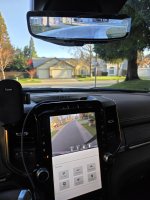
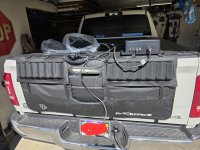
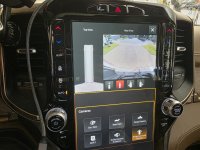
Well neither were an issue at all! I barely even had to unbox it to test. Here is my simple test setup, then the view as "trailer surround" and then just "trailer rear" selected. This was all sitting idle with no trailer connected. 1000018450.jpg1000018448.jpg
 

Attachments

  • 1000018449.jpg
    1000018449.jpg
    372.9 KB · Views: 7
I am about to start the camera install on my Jayco Travel trailer. I thought when I bought the truck it only came with a rear camera but it came with the 360 camera set up. Do I have to mount all the cameras? My camper has a rounded front cap so that camera would be difficult to mount. Also can you use the system while driving? Would be nice to see what is behind you and limit blind spots.
 
I am about to start the camera install on my Jayco Travel trailer. I thought when I bought the truck it only came with a rear camera but it came with the 360 camera set up. Do I have to mount all the cameras? My camper has a rounded front cap so that camera would be difficult to mount. Also can you use the system while driving? Would be nice to see what is behind you and limit blind spots.
I assume your Ram is 2024 or 2025?

The single camera that has the coax connector is only for the digital rear view mirror. It will display at all/any speed of the flip your mirror to digital mode. You can point its field of view outward like a rear view mirror, or down to see the ground for backing up, but you can't have both from the standard trailer mounting location (up high). You may be able to see everything with a mount around waist high level,not sure.

I can confirm the 360 system, you do not need all 4 cameras connected. I also not only have a rounded cap, but would prefer not to run a wire up the sides. The back is really what I needed.

I'll share my setup in the next post rather than a reply.
 
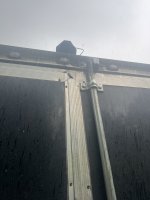
So here is my resulting setup. My rear view camera already had a custom attached steel tube arm extending from my ladder in the back (built by my father in law). So I attached the rear camera from the 360 system to that (the zip ties are to get me up and running until I get a better mount). You can see the difference in the cameras. The left one is the digital rear view mirror camera, the right one is a 360 surround camera. These are about 7ft above the ground.
1000018456.jpg
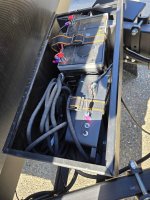
The thin fakra cable is long enough (12 meters) to put the giant control box waaaay up at the tongue. I followed the same route I used for the rear view camera cable along the underbelly/skirting to the tongue. I have room in my locking metal battery box to put the control module and take up slack. In this pic you can see the rear view camera cord slack and inline repeater on the left, and the huge 360 control box on the right. My battery box has grommeted holes to send cords in/out so it ends up perfect for this application and keeps the entire system external yet protected. I strapped it down tight and added some padding after the pic was taken. But you can see only the rear camera is connected. Since it is up near the hitch I did not need to use the bulky extender cable that adds another several feet in case one mounts the box far from the truck. (for anyone interested in the lock box it is from rvlockbox dot com)
1000018455.jpg
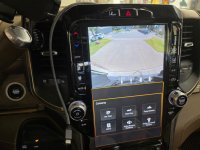
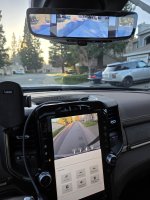
And lastly, here are my views. First pic I'm showing the rear surround camera on the Uconnect and the full screen digital rear view mirror from the trailer. You can see the field of visions compliment each other nicely, and only the drvm stays displayed while at speed. The 2nd image is my favorite view on the drvm, where the trailer rear view is center, and the side mirror cameras are placed on the sides for a running view of the blind spots. I love finally using (almost) all the tech that came with my truck!
1000018465.jpg
 

Attachments

  • 1000018466.jpg
    1000018466.jpg
    364.7 KB · Views: 17
I recently installed the DRVM camera and I’m already disappointed by its usefulness for backing up. It’s great on the road but not for backing.

You’ve inspired me to add a second camera. I’m leaning towards the Aux camera since I don’t already own the 360.
 
Thanks for the info daemonic3. I only have the 360 trailer cameras. My truck is set up for the digital rear view camera but they didn't give me that one when I purchased the truck and I didnt know anything about them at that point. If I would of I would of asked about it.

 
Back
Top