What's new
Ram Heavy Duty Forum

Register a free account today to become a member! Once signed in, you'll be able to participate on this site by adding your own topics and posts, as well as connect with other members through your own private inbox!

Wrong Speed Limits in Navigation?

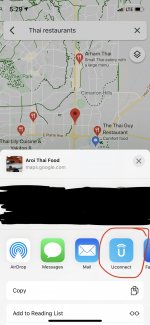
You can also hit the “share” button in Apple Maps or Google Maps (or really anything with an address) and send it to UConnect that way.

I am an idiot because I can't find the option to do that. Can you explain the steps for Google Maps?
 
I am an idiot because I can't find the option to do that. Can you explain the steps for Google Maps?

Search for something and click on the result so it shows up like this. Scroll to the side and you’ll see share. Click that and uconnect will be an option.
51c2ffe678ee7896f3731b085996a4b1.png


Sent from my iPhone using Tapatalk
 
I am an idiot because I can't find the option to do that. Can you explain the steps for Google Maps?
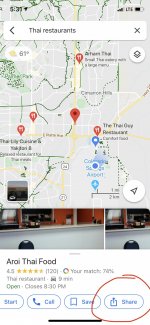
Find the place you want to go, hit the “Share” button (you may have to swipe the bottom buttons over to the left to see it), then hit the UConnect icon.

See screenshots below:
1F0D2891-8451-4D34-8A15-D2EA3AAA7A0D.jpeg
ED53591E-74B9-4EA1-9300-AE9F9737E7E2.jpeg
 
Find the place you want to go, hit the “Share” button (you may have to swipe the bottom buttons over to the left to see it), then hit the UConnect icon.

Thanks for the detailed reply. I tried the steps on my Android phone using Google Maps, but the Uconnect app doesn't seem to like the input from Google Maps. It just goes to a blank "Send and Go" page where the only option is to back out.

Well, it just worked after trying a few different restaurants. Thanks!
 
Pretty sure you need an active Uconnect subscription (or still in the 1st year trial) to use Send and Go.
 
Has anyone else had an issue where the navigation has a different (lower) speed than the posted speed limits? Just got a 2019 with 12" Uconnect and many of the speed limits for the streets around my house are 5 to 10 mph off. Found this odd as my 2017 8" Uconnect was bang on.

Unfortunately the maps are about 18 months out of date. They are not automatically updated Over the Air (OTA). Instead Ram is using an archaic process that involves buying a map update on a USB memory stick that is then physically mailed to the owner. You then have to go through a lengthy hour long process to update the map database on your vehicle. The map update process starts here: https://chryslergroup.navigation.com/home/en_US/ChryslerNA/USD or try here: https://www.driveuconnect.com/support/software-update.html
 
Last edited:
Unfortunately the maps are about 18 months out of date. They are not automatically updated Over the Air (OTA). Instead Ram is using an archaic process that involves buying a map update on a USB memory stick that is then physically mailed to the owner. You then have to go through a lengthy hour long process to update the map database on your vehicle. The map update process starts here: https://chryslergroup.navigation.com/home/en_US/ChryslerNA/USD or try here: https://www.driveuconnect.com/support/software-update.html
It appears the map update site shows 2018 HDs as the latest update? That's absurd. I might get a hold of RAM Cares and see what they say about map updates and what the latest version is.
 
Back
Top