
Ram Heavy Duty Forum
You are using an out of date browser. It may not display this or other websites correctly.
You should upgrade or use an alternative browser.
You should upgrade or use an alternative browser.
Valet mode delete
- Thread starter plumbyer
- Start date

H3LZSN1P3R
You're doing it wrong
Valet mode? Never heard of it in a HD pickup. A dealer should be able to reset it if you cant


Can’t post a picture right now but, my ‘23 Bighorn has a valet mode on my driver profile screen.I’m not sure what manual that came from, but valet mode only exists on the TRX.
Huh, well I may stand corrected then. I've never seen it on either my "old" 2020 or my new 2023. Both of mine have had the 12" (UC4 and now UC5), do you have the 8.4" screen by chance?Can’t post a picture right now but, my ‘23 Bighorn has a valet mode on my driver profile screen.
Yeah, 8.4” screen. I believe when you go into select user, there is a selection for valet mode at the top. Don’t quote me on that exactly, that’s off the top of my head. I’ll have to go look at it. But it is there.Huh, well I may stand corrected then. I've never seen it on either my "old" 2020 or my new 2023. Both of mine have had the 12" (UC4 and now UC5), do you have the 8.4" screen by chance?
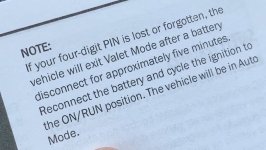
OP is probably a drive-by-post by now, but a 5 minute battery disconnect will reset valet mode, then you can use a different pin each time you put it into and out of valet mode.
You can find valet mode (on uconnect 5) by pressing the profile icon on top of the screen. The valet mode icon will be at the lower left on the “all profiles” screen.
You can find valet mode (on uconnect 5) by pressing the profile icon on top of the screen. The valet mode icon will be at the lower left on the “all profiles” screen.