What's new
Ram Heavy Duty Forum

Register a free account today to become a member! Once signed in, you'll be able to participate on this site by adding your own topics and posts, as well as connect with other members through your own private inbox!

Uconnect 5 FOTA - S21D.5 Release Date 12/22/21

RamCares

RamCares Team
Messages
1,309
Reaction score
700
Points
113
Good morning to our Ram Brand enthusiasts,

Our teams have heard your concerns and will be posting out periodically in an effort to provide you with new update releases and ask for feedback on how to better serve all of you. We appreciate your patience and feedback throughout the experience!

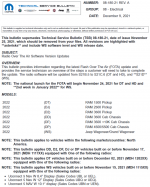
We're happy to share that as of this morning (December 9th, 2021), TSB 08-180-21 was released as an informational bulletin regarding the latest Flash Over The Air (FOTA) software update. Uconnect sends Firmware-Over-The-Air (FOTA) updates to vehicles equipped with built-in cellular modems within range of U.S. or Canadian cellular networks, in an effort to add new features or fix bugs. For your convenience, we've included a snippet of the TSB and the symptoms/conditions that it intends to address, below. *Please note the applicable vehicle build dates and sales codes.
1639058070616.png1639058084275.png

FOTA Tips
  • Have access to good cellular coverage
  • Enable a Key Off Power Off Delay in your Uconnect 5 system settings to allow the radio time to search the cloud for updates, once your ignition is cycled off
  • Schedule your FOTA for the evening when you're less likely to be utilizing your vehicle and it's connected services.

After FOTA is Completed
  • Wait about 40 minutes with their vehicle OFF (and with key fobs away from vehicle) to allow the radio to enter a "deep sleep" mode. This will mitigate the chances of any interruptions during the download process.
  • App-Over-The-Air (AOTA) will trigger, which refreshes internal radio apps. As your radio syncs with the cloud during this AOTA update time, your connected services and apps may work intermittently, and may take up to 24-48 hours to return to full functionality.
    • Some of these services include your WiFi hotspot, remote demands through the Ram App, etc.
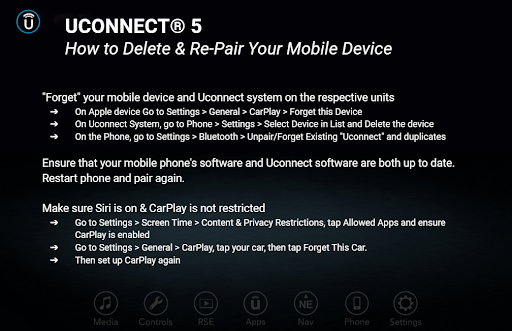
  • You may have to re-pair your phones, reset your radio station presets, or delete & re-pair your Apple CarPlay/Android Auto connection
    FDsxMd0XIAYkquc

    You can find more helpful resources by visiting our Twitter pages at @UconnectCares Twitter & @RamCares Twitter .
If you're not sure if you've received the latest software update, there are 2 ways to find your current Uconnect 5 software information:
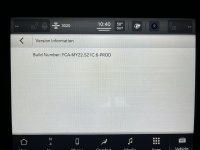
  • VEHICLE option from App Drawer --> Settings --> System Information --> Version Information
OR
  • APP option from App Drawer --> Settings --> Version Information

Please keep an eye out for this communication and do not hesitate to send our team a private message if you have any questions or concerns! If you would prefer to speak to a Ram Customer Care Specialist directly, please call 1-866-932-3878.

Thanks,

Ram Cares
 
Last edited:
Good morning to our Ram Brand enthusiasts,

Our teams have heard your concerns and will be posting out periodically in an effort to provide you with new update releases and ask for feedback on how to better serve all of you. We appreciate your patience and feedback throughout the experience!

We're happy to share that as of this morning (December 9th, 2021), TSB 08-180-21 was released as an informational bulletin regarding the latest Flash Over The Air (FOTA) software update. Uconnect sends Firmware-Over-The-Air (FOTA) updates to vehicles equipped with built-in cellular modems within range of U.S. or Canadian cellular networks, in an effort to add new features or fix bugs. For your convenience, we've included a snippet of the TSB and the symptoms/conditions that it intends to address, below. *Please note the applicable vehicle build dates and sales codes.

View attachment 27593View attachment 27594

FOTA Tips
  • Have access to good cellular coverage
  • Enable a Key Off Power Off Delay in your Uconnect 5 system settings to allow the radio time to search the cloud for updates, once your ignition is cycled off
  • Schedule your FOTA for the evening when you're less likely to be utilizing your vehicle and it's connected services.

After FOTA is Completed
  • Wait about 40 minutes with their vehicle OFF (and with key fobs away from vehicle) to allow the radio to enter a "deep sleep" mode. This will mitigate the chances of any interruptions during the download process.
  • App-Over-The-Air (AOTA) will trigger, which refreshes internal radio apps. As your radio syncs with the cloud during this AOTA update time, your connected services and apps may work intermittently, and may take up to 24-48 hours to return to full functionality.
    • Some of these services include your WiFi hotspot, remote demands through the Ram App, etc.
  • You may have to re-pair your phones, reset your radio station presets, or delete & re-pair your Apple CarPlay/Android Auto connection
    FDsxMd0XIAYkquc

    You can find more helpful resources by visiting our Twitter pages at @UconnectCares Twitter & @RamCares Twitter .
If you're not sure if you've received the latest software update, there are 2 ways to find your current Uconnect 5 software information:
  • VEHICLE option from App Drawer --> Settings --> System Information --> Version Information
OR
  • APP option from App Drawer --> Settings --> Version Information

Please keep an eye out for this communication and do not hesitate to send our team a private message if you have any questions or concerns! If you prefer to speak to a specialist, directly, please call

Thanks,

Ram Cares
Why have you stopped supporting and updating the 4c 12 inch systems?

Sent from my SM-G998U using Tapatalk
 
I just checked mine and no version S21c.6 is installed. Uconnect 5 has been glitchy at best. Just started up and I lost my Water temp and oil pressure readings on off road pages. Maybe someday everything will be operational!
 
I guess that applies to me. I'll see when I get it...
 
I just checked mine and no version S21c.6 is installed. Uconnect 5 has been glitchy at best. Just started up and I lost my Water temp and oil pressure readings on off road pages. Maybe someday everything will be operational!
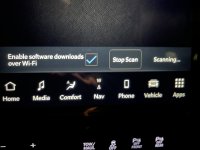
Do you have UC5 connected to your WiFi? Need a connection for the updates to download. I don’t think they pull down over the built in LTE radio.
 
Do you have UC5 connected to your WiFi? Need a connection for the updates to download. I don’t think they pull down over the built in LTE radio.
Updates don't download over the wifi.
 
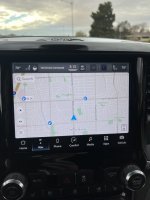
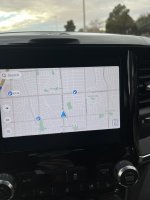
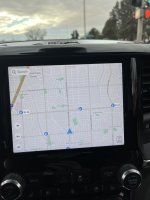
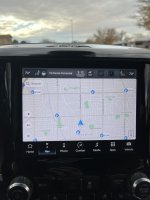
Interesting. I got the update notice a few days ago and checked the version on my truck. As it was still acting squirrely on 12/4 I took a pic; it showed 21C.6 as having been installed. I have the 8.4 screen. Before & after the update it does something odd - goes to full screen for a few seconds, then to "normal" size with black on top & bottom, then returns to normal. Even with this update, there are still issues to address.

I have developed a workaround for the diesel prices info, though! Before starting the first time of the day, I turn bluetooth off on my phone. Start the truck; nav will display fuel prices - these days it defaults to premium. Then I do a soft reboot. After this, I wait a few minutes. Hit search for gas stations & wait for diesel prices to display - takes about 3-5 minutes. Then I turn on bluetooth and reconnect my phone. I have an iPhone and do use Carplay. If I get into truck on later start during the day, depending upon time between starts, I may have to repeat procedure.
 

Attachments

  • 011.JPG
    011.JPG
    401.1 KB · Views: 72
  • 005.JPG
    005.JPG
    338.4 KB · Views: 65
  • 004.JPG
    004.JPG
    312.2 KB · Views: 63
  • 003.JPG
    003.JPG
    323.2 KB · Views: 66
  • 002.JPG
    002.JPG
    321.6 KB · Views: 75
  • 026.JPG
    026.JPG
    596.4 KB · Views: 75
FYI - After mine updated, I lost CarPlay.

I tried
  • Deleting the phone and re-pairing
  • Rebooting phone
  • Reboot Uconnect
None of that fixed it. I finally did a factory reset on Uconnect and it fixed the issue.
 
Last edited:
FYI - After mine updated, I lost CarPlay.

I tried
  • Deleting the phone and re-pairing
  • Rebooting phone
  • Reboot Uconnect
None of that fixed it. I finally did a factory reset on Uconnect and it fixed the issue.
I was hesitant to do factory reset. Decided to try that tonight. Will give it time to see how things settle in.
 
I have this system on my 21 Pacifica and it is terribly glitchy as well. I just ordered a 2022 Power Wagon and i hope they sort out the issues soon. The streets on the maps are notoriously hard to see while you're driving.
 
Hello all, I have truck connected to my home wifi and blue check mark is checked to enable software updates over wifi. Checked last night and it already has FCA-MY22.S21.8-PROD. Is this the new update? @RamCares

I never received a notification to update or anything I just saw this post and went to check software version and FCA-MY22.S21.8-PROD was already on there.
 
@RamCares

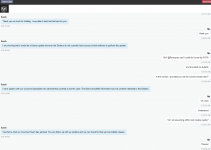
Per Ram Chat Customer Service, this update has NOT been released to dealers yet and will need to be a software installed by Dealerships

1639148093295.png
 
I’ve noticed a few bugs with my UC5 8.4 w/NAV and hopefully this fixes them, or most. Nothing major except this morning when I couldn’t turn the volume down after having it up pretty loud that was odd.

Hello all, I have truck connected to my home wifi and blue check mark is checked to enable software updates over wifi. Checked last night and it already has FCA-MY22.S21.8-PROD. Is this the new update? @RamCares

I never received a notification to update or anything I just saw this post and went to check software version and FCA-MY22.S21.8-PROD was already on there.
No. The update is S21C.6 per the @RamCares first post.

1639148060888.png

Not sure how long it takes for the updates to get to the trucks. The notice came out yesterday. Hopefully, only a couple days. I am on S21B.5 from the dealer.

Edit: Well seems like it might be longer than a few days if RamChat is anywhere near accurate on the above chat.
 
Last edited:
I’ve noticed a few bugs with my UC5 8.4 w/NAV and hopefully this fixes them, or most. Nothing major except this morning when I couldn’t turn the volume down after having it up pretty loud that was odd.

Not sure how long it takes for the updates to get to the trucks. The notice came out yesterday. Hopefully, only a couple days. I am on S21B.5 from the dealer.

Edit: Well seems like it might be longer than a few days if RamChat is anywhere near accurate on the above chat.
This C.6 update was Installed in my truck more than one week ago.
 
FYI - After mine updated, I lost CarPlay.

I tried
  • Deleting the phone and re-pairing
  • Rebooting phone
  • Reboot Uconnect
None of that fixed it. I finally did a factory reset on Uconnect and it fixed the issue.
think mine is doing that same thing. mine did the update and now doesnt go to carplay. did you find the system better after the update?
 
Back
Top