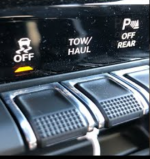
This may help to understand how it all works for my 2016:
Traction Control System (TCS)
The TCS monitors the amount of wheel spin of each of the driven wheels. If wheel spin is detected,
brake pressure is applied to the slipping wheel(s), and engine power is reduced to provide enhanced
acceleration and stability. A feature of the TCS functions similarly to a limited-slip differential and
controls the wheel spin across a driven axle. If one wheel on a driven axle is spinning faster than the
other, the system will apply the brake of the spinning wheel. This will allow more engine torque to be
applied to the wheel that is not spinning. This feature remains active even if TCS and ESC are in the
“Partial Off” mode. This brake pressure modulation transfers drive torque from slipping to non-slipping
wheels to provide optimal forward traction.
Electronic Stability Control (ESC)
The ESC system enhances directional control and stability of the vehicle under various driving
conditions. ESC corrects for oversteering or understeering of the vehicle by applying the brake of the
appropriate wheel to assist in counteracting the oversteer or understeer condition. Engine power may
also be reduced to help the vehicle maintain the desired path. ESC uses sensors in the vehicle to
determine the vehicle path intended by the driver and compares it to the actual path of the vehicle.
When the actual path does not match the intended path, ESC applies the brake of the appropriate
wheel to assist in counteracting the oversteer or
understeer condition.
• Oversteer - when the vehicle is turning more than appropriate for the steering wheel position.
• Understeer - when the vehicle is turning less than appropriate for the steering wheel position.
All Ram Two-Wheel Drive Vehicles And Four-Wheel Drive Vehicles In 2WD, 4WD AUTO, Or 4WD
LOCK Modes Can Choose The following ESC Operating Modes:
ESC On
This is the normal operating mode for ESC in 2WD/4WD AUTO/4WD LOCK modes and in 2WD
vehicles. This mode should be used for almost all driving situations. ESC should only be turned to
“Partial Off” or “ESC Off” for specific reasons as noted below.
ESC Partial Off
This mode is entered by momentarily pressing the “ESC Off” switch. When in Partial Off mode, the
TCS portion of ESC, except for the “limited slip” feature described in the TCS section, has been
disabled and the "ESC Off Indicator Light" will be illuminated. All other stability features of ESC
function normally. This mode is intended to be used if the vehicle is in deep snow, sand, or gravel
conditions and more wheel spin than TCS would normally allow is required to gain traction. To turn
ESC on again, momentarily press the “ESC Off” switch. This will restore the normal “ESC On” mode
of operation.
ESC Full Off - When in 4WD LOW:
This mode is intended for off-road use when ESC stability features could inhibit vehicle
maneuverability due to trail conditions. This mode is entered by pressing and holding the “ESC Off”
switch for five seconds WHEN THE VEHICLE IS STOPPED and the engine is running. After five
seconds, the “ESC Off Indicator Light” will illuminate and the “ESC Off” message will appear in the
odometer. ESC and TCS except for the “limited slip” feature described in the TCS section are turned
off until the vehicle reaches a speed of 40 mph (64 km/h). At 40 mph (64 km/h) the system returns to
“Partial Off” mode.
JFJ Notes:
“ESC Off” switch is Ram's name for the truck's Traction Control switch
Later 4x4 trucks (not sure which ones) also go ESC Full Off when in 4WD Lock.
When in Full Off mode the EVIC will always say so.