What's new
Ram Heavy Duty Forum

Register a free account today to become a member! Once signed in, you'll be able to participate on this site by adding your own topics and posts, as well as connect with other members through your own private inbox!

Premium TPMS option not displaying on the Infosystem/Digital Dash

phatboy64

Well-Known Member
Messages
720
Reaction score
484
Points
63
I posted this in another thread but I want to get more visibility

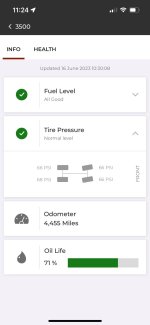
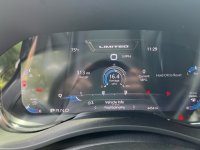
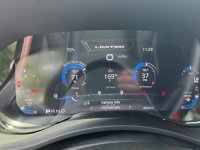
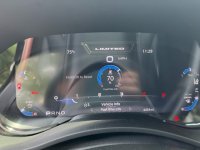
I have a 2023 3500 Limited HO with the Limited Level 1 group and a bunch of other options. I spent weeks trying to find where on the digital cluster I can see my tire pressure. It is not there. I can see my tire pressure on the RAM app but nowhere to be found in the cluster. I took it to the dealer yesterday and the service department also could not find it, we know where it is supposed to be but it is not there.
After about an hour of investigation the dealers theory is that for some reason I didn’t get the Premium System but rather the Base System that only has the audible warning even though the Premium System is listed on my build sheet. I don’t think this is the case as 1. It is on my build sheet and 2. I drive on the beach and have had my tires deflated to 25 PSI and I am sure if I had the base system I would have got a warning. The dealer is doing more research.

I swear I saw it once the first day I had my truck but not 100% sure.

So I am wondering, Is this something that if the truck was equipped with the correct components would it just need to be “activated”, and if so is that something that can be done with AlphODB?
 
3500’s have TPIS not TPMS, so even if you could find the display it would not alarm you if the pressure was low.

It’s in your app, so it has sensors.

The owners manual shows that it’s in a tile under vehicle info. Page 106
 
Last edited:
Try this..... I am assuming by the OP not commenting he got it figured out.


Try this..... I am assuming by the OP not commenting he got it figured out.


Sorry about that. I am the OP and i have not figured it out....
 
Sorry about that. I am the OP and i have not figured it out....

I missed that..
I have never seen a Ram not have the TPMS display....very odd.

If it's on the build list and it's not there...the dealer should be adding it for you.
 
3500’s have TPIS not TPMS, so even if you could find the display it would not alarm you if the pressure was low.

It’s in your app, so it has sensors.

The owners manual shows that it’s in a tile under vehicle info. Page 106

Correct. I know I have the sensors because as you said it is showing up in the app plus when I switched wheels over I put them in.

"The owners manual shows that it’s in a tile under vehicle info. Page 106" - That is the issue, it is not there as described in the manual. As mentioned the dealer agrees that on my truck it is not working as it should.
 
I missed that..
I have never seen a Ram not have the TPMS display....very odd.

If it's on the build list and it's not there...the dealer should be adding it for you.
Absolutely, they need to fix this on way or the other. But I have to believe the "equipment/parts" are there as it shows up on my RAM APP. (see attached)

APP.jpg
 
"The owners manual shows that it’s in a tile under vehicle info. Page 106" - That is the issue, it is not there as described in the manual. As mentioned the dealer agrees that on my truck it is not working as it should.

Are you missing any other pages under the vehicle info tile?
 
So what's their game plan?
Well the dealer is looking into this and asked me to bring the truck back so they can take a deeper look. My issue is I leave next Friday for a five week trip so I don't know I can get it to the dealer and leave it for a day or so before my trip. Trying to sort that out now.
 
Not from what I can tell. I just sent the 6 screens that show up

Are you able to get to the custom tile configuration page?
 
Are you able to get to the custom tile configuration page?
Yes, I can get to the one where I can pick how many tiles are displayed (1 - 5) and I can get the the section where I can choose what information is displayed in each tile (radio, fuel economy, vehicle information...) and I can get to the place where I can customize what shows in the top left, center and right of the cluster.

What I am wondering is if all the parts/HW is there could it be a easy an "enabling" it with AlfaODB?
 
What I am wondering is if all the parts/HW is there could it be an easy an "enabling" it with AlfaODB?
Use AlfaOBD to read the BCM system ID.
What are the following settings set to:
VehConfig 3: Base TPM System Present
VehConfig 3: Premium TPM System Present
VehConfig 5: Non-Regulated Tire Pressure Information System (TPIS) Present
VehConfig 7: TPMS Configuration: Logic 1 NHTSA Enable Warning
 
Use AlfaOBD to read the BCM system ID.
What are the following settings set to:
VehConfig 3: Base TPM System Present
VehConfig 3: Premium TPM System Present
VehConfig 5: Non-Regulated Tire Pressure Information System (TPIS) Present
VehConfig 7: TPMS Configuration: Logic 1 NHTSA Enable Warning
I will do this this morning. I am new to this SW where to I find these settings.
 
I connected and here are the results

VehConfig 3: Base TPM System Present

No

VehConfig 3: Premium TPM System Present

No

VehConfig 5: Non-Regulated Tire Pressure Information System (TPIS) Present

Yes


VehConfig 7: TPMS Configuration: Logic 1 NHTSA

Enable Warning
 
Back
Top