
Ram Heavy Duty Forum
You are using an out of date browser. It may not display this or other websites correctly.
You should upgrade or use an alternative browser.
You should upgrade or use an alternative browser.
OBDLink MX+
- Thread starter mjlebsa
- Start date

H3LZSN1P3R
You're doing it wrong
Not sure on turbo temp but the rest you can monitor

elephantrider
Hydraulic Lifter Crew
- Messages
- 2,435
- Reaction score
- 3,307
- Points
- 113
compressor wheel rpm is always fun to watch.
H3LZSN1P3R
You're doing it wrong
Yes the numbers are pretty impressive!compressor wheel rpm is always fun to watch.

H3LZSN1P3R
You're doing it wrong
Mine will go up to 100 as far as the gauge face but it does go up to past 30 for sureMy mx+ only goes to 15lb boost, I’ll have to figure out where all the settings are next time I’m playing around with it.

Turbo? No, you can monitor 5 different EGT probes. This will also indicate regens. I don't recall if OBDLink app and/or torque has a specific PID to show active regen. Torque needs the CTD PID file installed. I believe most of the aftermarket just use to temps to show an "active regen."
The pre-post DPF is your "soot load"
The pre-post DPF is your "soot load"
Turbo? No, you can monitor 5 different EGT probes. This will also indicate regens. I don't recall if OBDLink app and/or torque has a specific PID to show active regen. Torque needs the CTD PID file installed. I believe most of the aftermarket just use to temps to show an "active regen."
The pre-post DPF is your "soot load"
Which primers do you recommend monitoring?
Sent from my iPhone using Tapatalk
H3LZSN1P3R
You're doing it wrong
download OBD Jscan it works really good aswell and works with the OBD MX+
Screen shots of User Defined PID I'm using to display active DPF regen on OBD Link AppI don't recall if OBDLink app and/or torque has a specific PID to show active regen.....
Attachments
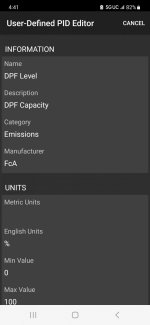

superjoe83
Well-Known Member
- Messages
- 572
- Reaction score
- 565
- Points
- 93
Normal MX is fine, that's what I useDoes the normal OBDLink MX work with AlfaOBD as well? That's what I had laying around from my Ford. Wasn't sure if I needed to get the MX+?

DeadEnd
Active Member
- Messages
- 109
- Reaction score
- 78
- Points
- 28
Thank you! You just saved me $130 bucks!Normal MX is fine, that's what I use
H3LZSN1P3R
You're doing it wrong
Mx+ is not neededDoes the normal OBDLink MX work with AlfaOBD as well? That's what I had laying around from my Ford. Wasn't sure if I needed to get the MX+?
Get the vLinker MC $50

Bought a vLinker MC+ and can not get it to pair with my I phone 13. Im not using a cable adapter. Tried with the power on engine off per instruction and read to try it with the engine running but all the phone does when attempting to pair is keep spinning and spinning. All the flashing lights on the vLinker are working like they should. Any suggestions and what to try next or should I squash it like a bug. 
Before you try to use the MC+ with any scan tool app, you need to pair it to just the iPhone itself.Bought a vLinker MC+ and can not get it to pair with my I phone 13. Im not using a cable adapter. Tried with the power on engine off per instruction and read to try it with the engine running but all the phone does when attempting to pair is keep spinning and spinning. All the flashing lights on the vLinker are working like they should. Any suggestions and what to try next or should I squash it like a bug.
1) go into phone settings > Bluetooth
2) on the phone, toggle Bluetooth off
3) plug the MC+ into the OBD port
4) on the phone, toggle Bluetooth back on
5) on the MC+, press and hold the pairing button for a few seconds, then release it
6) select the MC+ device once it is discovered in the phone Bluetooth settings
7) enter 1234 for the requested pairing code
8) open up whatever scan app you are using on the phone for the truck
9) go through whatever process that particular scan tool app has to connect to the MC+ interface, and then whatever truck module you are trying to connect to.
Steps 1-7 only need to be performed once.
You may need to press the pairing button on the MC+ each time you connect with your scan tool app.
I tried this to the letter with no results. I tried start button on ACC and RUN and even while the truck is running and it just won't see it.Jimmy07
Before you try to use the MC+ with any scan tool app, you need to pair it to just the iPhone itself.
1) go into phone settings > Bluetooth
2) on the phone, toggle Bluetooth off
3) plug the MC+ into the OBD port
4) on the phone, toggle Bluetooth back on
5) on the MC+, press and hold the pairing button for a few seconds, then release it
6) select the MC+ device once it is discovered in the phone Bluetooth settings
7) enter 1234 for the requested pairing code
8) open up whatever scan app you are using on the phone for the truck
9) go through whatever process that particular scan tool app has to connect to the MC+ interface, and then whatever truck module you are trying to connect to.
Steps 1-7 only need to be performed once.
You may need to press the pairing button on the MC+ each time you connect with your scan tool app.
EDIT: @Jimmy07 ... I thought I would try it one more time and no luck....but thanks for your help, I guess I bought a dud.
Last edited:
How can I find the PID for the 4 EGT sensors and the delta pressure sensor? Also the max and min values?Screen shots of User Defined PID I'm using to display active DPF regen on OBD Link App