What's new
Ram Heavy Duty Forum

Register a free account today to become a member! Once signed in, you'll be able to participate on this site by adding your own topics and posts, as well as connect with other members through your own private inbox!

NOCO charger startup mode fail (or not?) (and shame on Google)

Brutal_HO

The Mad Irishman
Staff member
Messages
14,228
Reaction score
26,508
Points
113
Location
Douglas County, CO
WTF NOCO?

Anyone know a good brand (reasonably priced) 2A-5A small charger that I can mount that is AGM only or will LOCK to the last mode used?

I have a Battery Tender Plus on my ATV that I bought 4 years ago when I switched that to AGM but that was before it is was $65, but it's only 1.25A and I don't think that's going to be enough for 2 H7 800CCA batteries.


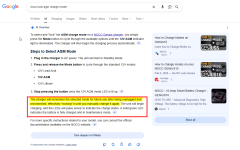
(and WTF Google?)

1767412626509.png
1767412602792.png
 
Well hell.

Which is it? I just checked by unplugging the NOCO and plugging it back in a few minutes later and it came back set as AGM...

I think I may not have even switched it last time I plugged the cord in so it must be remembering the setting afterall.
 
well, I should dig deeper before going off the deep end.

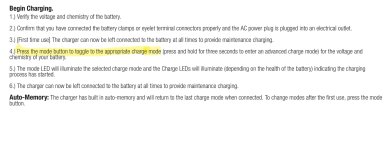
NOCO says it has "auto memory" so the one time I saw it not return to AGM must have been a fluke.


1767417805766.png

1767417744531.png

1767417854248.png
 
The Noco charger I have always defaults to the last type of battery that I’ve had in hooked up to. I’ve only hooked it up to Lithium once though and I don’t remember changing the charging mode. I believe it automatically selected the correct type. I always double check when I plug it in though.
 
auto recognizing battery type

None of the NOCO’s I’ve used auto-recognize battery type. What model do you use?
 
The Noco charger I have always defaults to the last type of battery that I’ve had in hooked up to. I’ve only hooked it up to Lithium once though and I don’t remember changing the charging mode. I believe it automatically selected the correct type. I always double check when I plug it in though.

It's mounted underhood so checking every time is a pain I'd rather not endure as I often don't plug it in until well after I've parked and realized it might site for a few days or weeks.

I have a battery monitor gadget installed, I'll have to try to get in the habit of opening the app when I go to plug it in. I can see the higher voltage charge AGM mode uses.

My concern was undercharging an AGM using flooded lead acid charging voltages is bad for them and shortens their life.
 
I have mine at the rear of the truck so it’s easy to see what comes up. Now that I have the Lithium ion batteries out of the trailer for the winter I’ll have to hook it up to one of those and see if it automatically selects the correct battery type.
 
My 10 amp NOCO is under the hood and the few times I have chedked it, it is sitting on the setting last used which in my case is AGM. I had to set it to AGM the first time I used it since it does not automatically recognize the battery type when first connected. Set it and forget it. And yes, I like to charge to the correct AGM voltage once in a while to prolong the AGM battery life since the trucks charging system is designed for normal lead acid batteries at slightly lower voltage.
 
Last edited:
@Mopar73340 they are not advertised as automatic battery type selecting, so don’t except it to determine the battery type.
 
From NOCO -
NOCO Genius chargers, especially the newer models, automatically detect common 6V and 12V battery types (flooded, gel, AGM, lithium-ion) and voltages, often requiring just a button press for lithium or specific modes, making them user-friendly without needing manual settings for basic charging. They intelligently adapt to the battery chemistry and condition, preventing overcharging and even using "Force Mode" for deeply discharged batteries.
How NOCO Chargers Work
  • Automatic Detection: When connected, many NOCO Genius chargers automatically sense if you've attached a 6V or 12V battery and start charging in the appropriate mode for lead-acid types (Flooded, Gel, AGM).
  • Manual Mode Selection (If Needed): For specific chemistries like Lithium-ion (LiFePO4) or for older/damaged batteries, you typically press the "Mode" button to select the correct setting.
  • Smart Charging: The internal computer manages the charging process, protecting against overcharging, which is why they are often called "smart" chargers.
Key Features
  • Multi-Chemistry: Compatible with Wet, Gel, MF, CA, EFB, AGM, and Lithium-ion batteries.
  • Force Mode: Allows charging of completely dead batteries (down to 0 volts) for short periods.
  • Desulfation: Can detect and repair damaged batteries with sulfation.
In Summary: You don't usually need to tell a NOCO charger what type of lead-acid battery it's connected to, as it figures it out; you just select the mode if it's lithium or if you need special functions like Force Mode.

I use
NOCO Genius 5


Same charger I use. There is no mention of auto-detecting battery chemistry in the manual, it actually tells you to manually select the chemistry.

I use it in multiple batteries with different chemistry and always have to select the proper mode, same as my Genius 1.

The auto-memory feature also negates the auto-detection ability.

IMG_8682.jpeg
 
Well I decided to test the auto battery detect type by hooking mine up to one of the lithium batteries I have. It did not automatically detect the type and I had to select lithium. So I guess that puts to rest that part of the internet claims.
 
From NOCO -
NOCO Genius chargers, especially the newer models, automatically detect common 6V and 12V battery types (flooded, gel, AGM, lithium-ion) and voltages, often requiring just a button press for lithium or specific modes, making them user-friendly without needing manual settings for basic charging. They intelligently adapt to the battery chemistry and condition, preventing overcharging and even using "Force Mode" for deeply discharged batteries.
How NOCO Chargers Work
  • Automatic Detection: When connected, many NOCO Genius chargers automatically sense if you've attached a 6V or 12V battery and start charging in the appropriate mode for lead-acid types (Flooded, Gel, AGM).
  • Manual Mode Selection (If Needed): For specific chemistries like Lithium-ion (LiFePO4) or for older/damaged batteries, you typically press the "Mode" button to select the correct setting.
  • Smart Charging: The internal computer manages the charging process, protecting against overcharging, which is why they are often called "smart" chargers.
Key Features
  • Multi-Chemistry: Compatible with Wet, Gel, MF, CA, EFB, AGM, and Lithium-ion batteries.
  • Force Mode: Allows charging of completely dead batteries (down to 0 volts) for short periods.
  • Desulfation: Can detect and repair damaged batteries with sulfation.
In Summary: You don't usually need to tell a NOCO charger what type of lead-acid battery it's connected to, as it figures it out; you just select the mode if it's lithium or if you need special functions like Force Mode.

I use
NOCO Genius 5

That AI generated result you posted is the usual 80/20 right/wrong sh*t.

(I think we need a new rule around here that if someone does copypasta from AI, they need to disclose.)

The fact all their current docs state Auto-Memory runs contrary to any auto detection.

1767557842379.png
 
Brutal HO, yup, I take AI stuff with a grain of salt.
 
Last edited:
Back
Top