rfullen280
Active Member
- Messages
- 350
- Reaction score
- 168
- Points
- 43
sameCurrently getting a 404 error.
sameCurrently getting a 404 error.


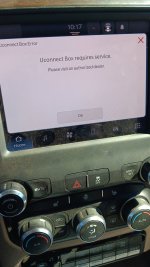
You’ll find that the grass tends to look greener on the other side. But when you finally get up the gumption to climb over the fence, you’re likely to find the same grass waiting for you when you get there.I guess it doesn't make a difference now, it's back at the dealer again. This time to replace the DEF pump and this issue.
I went by the Ford store this afternoon. I've had so many issues on this truck that I might send it down the road. Owned various Mopars since I was a kid but I'm about fed up with Stellantis, the disaster ordering it sitting in Mexico for over 5 months and then all the issues afterwards. I never should have sold my 2018.
While that may be true, first vehicle I've ever owned, and I've had a lot of them, that every time I pull my trailer I'm thinking, what's next?You’ll find that the grass tends to look greener on the other side. But when you finally get up the gumption to climb over the fence, you’re likely to find the same grass waiting for you when you get there.
Does anyone know what happened to the link? Seems like a few of us are getting 404. Is there another location anywhere to find it?I’m an editor on that drive (and put the T27.46 update on it), so for anyone else following along too, that is where I’ll be putting new updates as I receive them.
The link was taken down at the request of "RAM"Does anyone know what happened to the link? Seems like a few of us are getting 404. Is there another location anywhere to find it?
I swapped a 22 radio into my 21 and it keeps asking if I want to check for a new version... figured manually updating it would solve that.
That is strange, when I was not getting updates over the air I saw something similar. I did a factory reset of the UConnect system and within days the system updated.Ok next question, every time I get in the truck it keeps asking to connect to wifi to update the radio....it has a connection to wifi...anyway to turn off that notice?


That could be correct. Not all models can run the most up-to-date software...Hello All was browsing around and saw this forum. I currently have FCA-MY22.S21.8-PROD as my version. I always had my truck connected to WIFI so I am not sure why it never updated. Based on the forum I am way behind. I did a factory data reset last night and hope it updates. However, I downloaded the 27.46 update on a 4GB USB (FAT32) so I could manually do it, however, when I plug in the USB (USB port under radio) nothing happens. Any thing else I need to do or maybe I downloaded wrong software update? Help! I been having issues with this display since day 1 but I always checked ram website and they said I was up to date. Guess they were wrong. Thanks!
So I just called UCONNECT Customer Service, they said the most up to date software available for my vehicle is T25.50. This sound right.....? I thought we were on 27.46?
Make sure you didn’t extract or unzip anything. Just move the whole zipped up file onto the usb stick.Hello All was browsing around and saw this forum. I currently have FCA-MY22.S21.8-PROD as my version. I always had my truck connected to WIFI so I am not sure why it never updated. Based on the forum I am way behind. I did a factory data reset last night and hope it updates. However, I downloaded the 27.46 update on a 4GB USB (FAT32) so I could manually do it, however, when I plug in the USB (USB port under radio) nothing happens. Any thing else I need to do or maybe I downloaded wrong software update? Help! I been having issues with this display since day 1 but I always checked ram website and they said I was up to date. Guess they were wrong. Thanks!
So I just called UCONNECT Customer Service, they said the most up to date software available for my vehicle is T25.50. This sound right.....? I thought we were on 27.46?
I downloaded from the "5th Gen Forums" and literally just copied and pasted. It did not work. Do you know where i can get the 25.50 update? Is this truly the latest software update? UCONNECT said this is the latest but here on forums it says its 27.46?Make sure you didn’t extract or unzip anything. Just move the whole zipped up file onto the usb stick.
There is no 25.50.I downloaded from the "5th Gen Forums" and literally just copied and pasted. It did not work. Do you know where i can get the 25.50 update? Is this truly the latest software update? UCONNECT said this is the latest but here on forums it says its 27.46?
 drive.google.com
Thank you @Jimmy07There is no 25.50.
There is a 25.48, and a 25.51.
27.46 works on your radio, but your current software is really old.
Try stepping up to 27.46.
Try going to this one first, same thing, don’t unzip anything:
UCONNECT_R1HIGH_S26.15_MY22.zip

I've done all my updates with 16 or 32gb flash drives with no issue.When downloading, does it HAVE to be a 4gb usb or will any usb stick work