What's new
Ram Heavy Duty Forum

Register a free account today to become a member! Once signed in, you'll be able to participate on this site by adding your own topics and posts, as well as connect with other members through your own private inbox!

KAODtech bypass

IvanDeSlaer

New Member
Messages
8
Reaction score
1
Points
3
I just connected my bypass on my 2019 2500 RAM per the destructions. I'm waiting for OBDlink but I took my scantool and I wasn't able to talk to the truck anymore. Is this normal? I did the search a few different ways but I wasn't able to find an answer.
Thanks in advance.
 
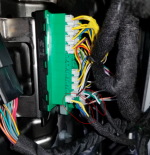
are the wires still color coded to the terminal block base colors? they used to have a heat shrink wrap rotating which side each plug goes to.
 
This is what I have. The blocks are green/black & green/white. I installed the white connector to the G/W and the black connector to G/B. Then the male OBD to the truck. My scantool to the OBD on the harness and it won't talk to the truck. Am I missing something?
 

Attachments

  • 20240201_204440.jpg
    20240201_204440.jpg
    272.1 KB · Views: 43
I reversed the previous installation and now everything works. I installed the BLK connector to the G/W block and the WHT connector to G/B block.
 
It's the wire colors that matter*.

It's literally posted in a pic in the 1st post in the ALFAOBD sticky thread.

* Seems one wire color can be different on the GRN/WH (GRN/PNK), but YEL/BLU goes to the BLACK base CANBUS block nearest the headlight switch (dash).

I don't understand why TF he's building these with the black/white connectors back-assward and useless dated instructions. It causes no end of confusion here.

1706849981508.png

 
How do you get the cables out is my question
Mine are stuck in there were do you push to release
 
How do you get the cables out is my question
Mine are stuck in there were do you push to release
Once you get the connectors out just remove the lock tabs to make future removal pain free. I learned that the hard way was as well. The connectors stay in just fine without the tabs.
 
Last edited:
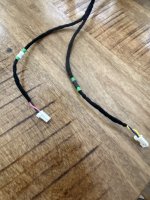
Not sure if I have an updated version but on mine each leg has what looks to me like color coded bands (green/black and green/white) to match the correct block.

Blue/yellow wired plug goes to block with black base

Red/green wired plug goes to block with white base

I’ll find out soon, finally ordered the vlinker and bought a license for Jacan.
 

Attachments

  • image.jpg
    image.jpg
    495.8 KB · Views: 34
Last edited:
Not sure if I have an updated version but on mine each leg has what looks to me like color coded bands (green/black and green/white) to match the correct block.

Blue/yellow wired plug goes to block with black base

Red/green wired plug goes to block with white base

I’ll find out soon, finally ordered the vlinker and bought a license for Jacan.
Mine was like that too atleast the white and black bands, that was a a couple years ago
 
Well, harness worked like a champ! Adjusted TPMS thresholds and activated Bambi mode. Whole thing was pretty darn easy.
 
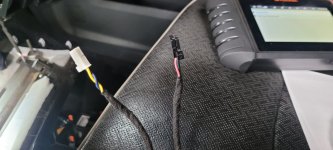
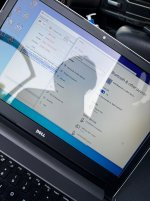
I just tried my new kaod bypass cable, the yellow and blue are on the green with black base, I can connect to the PC with the MX+ but alfaobd won’t come off idle and just throws up connection complaints. Do I have to go behind the dash with something too? Nothing is mentioned in the kaod instructions.
 

Attachments

  • IMG_1834.jpeg
    IMG_1834.jpeg
    818.1 KB · Views: 10
  • IMG_1835.jpeg
    IMG_1835.jpeg
    724.5 KB · Views: 10
I just tried my new kaod bypass cable, the yellow and blue are on the green with black base, I can connect to the PC with the MX+ but alfaobd won’t come off idle and just throws up connection complaints. Do I have to go behind the dash with something too? Nothing is mentioned in the kaod instructions.
I don’t have the windows version but on android you have to select the OBDlink adapter on the alfaobd app
 
Back
Top