What's new
Ram Heavy Duty Forum

Register a free account today to become a member! Once signed in, you'll be able to participate on this site by adding your own topics and posts, as well as connect with other members through your own private inbox!

Kaodtech Bypass Connection Question

Will_T

Well-Known Member
Messages
1,027
Reaction score
596
Points
113
Location
Oregon
I am finally installing the Kaodtech that arrived a month or so ago after a short backorder wait. They are out of stock on their website again so must be having a hard time keeping up with orders. Anyway:

I am doing what Kaodtech instructions call the "temporary" install. I will connect to the Can blocks and then plug the female end of the Kaodtech into the OBD-II port. Then plug my Banks iDash into the other, male, end of the Kaodtech. I found the Can blocks by removing the kick panel and then, to reach them, removed the small panel under the headlight switch.

My question is can I plug the connectors from the Kaodtech into any of the empty ports on the corresponding correct White/Green and Black/Green Can blocks? From what I can see, one block has several empty spots and the other has 2 or 3 empty. The instructions just say simply plug each one into the correct block, so I assume it does not matter where on the blocks? Just want to be sure my assumption is correct. Thanks!
 
Correct, 1 into each block, no specific spot.
 
Any spot is fine i know some tuners specify #5 spot on the black based block but im not sure that matters
 
Any block. I leave mine mounted all the time and tuck it away into the top of the side kick panel when not in use.
 
Any block. I leave mine mounted all the time and tuck it away into the top of the side kick panel when not in use.

Thanks! In looking at the pins in the iDash and the Kaodtech, I am thinking this may not work the way I had been told it would. As noted, I planned to connect and plug in the Kaodtech to the OBD-II port and then plug the iDash into the male plug of the Kaodtech. However, the iDash connector has a full complement of pins so when plugged directly into the OBD-II connections are made to all the pins the trucks's OBD-II port has. BUT, the Kaodtech only has three pins. So if I plug the Kaodtech into the truck's port and then the iDash into the Kaodtech, only three of the pins from the iDash will be connected. This leads me to believe that the iDash will not work when plugged in this way. We shall see I guess. I suppose I could connect the Kaodtech, but leave it out of the truck's port and just plug the iDash into the truck port. If I ever have a need for the bypass to clear a code or something, I could plug the bypass into the truck at that point. But still, I would need to use the iDash to access and clear the code and with only 3 pins in the Kaodtech it might not work as intended.

Anyone have any insight or ideas on this? I plan to have time this weekend to make the connections so I guess I will know after that if it will work or not.
 
Thanks! In looking at the pins in the iDash and the Kaodtech, I am thinking this may not work the way I had been told it would. As noted, I planned to connect and plug in the Kaodtech to the OBD-II port and then plug the iDash into the male plug of the Kaodtech. However, the iDash connector has a full complement of pins so when plugged directly into the OBD-II connections are made to all the pins the trucks's OBD-II port has. BUT, the Kaodtech only has three pins. So if I plug the Kaodtech into the truck's port and then the iDash into the Kaodtech, only three of the pins from the iDash will be connected. This leads me to believe that the iDash will not work when plugged in this way. We shall see I guess. I suppose I could connect the Kaodtech, but leave it out of the truck's port and just plug the iDash into the truck port. If I ever have a need for the bypass to clear a code or something, I could plug the bypass into the truck at that point. But still, I would need to use the iDash to access and clear the code and with only 3 pins in the Kaodtech it might not work as intended.

Anyone have any insight or ideas on this? I plan to have time this weekend to make the connections so I guess I will know after that if it will work or not.
The OBD port only uses 7 pins total. It doesn’t matter how many pins are populated on the device you’re plugging in:
Pin 16 for power
Pins 4&5 for ground
Pins 3&11 for the IHS bus to the gateway
Pins 6&14 for the C bus to the gateway

The bypass only needs to get power and two grounds from the OBD port. The other two pairs of wires go straight to the IHS & C bus blocks, effectively bypassing the security gateway. Therefore, if you look at the female end of the bypass that you plug your device into, it will be back to 7 wires.
 
It will work thats what i use with my EZ-Lynk instead of paying for their bypass cable that only plugs in to the black canbus bar instead of both
 
it'll do what you want. I use the same bypass for efilive. I leave it plugged in.
 
The OBD port only uses 7 pins total. It doesn’t matter how many pins are populated on the device you’re plugging in:
Pin 16 for power
Pins 4&5 for ground
Pins 3&11 for the IHS bus to the gateway
Pins 6&14 for the C bus to the gateway

The bypass only needs to get power and two grounds from the OBD port. The other two pairs of wires go straight to the IHS & C bus blocks, effectively bypassing the security gateway. Therefore, if you look at the female end of the bypass that you plug your device into, it will be back to 7 wires.

Thanks as always for the complete explanation! I get it now and yes it routes back to 7 pins. I saw the OBD-II end and did not think about the two pairs to the blocks routing back to the other end of the bypass.


It will work thats what i use with my EZ-Lynk instead of paying for their bypass cable that only plugs in to the black canbus bar instead of both
Thanks to you also! You can always be depended on for the quick and succinct answer, whereas Jimmy provides us dummies the pertinent part of his encyclopedic knowledge we appreciate. Together you two are a good pair! 1666210145835.png
 
Thanks as always for the complete explanation! I get it now and yes it routes back to 7 pins. I saw the OBD-II end and did not think about the two pairs to the blocks routing back to the other end of the bypass.


Thanks to you also! You can always be depended on for the quick and succinct answer, whereas Jimmy provides us dummies the pertinent part of his encyclopedic knowledge we appreciate. Together you two are a good pair! View attachment 45817
He has access to a way bigger picture book than i do lol
 
I installed it this weekend and it was fairly easy to get the connections made with the large panel below the steering wheel removed and the small panel under the headlight switch. All seems well and the iDash is working as before. The only weird thing, and it must be just a coincidence, but today I noticed that the truck was not recognizing the FOB I usually always use. I think I used my 2nd FOB when I drove the truck after installing the Kaodtech. So if I am remembering that correctly, today would have been the first time I used FOB #1 since the install. What happens is that the dash says, "FOB not detected" then "Push Start with the FOB". That works. The FOB also works to unlock the truck when pushing the buttons on the FOB, but not when in my hand and I grab the door handle. So it seems to be an issue with the detection, not the FOB itself. The other, 2nd FOB still works normally. That has to be unrelated to the Kaodtech install, right? Or maybe I loosened something under the dash when doing the install that caused this? Anyone have any ideas? Are any of the other connections on those two C blocks related to the FOB communication?
 
If the second FOB works I say it's coincidental and suspect the battery. Switch batteries and see what happens. Other than that I haven't a clue
 
If the second FOB works I say it's coincidental and suspect the battery. Switch batteries and see what happens. Other than that I haven't a clue
I thought about the battery but with only 5,000 miles on the truck the FOB has not seen much use. Also, if it was the battery, wouldn't the buttons on the FOB that lock/unlock the doors also not work? They work fine. I looked closely at the FOB, even with the manual key removed, and cannot easily see how to access a battery? Do you know how to get to it?
 
I thought about the battery but with only 5,000 miles on the truck the FOB has not seen much use. Also, if it was the battery, wouldn't the buttons on the FOB that lock/unlock the doors also not work? They work fine. I looked closely at the FOB, even with the manual key removed, and cannot easily see how to access a battery? Do you know how to get to it?
It does say in the manual but the back just pops off use the key to pop it off
 
Low batteries in
I thought about the battery but with only 5,000 miles on the truck the FOB has not seen much use. Also, if it was the battery, wouldn't the buttons on the FOB that lock/unlock the doors also not work? They work fine. I looked closely at the FOB, even with the manual key removed, and cannot easily see how to access a battery? Do you know how to get to it?
Electronic devices with low batteries do strange things. How change FOB battery
 
My FOB that I always use has started to act similar, where as my second fob that I rarely use has no issues. I bet it's your fob battery.
 
Thanks all! I got it open and tested the battery. It was just a little weaker than a new one I had so I changed it. (Even though I went against the manual and did not get the replacement from the Ram dealer. Oh no!) Now it is working again so far. Strange as it is supposed to last 3 years under normal use and mine is only 1-1/2 years and much less than normal use. Hopefully it will keep on working. I was also surprised at how much dust and dirt was inside the FOB so that alone was a good reason for opening it up. Now I have set my glasses somewhere and can't find them. This forum is good, but I guess you can't help with that! Sure is fun getting old.
 
The OBD port only uses 7 pins total. It doesn’t matter how many pins are populated on the device you’re plugging in:
Pin 16 for power
Pins 4&5 for ground
Pins 3&11 for the IHS bus to the gateway
Pins 6&14 for the C bus to the gateway

The bypass only needs to get power and two grounds from the OBD port. The other two pairs of wires go straight to the IHS & C bus blocks, effectively bypassing the security gateway. Therefore, if you look at the female end of the bypass that you plug your device into, it will be back to 7 wires.
anyone got a part number for the connectors to the IHS & C bus blocks, the 2 wire white ones.

nvrmnd, found them posted here...
 
Last edited:
I got a Kaodtech Bypass but I am not sure what cable goes where as they aren’t labeled like the instructions say.

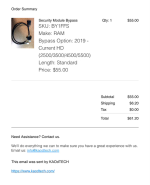
Here’s what I ordered.
1718802148435.png
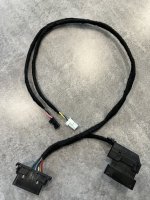
Next is what I got and the next picture is from a Cummins forum that shows labels which mine doesn’t have.

Questions:
Do I have the right cable?
Which cable goes where (small white & black connectors)?
 

Attachments

  • IMG_4722.jpeg
    IMG_4722.jpeg
    941.1 KB · Views: 38
  • IMG_4723.png
    IMG_4723.png
    1.1 MB · Views: 40
Cable is correct. Look at the Alpha Thread here for connection. Also for ease of removing the Connectors you can shave down the small tabs on the connectors so they can be pulled out easier.
AlfaOBD
 
Back
Top