What's new
Ram Heavy Duty Forum

Register a free account today to become a member! Once signed in, you'll be able to participate on this site by adding your own topics and posts, as well as connect with other members through your own private inbox!

JScan hook up and programing questions

klammer

Member
Messages
39
Reaction score
11
Points
8
Good afternoon,

I purchased a 2024, 2500 Laramie, 6.4 in October. I want to change some settings. I have all Apple devices so reading here, JScan seems like the way to go for me so I downloaded the app to my iPhone. After reading numerous threads through the search, I still am a bit confused as to location that I need to plug into. I bought the TIKSCIENCE cable adapter (security bypass cable) and a Vgate Vlinker MC+.

My questions are:

- Where is the location that I plug the bypass cables into located? Do I remove the knee kick plate to access? I also thought read somewhere that the instrument cluster needs to be removed?

- Once plugged in and MC+ connected, I then open JScan, buy a license and I should be ready to use JScan? I want adjust TPMS minimum pressure to remove the tire light and the warning (I air down when not towing anything). I also want to deactivate the seat belt chime, enable fog lamps on with high beam and enable actual gear display. I would love to get rid of the horn blowing 3 times when idling and I leave the vehicle with the fob, but it appears that is onlt able to be done with AlphaOBD.

- TPMS shows Light Load inflation pressure and Max Load inflation pressure. Which one for what I am looking to do?

- When changing settings, I assume I have to do one at a time & not all of the above listed at once?

Would my life be easier if I buy the Kaodtech bypass cable and return the one that I bought?

Thank you in advance for any help. I have worked on trucks, cars and bikes but am very new to this stuff.
 

Attachments

  • IMG_4697.PNG
    IMG_4697.PNG
    1.2 MB · Views: 18
  • IMG_4698.PNG
    IMG_4698.PNG
    872.2 KB · Views: 18
The kadotech system doesn’t require as much disassembly and you can add and remove, easier. I went with the one from infotainment, here is a video showing the process (the clips on the the buses can be tricky to disconnect, a snip can fix that as shown below:


I would make one change at a time like you said.
 
I use the Vlinker MC+ and the kaodtech cable. The video shows you exactly what you need to do. JScan is great. If you make a mistake you can restore any settings easily. JScan is easy to use and it will prompt you to purchase a license when you connect.
 
Thank you very much! The video is great and exactly what I needed. Thanks also for the suggestions and info. I'll send back the cables that I bought and get the Kaodtech coming. On Kaodtech site, they list a 2018+ and 2019 - Current 1500 cable and a 2019 - Current HD (2500/3500/4500/5500) cable. I assume the 2019 - Current HD is the cable I want?

Thanks again.
 

Attachments

  • IMG_4700.JPG
    IMG_4700.JPG
    623.1 KB · Views: 23
Yes get the one for 2019- current HD trucks. I started out with that red cable and it works but is a pita because you have to remove the speedometer cluster to get to the security bypass which is quite a bit of disassembly. I ended up getting the Kaodtech and never looked back. Pull out the headlight control and you can see the bcm’s. I use J-scan and it’s very user friendly.
 
I received the kaodtech cable. Going to give this a shot either today or tomorrow (crazy cold here). I "assume" I should back up my current oem settings before I make any changes? When I hook this up and have the Jscan app up and running on my phone, I take it I will be prompted to buy the license. Once I have done that how do I back up the current, non altered settings? Do they back up to my license inf in Jscan? I think I read that it takes a while to back up. All programming is done with vehicle off with ignition set to run correct? when done, there is a wait period for everything to reset before starting or doing the next program, open and close door?
 
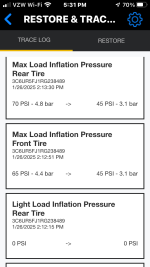
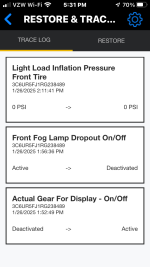
I plug my Kaodtech cable into my bcm with the headlight switch pulled out so i can see without laying down , I push my start button once to put the truck in accessory mode plug in my reader into the cable and plug the other end of the cable into the obd port then connect to it with my phone. Then you can write whatever is needed. Jscan keeps a log of what you’ve done , press the gear icon on the top right of the jscan landing page then scroll down to trace and restore and there is your log automatically generated everytime you make a change.
 
I really like the JScan. At least for what I am doing with it. Primarily because it supports iPhones. Easy interface, reasonable price and great customer service. He does have a site with instructions that I hope he will expand. I think it was originally designed for Jeep but lots of Ram owners are using it. A significant update to the app is coming soon.
 
I really like the JScan. At least for what I am doing with it. Primarily because it supports iPhones. Easy interface, reasonable price and great customer service. He does have a site with instructions that I hope he will expand. I think it was originally designed for Jeep but lots of Ram owners are using it. A significant update to the app is coming soon.
I just found that and am reading it. Very informative.
 
Thank you for all the info. Programing went very smooth. JScan is indeed very user friendly. I did file down the small hooks smooth on the Kadotech cable that Brutal_HO recommended. Worked very well.

I reset the TPMS and got rid of the warning light. Fog lights now work on high beam and actual gear displayed. THe only thing it wouldn't do is eliminate the seat belt alert chime. Gave me a message "This adaptation won't work on this vehicle, data returned by ECU don't match our pattern".

All in all, happy with the results.
 
Thank you for all the info. Programing went very smooth. JScan is indeed very user friendly. I did file down the small hooks smooth on the Kadotech cable that Brutal_HO recommended. Worked very well.

I reset the TPMS and got rid of the warning light. Fog lights now work on high beam and actual gear displayed. THe only thing it wouldn't do is eliminate the seat belt alert chime. Gave me a message "This adaptation won't work on this vehicle, data returned by ECU don't match our pattern".

All in all, happy with the results.

Glad it worked out for you.

Can you upload a screen shot of the high beam with fogs setting? I tried for a few minutes a few weeks ago and couldn’t find it.

You can find by going to Settings > Trace and Restore Adaptations and it’ll show you all the changes made.
 
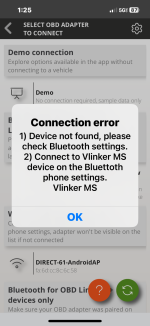
Quick question. Since I did the mods in my post, I have gotten a new phone. Went from a iPhone 6S to an iPhone 16e. Today, I went to shut off the door chime today using Jscan and the vLinker MC+ but it won't connect. BT light is on as well as the power light. I get a connection error in the picture below. The vLinker does not show in the 16e's bluetooth settings. Also, the jscan doesn't show the MC+. It shows MS and FS. Any ideas what is going on?

Thanks,
klammerIMG_0298.PNG
 
Quick question. Since I did the mods in my post, I have gotten a new phone. Went from a iPhone 6S to an iPhone 16e. Today, I went to shut off the door chime today using Jscan and the vLinker MC+ but it won't connect. BT light is on as well as the power light. I get a connection error in the picture below. The vLinker does not show in the 16e's bluetooth settings. Also, the jscan doesn't show the MC+. It shows MS and FS. Any ideas what is going on?

Thanks,
klammerView attachment 86468
Go to the JScan lovers, Facebook page and message the developer. I have been using my iPhone 14 with the V linker MC plus without issue.
 
Got the jscan to work. Had to shut off wifi and disconnect from the Ram in blue tooth, then use auto connect. Unfortunately, I can't disconnect the chime that allows the door to be open while in accessory or run mode.
 
Got the jscan to work. Had to shut off wifi and disconnect from the Ram in blue tooth, then use auto connect. Unfortunately, I can't disconnect the chime that allows the door to be open while in accessory or run mode.
It will do it. I did it on my 2024 tradesman along with the seatbelt alarm
 
Back
Top