What's new
Ram Heavy Duty Forum

Register a free account today to become a member! Once signed in, you'll be able to participate on this site by adding your own topics and posts, as well as connect with other members through your own private inbox!

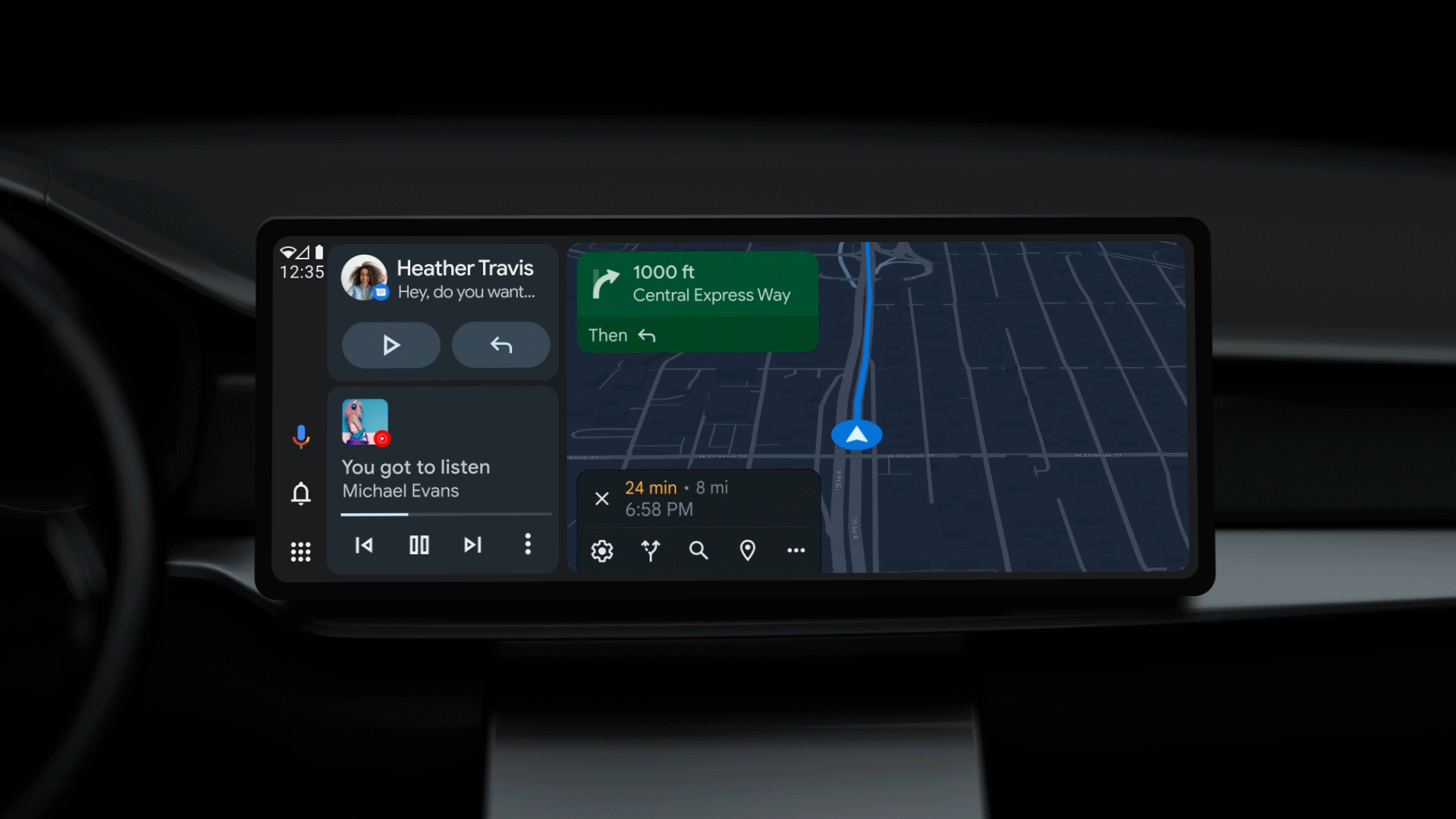
Google is updating Android Auto to fit all screen sizes!

I bought the AutoSky AI box - box connected in perfect and worked for 2 days until the box died - got a replacement from Amazon - went to install that new box and got to the step where you pair your phone via Bluetooth to the AI box - it should have asked to allow pairing, synching and Android auto (sets permissions) - this did not happen. So even though it connected, it won't allow AA to launch. Any idea how to manually set those permissions? I did try to forget everything and re-pair and it does the same thing. Thanks.
 
Has anyone been able to do an update on their Autosky box? I find mine crashes more often then I feel is normal, also the GPS reception is complete garbage, I'm hoping maybe a software update would help improve these issues.
 
Has anyone been able to do an update on their Autosky box? I find mine crashes more often then I feel is normal, also the GPS reception is complete garbage, I'm hoping maybe a software update would help improve these issues.
I'm not familiar with that particular box but a lot of CarPlay AI boxes have an option to use the vehicle GPS in the advanced settings.
 
Dang, am i the only one that seems to NOT like the full screen? :oops:
I have Android and my wife has Apple, when she drives b.c ive been drinking say, and connects her phone, i am NOT a fan of the full screen at all. I really like i can split the screens to see multiple things.
But just seen Apple you have the option to split them as well though so i can see why its annoying for people who do want full screen as its an option, idk i love the way android is now so wouldnt bug me none.
 
Dang, am i the only one that seems to NOT like the full screen? :oops:
I have Android and my wife has Apple, when she drives b.c ive been drinking say, and connects her phone, i am NOT a fan of the full screen at all. I really like i can split the screens to see multiple things.
But just seen Apple you have the option to split them as well though so i can see why its annoying for people who do want full screen as its an option, idk i love the way android is now so wouldnt bug me none.
No, you're not the only one. I prefer the split screen too. But it would be nice if Android Auto had the option in the Ram's.
 
Dang, am i the only one that seems to NOT like the full screen? :oops:
I have Android and my wife has Apple, when she drives b.c ive been drinking say, and connects her phone, i am NOT a fan of the full screen at all. I really like i can split the screens to see multiple things.
But just seen Apple you have the option to split them as well though so i can see why its annoying for people who do want full screen as its an option, idk i love the way android is now so wouldnt bug me none.
Is there a way to split the split screen that isn't showing the map? I'd like to add some shortcuts in addition to the music player like you can do on the home screen.
 
Is there a way to split the split screen that isn't showing the map? I'd like to add some shortcuts in addition to the music player like you can do on the home screen.
If im understanding you correctly, youd like to change the top screen to something else other than the map? If so yes you can, there is your phone icons between the screens click any one of those to change it, i believe there should be a setting icon itll take you to your home screen on your phone essentially and you can click what youd like. Just did this yesterday to look through my call log, thought it was pretty cool.

BUT unsure if that answers your question.
 
If im understanding you correctly, youd like to change the top screen to something else other than the map? If so yes you can, there is your phone icons between the screens click any one of those to change it, i believe there should be a setting icon itll take you to your home screen on your phone essentially and you can click what youd like. Just did this yesterday to look through my call log, thought it was pretty cool.

BUT unsure if that answers your question.
What I would like to do is leave the top screen with Google Maps. Currently my lower screen is the music player widget. I'd like to be able to split the lower screen in two parts (left and right). I'd like to have the music player widget on the left side of the lower area and 6 shortcuts on the right side.
 
What I would like to do is leave the top screen with Google Maps. Currently my lower screen is the music player widget. I'd like to be able to split the lower screen in two parts (left and right). I'd like to have the music player widget on the left side of the lower area and 6 shortcuts on the right side.
AH i see. I am actually unsure about that one, good question. I work night shift, so when i go to take my daily nap tonight ill try to see if i can do this and get back to you!
 
What I would like to do is leave the top screen with Google Maps. Currently my lower screen is the music player widget. I'd like to be able to split the lower screen in two parts (left and right). I'd like to have the music player widget on the left side of the lower area and 6 shortcuts on the right side.
Go to edit your home pages, then you have to remove the one you have with CarPlay right now (you can only have one page with CarPlay in it) and then add a new one. It’ll let you pick the layout.
 
Go to edit your home pages, then you have to remove the one you have with CarPlay right now (you can only have one page with CarPlay in it) and then add a new one. It’ll let you pick the layout.
OK, I'll give it a try. If I do it that way will it still open up Android Auto with Google Maps on the new page I create when I tap the Android Auto icon at the bottom of the screen?
 
Go to edit your home pages, then you have to remove the one you have with CarPlay right now (you can only have one page with CarPlay in it) and then add a new one. It’ll let you pick the layout.
The Android Auto page isn't available in the Home pages view so I can't delete it from there. And there isn't an edit pages option available in the Android Auto view. I can delete the Now Playing widget from the Android Auto page but I can only add a single widget that takes up the bottom half of the screen in that view.
 
The Android Auto page isn't available in the Home pages view so I can't delete it from there. And there isn't an edit pages option available in the Android Auto view. I can delete the Now Playing widget from the Android Auto page but I can only add a single widget that takes up the bottom half of the screen in that view.
So i tried messing with it myself. I couldnt figure out on what you wanted to do. You can kinda do like a split screen where it gives you the weather/music thats playing but thats about it. Unless like you said change the bottom music page to something else. Unfortunate. Again i love the way it is but it really sucks Android dont have the options like Apple does for people who want it.
 
So i tried messing with it myself. I couldnt figure out on what you wanted to do. You can kinda do like a split screen where it gives you the weather/music thats playing but thats about it. Unless like you said change the bottom music page to something else. Unfortunate. Again i love the way it is but it really sucks Android dont have the options like Apple does for people who want it.
I don't think this is an Android Auto problem. I think it is a problem of how Ram implements Android Auto.
 

So full screen Android Auto is on the horizon.

Now it's a question of how long Uconnect will take to update the UC5 to take advantage of this.
Dreaming of full screen android ,hoping real soon, actually thinking about switching to Apple just for that feature,,, but, sure would rather not
 
I think full screen Android Auto is a long shot at this point. But I hope I'm wrong. Other manufacturers figured out how to make AA full screen on their vertical screens. If RAM figured it out, I'd be using AA all the time. But there's no way I'd switch to Apple. I find their business model brilliantly insidious.
 
@B4ZINGA & @daemonic3 have you guys had issues with Google not reading text messages or dictating directions with the right volume setting? I've noticed lately text messages and directions are both coming through the Uconnect as music volume, which means unless I've got the music blasting I can't hear Google talking.

I've also noticed Google Assistant never works if it prompts me to speak. Like I can say "hey Google, send text message to whoever" and it hears that then says "sure, what's the message?" and before I can get a word out it says "sorry I didn't get that" and it does it one more time before turning off.

It's super frustrating and completely defeats the safety of the hands free aspect of Android Auto.

I've tried to reach out to auto sky to see if maybe there's a firmware update to fix this but so far their customer service sucks.
 
@B4ZINGA & @daemonic3 have you guys had issues with Google not reading text messages or dictating directions with the right volume setting? I've noticed lately text messages and directions are both coming through the Uconnect as music volume, which means unless I've got the music blasting I can't hear Google talking.

I've also noticed Google Assistant never works if it prompts me to speak. Like I can say "hey Google, send text message to whoever" and it hears that then says "sure, what's the message?" and before I can get a word out it says "sorry I didn't get that" and it does it one more time before turning off.

It's super frustrating and completely defeats the safety of the hands free aspect of Android Auto.

I've tried to reach out to auto sky to see if maybe there's a firmware update to fix this but so far their customer service sucks.
I have not noticed the assistant not working yet! I tend to only ask it for random facts or things I can't remember though, nothing important.

There have been times where some combination of a phone call while playing media but the phone call had a disconnect issue, the media gets "stuck" in voice call mode and all comes through that front middle speaker. This happened with my other wireless AA to carplay boxes as well though. I don't think it is specific to our auto sky ones.
 
I got fed up and ordered one of these since it had way more overall positive reviews: https://www.amazon.com/dp/B0DNFLM91K?ref=ppx_yo2ov_dt_b_fed_asin_title&th=1

It's currently on sale for 42% off making it $81, and so far EVERYTHING works as intended, I think even the 2 finger pinch to zoom in/out works.
You'd better post an update after you test! I'm on my 3rd and best overall device (the auto sky), but if you found one that passes the pinch test I may part with another $81...
 
Back
Top