What's new
Ram Heavy Duty Forum

Register a free account today to become a member! Once signed in, you'll be able to participate on this site by adding your own topics and posts, as well as connect with other members through your own private inbox!

Google is updating Android Auto to fit all screen sizes!

I forgot to report back!

Everything indeed works, including Google Maps. I will say it is just a little bit slower to startup than my previous other AI boxes. But I'll take it. Also I will qualify the original poster's statement that "Google maps works like before" with the qualifying statement that there is no multi-touch. No pinch to zoom in/out, or twist map orientation. Only single finger is supported so you have to click the +/- buttons. It is not a showstopper at all.
 
I found today that the next/prev track on the screen and the buttons on the back of the steering wheel act as the 15s forward and back for podcasts in Spotify.
Yep, been using them for that for years in just Bluetooth mode using iHeart for podcasts. A caveat though. If you are using AA and do that, it will skip to the next podcast.
 
For those using the AI box, how is music sound quality affected from streaming services?
 
And I’m over here wishing I could make Car play smaller and fit shortcuts under it…
 
Yes… CarPlay only works in full screen. I like having the map and my controls under it so I just leave it on the factory navigation. I use Waze in CarPlay, so it still gives me the updates for cars on the shoulder etc even if im not on the CarPlay screen. Ram, Android Auto, and Apple CarPlay should give us the option for full or split screen.
 
Yes… CarPlay only works in full screen. I like having the map and my controls under it so I just leave it on the factory navigation. I use Waze in CarPlay, so it still gives me the updates for cars on the shoulder etc even if im not on the CarPlay screen. Ram, Android Auto, and Apple CarPlay should give us the option for full or split screen.
Believe you can create a view like that by creating a page on the Home tab.
 
Believe you can create a view like that by creating a page on the Home tab.
You can. That’s how I run it if I’m listening to an audio source that isn’t my iPhone.
 
Believe you can create a view like that by creating a page on the Home tab.
I don’t see the option for CarPlay to be split on the Home Screen. It’s under the phone/carplay tab. On the Home Screen, I have the factory nav on top and controls under it. I don’t see an option to put CarPlay there instead of the factory nav. Maybe I’m missing something?
 
I don’t see the option for CarPlay to be split on the Home Screen. It’s under the phone/carplay tab. On the Home Screen, I have the factory nav on top and controls under it. I don’t see an option to put CarPlay there instead of the factory nav. Maybe I’m missing something?
Make a new homepage. It’ll give you the option to select CarPlay.
 
I don’t see the option for CarPlay to be split on the Home Screen. It’s under the phone/carplay tab. On the Home Screen, I have the factory nav on top and controls under it. I don’t see an option to put CarPlay there instead of the factory nav. Maybe I’m missing something?

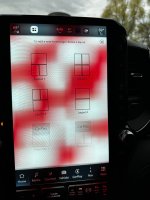
First screen shows where the option is when adding a new home page. Bottom left option.

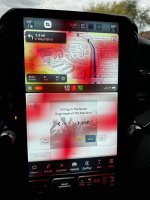
Second screenshot is how it looks when you then add media to the bottom. You can customize what you want to show there.
 

Attachments

  • IMG_4497.jpeg
    IMG_4497.jpeg
    690.6 KB · Views: 32
  • IMG_4496.jpeg
    IMG_4496.jpeg
    737 KB · Views: 32
I didn't realize that google android was in these trucks. That explains a lot for the bugs and issues.
 
I didn't realize that google android was in these trucks. That explains a lot for the bugs and issues.
I'm sure that was in jest... but I was thinking the other day a lot of uConnect issues could be resolved if Ram/Stellantis dumped it and switched to Android Automotive (different from Android Auto). Volvo did that, and GM seems to be doing the same. I'm hoping aftermarket radio companies do it so I can upgrade my 23 year old Chrysler from the clunky Kenwood system it's been using since 2016, which Kenwood really hasn't improved much in newer systems.

I'm sure they never will, along with Ford, Tesla, Rivian, etc. Too much invested in their home-baked systems.
 
Make a new homepage. It’ll give you the option to select CarPlay.
First screen shows where the option is when adding a new home page. Bottom left option.

Second screenshot is how it looks when you then add media to the bottom. You can customize what you want to show there.
Got it! Thanks guys! I was trying to add it as a normal shortcut, didn’t realize it had its own layout.
 
I didn't realize that google android was in these trucks. That explains a lot for the bugs and issues.
Yeah... no.
It's crap-tastic home made OS and UI...

I'm guessing you're a Crapple fan-boi?
 
Yeah... no.
It's crap-tastic home made OS and UI...

I'm guessing you're a Crapple fan-boi?

I don't use phone applications of any kind - to the extent possible.

Mostly a linux user, refuse to buy anything from apple for a variety of reasons.

Personally I liked the older nokia phone software much better, but I am stuck with android for lack of options. I think that it is a POS, buggy spyware.
 
Slightly off topic but since we can't use AA in full screen, I still use the crappy native nav system - at night when the screen is in dark mode (mostly a black background), the nav is almost useless - the streets are basically black as well and there is little to no contrast - any fix for that (or setting that I may be missing)? Thanks
 
Slightly off topic but since we can't use AA in full screen, I still use the crappy native nav system - at night when the screen is in dark mode (mostly a black background), the nav is almost useless - the streets are basically black as well and there is little to no contrast - any fix for that (or setting that I may be missing)? Thanks
I'm not sure if it impacts the TomTom nav since I don't use it and mine appears to be always in dark mode, but I noticed when I notch the dimmer switch up to the top setting (before turning on the dome lights), the dash goes to full brightness and AA switches to day mode for maps. Maybe the factory nav on "light mode" (if that's a thing, I can't be bothered with it since I use Google Maps 100%) will stick to it. The impact there is you'll be blinded by it at night.

Otherwise, perhaps there are brightness/contrast controls for the screen itself somewhere. I haven't looked.
 
I'm not sure if it impacts the TomTom nav since I don't use it and mine appears to be always in dark mode, but I noticed when I notch the dimmer switch up to the top setting (before turning on the dome lights), the dash goes to full brightness and AA switches to day mode for maps. Maybe the factory nav on "light mode" (if that's a thing, I can't be bothered with it since I use Google Maps 100%) will stick to it. The impact there is you'll be blinded by it at night.

Otherwise, perhaps there are brightness/contrast controls for the screen itself somewhere. I haven't looked.
Yes, turning the dimmer switch to full bright increases the screen brightness to the point that it can be blinding. I discovered that when I was just getting familiar with my truck. I also discovered there are screen brightness settings in the menu but turning the dimmer switch to full overrides those settings. I believe there also is an option to not go into dark mode.
 
I'm sure that was in jest... but I was thinking the other day a lot of uConnect issues could be resolved if Ram/Stellantis dumped it and switched to Android Automotive (different from Android Auto). Volvo did that, and GM seems to be doing the same. I'm hoping aftermarket radio companies do it so I can upgrade my 23 year old Chrysler from the clunky Kenwood system it's been using since 2016, which Kenwood really hasn't improved much in newer systems.

I'm sure they never will, along with Ford, Tesla, Rivian, etc. Too much invested in their home-baked systems.
UConnect 5 is built on Android Automotive.
 
Back
Top