
What's new
Ram Heavy Duty Forum

Register a free account today to become a member! Once signed in, you'll be able to participate on this site by adding your own topics and posts, as well as connect with other members through your own private inbox!

Front camera

Rgpracer

Active Member
Messages
260
Reaction score
122
Points
43
New to this system in my 2020 2500, is there a way that the front camera can come on, other than selecting it, like the reverse camera does?
If you get close to something, you get your warnings sound, but no camera, so, what is purpose of front camera, only as "top down" view?
Thanks
 
I put this post on the 12.1 site, but no replies, so, thought I would add it here and see if I get a bite.
Moderator, please remove from other site so I won't have duplicate post.

Never had this many cameras or top down views, is there a way that the front camera can come on, other than selecting it, like the reverse camera does?
If you get close to something, you get your warnings sound, but no camera, so, what is purpose of front camera, only as "top down" view?
Thanks
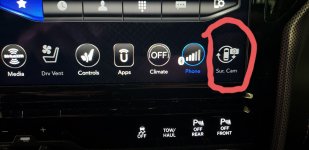
 
No, it does not come on automatically.... it needs to be manually selected.
You're gonna need to find this icon (Surround Camera) and drag/drop it on the bar at the bottom, you can access all the cameras from there when you want rather than digging through menus.
 

Attachments

  • 20210306_134424.jpg
    20210306_134424.jpg
    233.9 KB · Views: 70
Last edited:
It's actually one of the frustrating things about the Ram. They didn't go a little thing like allow for the front camera to automatically turn on at low speed.

Would be very helpful if they added that feature.

Sent from my SM-G998U using Tapatalk
 
The park warning is enough for me 99% of the times...
I just put the icon there for the times I do need I don't have to dig through menus.
 
It's actually one of the frustrating things about the Ram. They didn't go a little thing like allow for the front camera to automatically turn on at low speed.

Would be very helpful if they added that feature.

Sent from my SM-G998U using Tapatalk
That would be a bigger pain for us who dont need the front camera ever
 
If it were just a selectable option like it should be it wouldn't bother you

Sent from my SM-G998U using Tapatalk
 
No, it does not come on automatically.... it needs to be manually selected.
You're gonna need to find this icon (Surround Camera) and drag/drop it on the bar at the bottom, you can access all the cameras from there when you want rather than digging through menus.
Thanks Gondul, i did that, just wanting to know if the only way that it will come on is if you physically activate it.....wanting to know if.....you pull up close to something, will it activate on it's own to SHOW you how close uou are.
Thanks
 
Thanks Gondul, i did that, just wanting to know if the only way that it will come on is if you physically activate it.....wanting to know if.....you pull up close to something, will it activate on it's own to SHOW you how close uou are.
Thanks
No it will not do it on its own but really how often would you need to be that close to something lol
 
No it will not do it on its own but really how often would you need to be that close to something lol
Literally every single time I park in my garage. Agreed with OP, it’s a pretty big miss on Rams part.
 
They are all like that stop being lazy lol
Nope. $90k truck. Needs to do what it’s meant to do.
I did figure out a work around however, when the front sensor beeps and if worried about hitting an object, shift into reverse, then back into drive and front camera will display. Again, this is how it was intended to work. Shouldnt have to throw it into reverse to make it so.
 
Last edited:
Nope. $90k truck. Needs to do what it’s meant to do.
I did figure out a work around however, when the front sensor beeps and if worried about hitting an object, shift into reverse, then back into drive and front camera will display. Again, this is how it was intended to work. Shouldnt have to throw it into reverse to make it so.

Working as designed.

Just put the surround camera button in the Uconnect screen. When you press it, it will show the front camera first. Isn't that easier and quicker than shifting?
 
Working as designed.

Just put the surround camera button in the Uconnect screen. When you press it, it will show the front camera first. Isn't that easier and quicker than shifting?
When the park sense alarm is inititiated why would the corresponding camera not activate? It’s literally the biggest value of having a front camera. I know you’re the resident expert Brutal (and love commenting on my comments) but a little common sense would tell you that the purpose of the front camera is to see objects in front of you typically when parking or going slowly up to an object (again, OPs entire point). Shouldnt have to press a button to activate it, just like I don’t have to push a button after going from reverse to drive (and no, pushing multiple buttons is no quicker/easier than shifting IMO). Last note, I do have the surround camera button saved on my Uconnect and when I press it it shows surround and backup not front camera. Perhaps I can change this setting somewhere to do what you’re are suggesting it will do?

Guess we can agree to disagree on if it is “working as designed”.
 
When the park sense alarm is inititiated why would the corresponding camera not activate? It’s literally the biggest value of having a front camera. I know you’re the resident expert Brutal (and love commenting on my comments) but a little common sense would tell you that the purpose of the front camera is to see objects in front of you typically when parking or going slowly up to an object (again, OPs entire point). Shouldnt have to press a button to activate it, just like I don’t have to push a button after going from reverse to drive (and no, pushing multiple buttons is no quicker/easier than shifting IMO). Last note, I do have the surround camera button saved on my Uconnect and when I press it it shows surround and backup not front camera. Perhaps I can change this setting somewhere to do what you’re are suggesting it will do?

Guess we can agree to disagree on if it is “working as designed”.
Hell i dont have a front cam or sensors and i can get within an inch of anything in front of my truck perhaps you should learn to drive instead of relying on gadgets.... it is working as designed like every other brand....
 
Hell i dont have a front cam or sensors and i can get within an inch of anything in front of my truck perhaps you should learn to drive instead of relying on gadgets.... it is working as designed like every other brand....
Congrats bud. Here’s your gold star.

Completely missing the point, but not surprised in the slightest.
 
When the park sense alarm is inititiated why would the corresponding camera not activate? It’s literally the biggest value of having a front camera. I know you’re the resident expert Brutal (and love commenting on my comments) but a little common sense would tell you that the purpose of the front camera is to see objects in front of you typically when parking or going slowly up to an object (again, OPs entire point). Shouldnt have to press a button to activate it, just like I don’t have to push a button after going from reverse to drive (and no, pushing multiple buttons is no quicker/easier than shifting IMO). Last note, I do have the surround camera button saved on my Uconnect and when I press it it shows surround and backup not front camera. Perhaps I can change this setting somewhere to do what you’re are suggesting it will do?

Guess we can agree to disagree on if it is “working as designed”.

If you feel you're being singled out or targeted for some obscure reason that completely escapes me, unless you're still mad that one of your threads got moved, you're welcome to send me a PM to discuss it.

In the mean time, how about we agree not to insult other members?

Hell i dont have a front cam or sensors and i can get within an inch of anything in front of my truck perhaps you should learn to drive instead of relying on gadgets.... it is working as designed like every other brand....

Let's all keep the personal insults out of the conversation.
 
Sounds like you want to use it for parking the front camera is intended for off road use.


Sent from my motorola edge plus using Tapatalk
 
No it will not do it on its own but really how often would you need to be that close to something lol
Every time i park in the garage, or pull up in a veterans parking spot (they have a pole in 4 spots for us) in a lowes parking lot....yep, i can choose the camera, but when the sensors on the front go off......would be nice that it activates the camera....just saying.
Thanks H3
 
Back
Top