What's new
Ram Heavy Duty Forum

Register a free account today to become a member! Once signed in, you'll be able to participate on this site by adding your own topics and posts, as well as connect with other members through your own private inbox!

Front Camera View

Red Rider

Member
Messages
50
Reaction score
36
Points
18
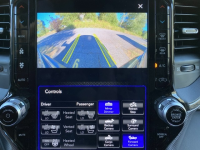
When I put the truck in reverse, the rear view and birdseye view comes up along with icons to access a number of other cameras…including the front camera. Does anyone know of anyway to pull up the front camera when NOT in reverse? If you you pull up the camera icon screen, there are a ton of options except the front camera. Is this something that could be changed with the AlphaOBD program? I would find it handy when pulling into a tight parking spot or getting up close to an object.

Thanks,
 
It should be there under apps and you should be able to drag it to the lower bar for quick access
 
Mine shows up under the " cameras " icon. Can you take a picture of what your " cameras " icon shows when you open it?
 
On my 22 with the 12" screen I added a shortcut for the surround view with the front camera
 
You could do all that, or use AlfaOBD to enable the forward facing off-road camera button with tire direction/grid lines ala Power Wagon (only works on 2500).


1660105989498.png
 
You could do all that, or use AlfaOBD to enable the forward facing off-road camera button with tire direction/grid lines ala Power Wagon (only works on 2500).


View attachment 42454
Has it been tried on the UC5 yet?
 
Thanks to one and all for the input. I used AlphaOBD to make the two changes noted above and all is well.
 
Disabled from the factory when in drive due to liability reasons. They don’t want people looking at screen at highway speeds and getting distracted.
 
Back
Top