What's new
Ram Heavy Duty Forum

Register a free account today to become a member! Once signed in, you'll be able to participate on this site by adding your own topics and posts, as well as connect with other members through your own private inbox!

Dash Cam power

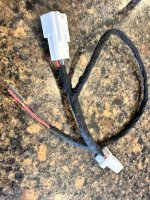
Running into a problem. While I was able to easily get to the power wire at the mirror & the Dongar connector fit just fine, things didn't work. Finally determined that the wire at the mirror has insufficient power. Only tested at 3 volts, and I need 12 to run the dash cam. Also, determined that pink/yellow wire at passenger side is also 3 volts.
I'm sure you've got this sorted by now, just bumping this up for future readers. The Dongar connectors are reducing 12v to USB levels 2-5v, circled in the photo, adapter, reducer, flux capacitor, whatever it's called inside the shrink wrap. For a non-usb powered dash cam you need the pass through set up with the connectors but instead of tee-ing off to usb, tee off to red and black wires.
Image 3-10-23 at 10.30 AM.jpg
 
so open it up and remove the adapter, reducer, flux capacitor, whatever it's called inside the shrink wrap leaving just the red and black wires to connect to?
 
so open it up and remove the adapter, reducer, flux capacitor, whatever it's called inside the shrink wrap leaving just the red and black wires to connect to?
I just ordered a correct Tee from @Jimmy07 instead of that. Its a pretty small piece to be fishing for the wires but if you already own it, yes.
 
Last edited:
The bummer is only ACC power is available up there, which can work for a lot of folks but many dash cams have parking modes now and you need always on for that. So I ended up just running down the A pillar into the dash and pulled everything from the Aux/upfitter wiring leads for power and acc.


Sent from my iPhone using Tapatalk
 
The bummer is only ACC power is available up there, which can work for a lot of folks but many dash cams have parking modes now and you need always on for that. So I ended up just running down the A pillar into the dash and pulled everything from the Aux/upfitter wiring leads for power and acc.


Sent from my iPhone using Tapatalk
Yes, parking mode is a whole other ball of wax, an expensive one if you want any significant time. I can't get behind the cost of the battery packs 20 hours of parking mode for $330-ish. BX-124X Power Magic Ultra as the example. If I was doing it I'd put a full size deep cycle truck battery in the bed on a small solar charger and get a week of parking mode for $150 but this involves routing battery cables to the engine compartment to charge fully when the engine is running, some people aren't comfortable with that or can't spare the space.
 
I'm sure you've got this sorted by now, just bumping this up for future readers. The Dongar connectors are reducing 12v to USB levels 2-5v, circled in the photo, adapter, reducer, flux capacitor, whatever it's called inside the shrink wrap. For a non-usb powered dash cam you need the pass through set up with the connectors but instead of tee-ing off to usb, tee off to red and black wires.
Thanks for the bump of this issue, which is helpful for others. For me, yes I solved the power supply by running wire down passenger side pilar and to back of Uconnect screen. Problematic for me was that I ordered the Dongar connector that didn't have the USB connector, but received the one that did. I cut off the USB connector & attempted to connect power to the two wires. Nothing worked for some strange reason, so I went to "plan B." My setup does not power the dash cam when engine is off, as when truck is parked & recording parking lot. This works for me as my truck mostly stays inside my garage.
 
Yes, parking mode is a whole other ball of wax, an expensive one if you want any significant time. I can't get behind the cost of the battery packs 20 hours of parking mode for $330-ish. BX-124X Power Magic Ultra as the example. If I was doing it I'd put a full size deep cycle truck battery in the bed on a small solar charger and get a week of parking mode for $150 but this involves routing battery cables to the engine compartment to charge fully when the engine is running, some people aren't comfortable with that or can't spare the space.

I’m running a Viofo A139 Pro with their hardwire kit. The wire kit has a cut off for power levels and in the app you can set how long you want parking to work. I have mine set to park record for 3 hours. I’m usually not parked longer than that.


Sent from my iPhone using Tapatalk
 
I’m running a Viofo A139 Pro with their hardwire kit. The wire kit has a cut off for power levels and in the app you can set how long you want parking to work. I have mine set to park record for 3 hours. I’m usually not parked longer than that.


Sent from my iPhone using Tapatalk
Nice unit. I set my wife up with the Blackvue 750XPlus LTE, I noticed they've just released a 770X and 970X but at the time, built in LTE was the major deciding factor for me in why I chose it. I wanted it to record and notify at all times and not be limited by wifi access or a separate LTE module. We've had some very frustrating phone calls in the past where she has gotten lost on North Fort Hood and that can get real sketch and you can end up on a live fire range from some of the open (unofficial) roads downrange the scrappers from Gatesville use to collect expended sabot rounds so I got her this camera so I can go live view remotely, see what she is seeing and help her out. Now, driving into downtown DC, with the constant detours and construction it has been very helpful.
Sample phone conversation when she's lost:
Her: I think I'm lost
Me: Where you at
Her: By the Louis Vuitton store
Me: That means nothing to me, what street?
Her: I don't know I think Siri is in cahoots with Big Oil, she's running me all over the place.
Me: Give me a sec
Her: I'm checking the store hours real quick
Me: Ok, turn right at the next intersection, go two blocks and turn right on K street
Her: They open at 11:00 today
Me: Did you hear me?
Her: No
Me: Turn right at the next intersection, go two blocks and turn right on K street
Her: Thank you babe, I might do some shopping after work
Me: :(
 
I'm sure you've got this sorted by now, just bumping this up for future readers. The Dongar connectors are reducing 12v to USB levels 2-5v, circled in the photo, adapter, reducer, flux capacitor, whatever it's called inside the shrink wrap. For a non-usb powered dash cam you need the pass through set up with the connectors but instead of tee-ing off to usb, tee off to red and black wires.
View attachment 53092
Received what I need from Jimmy, for a non USB powered dash cam.
IMG_0708.JPG
 
The bummer is only ACC power is available up there, which can work for a lot of folks but many dash cams have parking modes now and you need always on for that. So I ended up just running down the A pillar into the dash and pulled everything from the Aux/upfitter wiring leads for power and acc.


Sent from my iPhone using Tapatalk
Which wires are ACC and ground? Sorry if it’s posted earlier didn’t see it.
 

Attachments

  • image.jpg
    image.jpg
    431.7 KB · Views: 39
I’ll leave that response to someone else as I didn’t even check them. I had read about that it was on ACC / Ground there and needed +12 so I just moved on to a different location.


Sent from my iPhone using Tapatalk
 
Which wires are ACC and ground? Sorry if it’s posted earlier didn’t see it.
See here https://hdrams.com/forum/index.php?threads/dash-cam-power.7948/post-159669

and this one

Hope that helps
 
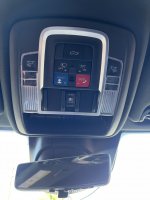
I looked through this thread and I can’t find any indication of acc power pinout in the overhead console. I have adaptive cruise, here is an overall pic. If needed I can post the part number of the overhead console.
 
Looking for the wire color/pinout of acc and gnd

THANK YOU!!
 

Attachments

  • image.jpg
    image.jpg
    328.4 KB · Views: 19
Is this in the console or in the rearview? I have adaptive cruise, are these wires in there for this set up too?

How do I remove the rear view garnish trim without damage on the DASM, rearview assembly?
There's 12v ignition power at the mirror on pink/yellow, ground on black.
Most dash cams use 5v, for them you need a 12v to 5v Power Adapter Reduc
 
Is this in the console or in the rearview? I have adaptive cruise, are these wires in there for this set up too?

How do I remove the rear view garnish trim without damage on the DASM, rearview assembly?
I can't speak to a DASM mirror. Here are my notes for my 2020

Wiring Cover Removal:
Remove the upper smaller plastic piece of the two plastic assemblies, this can be done using a small screwdriver and slightly sliding the piece up. Leave the larger lower plastic piece on, it will come off with the mirror removal and can be removed when the mirror is removed.

Remove Mirror:
Twist the mirror & mount assembly (and bottom cover) 1/6 turn counter-clockwise to the left.

Mirror Harness Wiring:
The pink with yellow stripe wire is 12V hot when "Key ON" to Accy or Run
The black wire is ground.

Replacing Mirror:
There's a hex bolt head and a base with two notches attached to the windshield. The mirror arm has two nubs that you align up to the two notches on the windshield mount. When seated push hard and rotate the assembly about 1/6th clockwise to the right until it stops.
 
That’s funny, sometimes you just have to take a step back to a simpler approach. I feel silly that I didn’t do this prior to posting. Thank you for the perspective!
 
Back
Top