What's new
Ram Heavy Duty Forum

Register a free account today to become a member! Once signed in, you'll be able to participate on this site by adding your own topics and posts, as well as connect with other members through your own private inbox!

cell phone mount

Well for starters....

1. The mount is designed to clamp/crimp on the bottom of your phone, if you have a larger case, it doesn't work.
2. The charging cable ALWAYS get caught in the grove under where the phone drops in, so while futzing around to get the phone out of the "mount" the cable gets caught and invariably pulls out, shutting down car play... arghhh.
3. The phone mount is facing the rear of the truck (it's square) so using the phone at all is a pain in the ass since it's not facing the driver, so you have to pull it out... then see #2... cable gets pulled out.
4. That big beautiful screen we have is currently have is mostly (1/2) useless to iPhone users since we only get to use half the screen and end up with a stupid display beneath it that shows Sirius Weather or whatever... heck you can't even display the radio interface nor the on-board navigation screen, all of those take over the CarPlay screen. God forbid you hit a camera button and it would use that lower section... nope it replaces the CarPlay display. Love to take the software engineer who made this out behind the building on day...
5. Apple designed Carplay so that you are forced to use your phone to enter addresses on the move (when Siri voice screws it up) since they disable the onscreen keyboard when the truck is moving.


Really it is item number 2 and 3 that drive me the most crazy though I gotta admit #4 was the most disappointing about the nice huge useless 12" display unless you are using on-board Nav. If only the camera system could take advantage of the entire screen... nope. Grrrr.

Now that I have a movable mount I'm much happier. To each their own eh!
Can't help with 1, 2, or 3, but for #4 on my 2020 12" you could display the audio controls below CarPlay. That's how I usually had mine set up. The 22s with Uconnecct 5 can use the whole screen for CarPlay.

On #5, that's actually RAM, not Apple that did that. The phone gets a list of restrictions from the system it's plugged into. On my VW I used software (VCDS) to change the configuration and it gives me a keyboard now. Unfortunately even with AlfaOBD you can't make a similar change to the Uconnect system.
 
Well for starters....

1. The mount is designed to clamp/crimp on the bottom of your phone, if you have a larger case, it doesn't work.
2. The charging cable ALWAYS get caught in the grove under where the phone drops in, so while futzing around to get the phone out of the "mount" the cable gets caught and invariably pulls out, shutting down car play... arghhh.
3. The phone mount is facing the rear of the truck (it's square) so using the phone at all is a pain in the ass since it's not facing the driver, so you have to pull it out... then see #2... cable gets pulled out.
4. That big beautiful screen we have is currently have is mostly (1/2) useless to iPhone users since we only get to use half the screen and end up with a stupid display beneath it that shows Sirius Weather or whatever... heck you can't even display the radio interface nor the on-board navigation screen, all of those take over the CarPlay screen. God forbid you hit a camera button and it would use that lower section... nope it replaces the CarPlay display. Love to take the software engineer who made this out behind the building on day...
5. Apple designed Carplay so that you are forced to use your phone to enter addresses on the move (when Siri voice screws it up) since they disable the onscreen keyboard when the truck is moving.


Really it is item number 2 and 3 that drive me the most crazy though I gotta admit #4 was the most disappointing about the nice huge useless 12" display unless you are using on-board Nav. If only the camera system could take advantage of the entire screen... nope. Grrrr.

Now that I have a movable mount I'm much happier. To each their own eh!
I've never had the power cable get pulled out of the phone when removing it from the cradle. Mine is a Samsung phone with a USB-C charging port. Not putting down your choice to run a phone mount, I'm just surprised that is listed among your complaints.
 
The 22s with Uconnecct 5 can use the whole screen for CarPlay.
My '22 is actually useful in this respect other than all the other quirks that come with it. I take my phone out of my pocket, shove it into the charger (gets ridiculously hot in the Otterbox Defender, but still charges), and it auto-links to Carplay and I'm off to my Home screen set up with page 1 as Map on top and Media on the bottom...page 2 is Media on top & phone Recents & Favorites on the bottom, and page 3 is OffRoad top & Media bottom.

Carplay is full page whatever I choose from the 8-squares menu off the enabled apps on my phone....other than Text/Chat. I normally just flip into Spotify or maintain my standing as last Pandora user in the world. Sometimes I Waze it if I'm ready to base my interstate run on how many "Vehicles stopped on shoulder ahead" that I want to hear about.

FYI, I was this many days old when I learned that the icons on the bottom of the screen for Comfort and Nav actually change. They let you know at a glance on what fan speed & air flow (or "A" for auto) on the Comfort icon as well as the compass direction on the Nav icon. I know that takes special programming and is a nice touch.
 
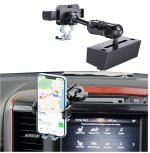
Just got an iPhone 14 pro, considering the Bulletpoint system. Question about the spring loaded clamp that grabs the phone.
Will it interfere with the side buttons on the phone?
Do you have to find a sweet spot while clamping the phone?
Will probably go with mag mount, but am thinking spring type clamp would be stronger...?
 
Just got an iPhone 14 pro, considering the Bulletpoint system. Question about the spring loaded clamp that grabs the phone.
Will it interfere with the side buttons on the phone?
Do you have to find a sweet spot while clamping the phone?
Will probably go with mag mount, but am thinking spring type clamp would be stronger...?
Quad lock, no interference, it will wireless charge your phone as well. Then you get a case and a holder all in one.
 
Just got an iPhone 14 pro, considering the Bulletpoint system. Question about the spring loaded clamp that grabs the phone.
Will it interfere with the side buttons on the phone?
Do you have to find a sweet spot while clamping the phone?
Will probably go with mag mount, but am thinking spring type clamp would be stronger...?
Yes, the spring type can activate the buttons. Mine phone was freaking out one time, the buttons tried to activate emergency call. Never heard the noise it made before that. So, I’m just careful on how I put the phone in the Mount to avoid the buttons.
Can’t speak to the magnet, I use that for the radio microphone and it seems strong.
 
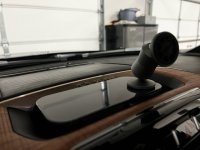
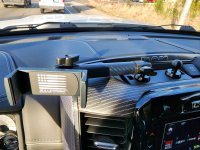
Bayou Goat with Clutchit magnetic mounts. Picture is my TPMS, but works great for the phone too. You can use pretty much any suction or magnetic mount on the flat plate.

IMG_0330.jpgIMG_0329.jpg
 
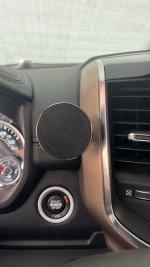
Course Motorsports. Out of the way, not in front of the vent or stereo, no go-go gadget arms hanging over your dash and yes they make a chargeable version. And, yes, works with column shifter.
 

Attachments

  • Phone Mount.jpg
    Phone Mount.jpg
    267.3 KB · Views: 20
Back
Top