
What's new
Ram Heavy Duty Forum

Register a free account today to become a member! Once signed in, you'll be able to participate on this site by adding your own topics and posts, as well as connect with other members through your own private inbox!

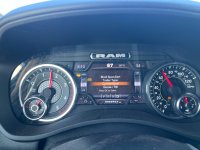
Blind Spot Alert Trailer Type selection issue

SpeyRam

Well-Known Member
Messages
249
Reaction score
393
Points
63
Location
Washington State
Has anyone else experienced this condition when you can't select/clear the trailer type selection for the Blind Spot Alert when towing until the truck is shut off and clears the screen and resets? It occasionally happens while towing my truck camper and renders all other gauge cluster functions from the steering wheel buttons inoperable (other than cruise control) until the truck is shut off and resets itself. Quite annoying.
1724711386976.jpeg
 
Mine occasionally does it. My truck is also a 24 3500. I have not found anything that corrects it. It does seem to happen more with my boat (that does not have electric brakes) hooked up than with other trailers. Of course I pull my boat more than other trailers too.
 
I've towed with my new 2024 2500 several times and when I get that message, I hit okay and the message clears. No problems so far towing my 26' trailer. Mine is the 6.4 gasser, not sure if that makes a difference.
 
Last edited:
Has anyone found a solution for this? My 24 3500 gets stuck on that display all the time.
 
I dont have a problem selecting, but if I select gooseneck it shuts off blind spot alert. Additionally the trailer reverse guidance feature doesn't work at all.
 
Yep, when towing my 30' toy hauler it does it occasionally. No rhyme or reason why, just does it. It does reset when truck is turned off but I've also had it go back to normal after about 20 minutes of driving as well. Really weird.
 
Does selecting one of these options allow blind spot detection to work while ignoring the trailer or something like that?

I have a cabover truck camper and I need to turn it off when installed otherwise it will give me a warning that I have to ignore and have the annoying light in the mirror, although the light is a good reminder that I have turned it off. Sometimes I forget to turn it back on when I take the camper off.

Would one of those settings allow me to have the camper on with the blind spot alert still semi functional?
 
Does selecting one of these options allow blind spot detection to work while ignoring the trailer or something like that?
Possibly. If you select conventional, it’s supposed to allow blind spot monitoring to work, but in extended mode for the trailer. The truck will try to detect the length of the trailer, but in your case, won’t see one. I normally leave mine in Auto as it does a decent job of identifying the length of the trailer after a few turns, but I believe there is a manual length setting as well. It will probably turn off your rear proximity sensors as well.
 
Last edited:
When I look at my Blind Spot settings the trailer was already set to Auto when the monitor was giving me a warning. I couldn't find an option to set it to a conventional trailer. My camper doesn't have trailer brakes (obviously) so I don't know if that has anything to do with it.

The camper blocks the taillights to the rear but they have a view out the sides (my understanding is the sensors are in the taillights).
 
When I look at my Blind Spot settings the trailer was already set to Auto when the monitor was giving me a warning. I couldn't find an option to set it to a conventional trailer. My camper doesn't have trailer brakes (obviously) so I don't know if that has anything to do with it.
The conventional/gooseneck selector should pop up when you connect the camper to the trailer light connector. I’ve seen it on a utility trailer with no brakes connected to the 4 pin, so the lack of electric brakes shouldn’t matter.
The camper blocks the taillights to the rear but they have a view out the sides (my understanding is the sensors are in the taillights).
This could be the problem. Yes, I believe the sensors for this are in the tail lights. If it’s blocked from the rear it likely won’t work even though the sides are clear. Sensor would need to be able to detect behind the vehicle, which is likely blocked.
 
The conventional/gooseneck selector should pop up when you connect the camper to the trailer light connector. I’ve seen it on a utility trailer with no brakes connected to the 4 pin, so the lack of electric brakes shouldn’t matter.
Interesting, I don't ever remember seeing the message when I connect my 7 pin connector for the camper.

This could be the problem. Yes, I believe the sensors for this are in the tail lights. If it’s blocked from the rear it likely won’t work even though the sides are clear. Sensor would need to be able to detect behind the vehicle, which is likely blocked.
It wouldn't be so bad if the Blind Spot setting wasn't buried in the vehicle settings. I can't figure out out how to make a shortcut to the setting. It would be nice if I could tie it to the rear park sensor switch which I also have to turn off when the camper is on. Better yet, let me have a calibrated setting for when the camper is on. It wouldn't be perfect but still better than nothing.
 
This happened to me multiple times over the weekend. The sensor would calculate to auto or 30ft and then the selection screen for conventional or 5th wheel would pop up and lock up. The screen lock up seemed to happen if I was turning when the sensor would calculate the trailer's length. The easy answer would be to not turn while while it was doing it's thing, but I was getting back onto the freeway from the rest area one time and pulling out of a gas station another time couple of times. Pulling over and turning off the ignition was the only way to to get the rest of the displays back.
 
I have a 2024 2500 Rebel Cummins that I pull 40' TT with a 7-pin. I've traveled around 10K with this trailer in tow around the country with no issues with the blind-spot trailer detection. Over the weekend I pulled a short u-haul enclosed trailer a bit over 1K miles with a 4pin that did this every time I stopped. Each time I had to shut the motor off for 10-30s, restarted, & the OK button started functioning again as well as the blind-spot with trailer. What a PITA.
 
Same problem here. Works fine using the 7 pin, but when using the 4 pin my screen often locks up as described by others. Annoying to be staring at that for a multi-hour drive.
 
Same problem here. Works fine using the 7 pin, but when using the 4 pin my screen often locks up as described by others. Annoying to be staring at that for a multi-hour drive.
Are you using an adapter for the 4 pin? I have the same issue. Wondering if Mopar brand adapter, vs an off brand, would somehow fix the issue.
 
Back
Top