What's new
Ram Heavy Duty Forum

Register a free account today to become a member! Once signed in, you'll be able to participate on this site by adding your own topics and posts, as well as connect with other members through your own private inbox!

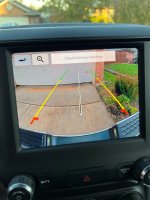
Backup screen warning message avoidance

RV_Goose

Well-Known Member
Messages
906
Reaction score
559
Points
93
I figured out that if I hit the backup camera button before I put truck in reverse, the warning banner across the top does not display when I put the truck in reverse.
-
That warning is very annoying to me as it usually is covering something I need to see.
 
I am only about 400 miles in my new 2500, and this banner things annoys me to no end.
I will give this a try, thanks!
 
What banner are you referring to? When I go into reverse I do not see any banners on the screen. For reference, I have a 22 with the 8.4 non-nav screen.
 
What banner are you referring to? When I go into reverse I do not see any banners on the screen. For reference, I have a 22 with the 8.4 non-nav screen.
Same here and I don't get any banners when in reverse.
 
nope.... I have to take a drive here in a bit... I will take pic
 
Now, considering I only have about 400 miles on this thing, I am still learning about it.
I did see where the banner goes away when the headlights are on.
Interesting (not)
 

Attachments

  • B_up_Cam_banner.jpg
    B_up_Cam_banner.jpg
    387.9 KB · Views: 37
Now, considering I only have about 400 miles on this thing, I am still learning about it.
I did see where the banner goes away when the headlights are on.
Interesting (not)

The banner where it says "check entire surroundings " on my 2020 is a banner across the entire top of the screen for what seems like a long time, especially when trying to backup quickly. It only lasts seconds, but it seems like forever when backing into my driveway with 2-3 cars behind me.
 
Back
Top