
I’ve got it in mine. They aren’t lying about it not moving....like ever. I got the adapter and use a zeehoo wireless charger. Works greatAnyone here use Bulletpoint mounts? They use the existing screws in the tray above the radio. They make a magnetic one and a traditional one
View attachment 13824
Ram Heavy Duty Forum
You are using an out of date browser. It may not display this or other websites correctly.
You should upgrade or use an alternative browser.
You should upgrade or use an alternative browser.
Anyone add wireless phone charging that is NOT the Ram built in one?
- Thread starter jrhoads23
- Start date
robert_2500
New Member
- Messages
- 2
- Reaction score
- 0
- Points
- 1
Another one I have been looking at that seems nice is Direct Fit by Course Motorsports. Looks to be roughly equivalent to the Bulletpoint, but you don't lose the use of your tray. It looks like the Bulletpoint allows you to move the final position some, but if the Direct Fit one is fixed in a good spot, I like the idea of keeping my tray available. Anyone have one of those? They have a magnetic one and a wireless charging one.

Direct Fit Phone Mount - Dodge Ram 1500/2500/3500/4500/5500 (2019+ New
Fits: Dodge Ram 1500/2500/3500/4500/5500 (2019+) Without 12" screen Finally a phone mount designed specifically to bolt onto your Dodge truck. Unlike the universal vent mounts, stick on mounts or suction cup mounts, Course Motorsports Direct Fit phone mounts are vehicle specific and are...coursemotorsports.com
I arrived here from a Google search. Thank you for this post. I've ordered one and it arrives today. I can't wait.
I arrived here from a Google search. Thank you for this post. I've ordered one and it arrives today. I can't wait.
I have been using the Direct Fit one for a while now and like it a lot (I got the wireless charger one). Not sure if you got that one but here are a couple notes that I found...
The only downside is you lose your view of the left 1 inch or so of the radio (I have the 8" display). Not the end of the world but there is some useful stuff that you can't really see.
It says in the documentation that it needs a certain amps (?) to operate properly, and I found that to be true. If it is underpowered, the unit will engage / disengage every couple seconds, making it pretty much unusable.
Cigarette lighter: The unit come with a cigarette lighter adapter and if you use the one up on the little dash tray area, it provides enough power for it to work properly. The issue I have with this is 1) I like using that area for other stuff - having the cord and cig lighter adapter in there takes up some space. And 2) I believe that gets constant power - even when the truck is off. I prefer not to have that (some people may want that)
There are 4 USB ports under the radio - two larger ones and two smaller ones. These do not provide enough power to the unit (as described above) so do not use them
The last place I tried was the USB port in the top tray of the center console armrest (I have the front row bucket seats). This port DID provide enough power to it and it turns off when the truck is turned off. So I got a 6 foot USB cable and routed it from the wireless charger immediately into the air vent right there (pulled the center dash off which is really easy). I ran it behind the dash so it came out the bottom - into the main center console area and just ran it to the back and then tucked it in the back of the top tray and plugged it in. Works good and a 6 foot cable seems to be the perfect length. I can post pics if someone wants.
NOTE: I have the 8" screen - I believe everything is different if you have the 12" screen. The mount that ships with it is different and other stuff like routing the USB cable may be different.
robert_2500
New Member
- Messages
- 2
- Reaction score
- 0
- Points
- 1
I got the most basic one so I could use my own head on the ball part. I use Android Auto, and the USB-C cord rapid charges my phone, so I am good and happy there.I have been using the Direct Fit one for a while now and like it a lot (I got the wireless charger one). Not sure if you got that one but here are a couple notes that I found...
The only downside is you lose your view of the left 1 inch or so of the radio (I have the 8" display). Not the end of the world but there is some useful stuff that you can't really see.
My truck is not my daily driver, so I will soon see what you are talking about when we go on a trip. I hope it's not too bad.
It says in the documentation that it needs a certain amps (?) to operate properly, and I found that to be true. If it is underpowered, the unit will engage / disengage every couple seconds, making it pretty much unusable.
Cigarette lighter: The unit come with a cigarette lighter adapter and if you use the one up on the little dash tray area, it provides enough power for it to work properly. The issue I have with this is 1) I like using that area for other stuff - having the cord and cig lighter adapter in there takes up some space. And 2) I believe that gets constant power - even when the truck is off. I prefer not to have that (some people may want that)
There are 4 USB ports under the radio - two larger ones and two smaller ones. These do not provide enough power to the unit (as described above) so do not use them
The last place I tried was the USB port in the top tray of the center console armrest (I have the front row bucket seats). This port DID provide enough power to it and it turns off when the truck is turned off. So I got a 6 foot USB cable and routed it from the wireless charger immediately into the air vent right there (pulled the center dash off which is really easy). I ran it behind the dash so it came out the bottom - into the main center console area and just ran it to the back and then tucked it in the back of the top tray and plugged it in. Works good and a 6 foot cable seems to be the perfect length. I can post pics if someone wants.
NOTE: I have the 8" screen - I believe everything is different if you have the 12" screen. The mount that ships with it is different and other stuff like routing the USB cable may be different.
When I ordered the direct fit, it says on the description works with everything but the 12" so at least in my version, it doesn't even work with the 12".
Thank you.
I believe they have a totally different part number for the 12" screenWhen I ordered the direct fit, it says on the description works with everything but the 12" so at least in my version, it doesn't even work with the 12".
Mine is battery poweredMine is ignition on aswell...

John Jensen
Well-Known Member
- Messages
- 1,274
- Reaction score
- 1,154
- Points
- 113
I also use `the BulletPoint Base. I got the 20mm to 17mm ball adapter and mounted a iOttie wireless phone mount to it.
Like others have reported, the usb ports do not have enough power to power wireless iOttie unit so I use the 12v outlet.
I changed the 12v outlet from battery to ignition by moving fuse 90 to the 91 slot.
I'm changing from the single BulletPoint mount to the double so I can add a passenger iOttie wireless.
Beranimus, I tried the ZeeHoo and liked it. It was too snug on my phone with case. The iOttie opens a bit wider and holds my phone with its front flap case better.
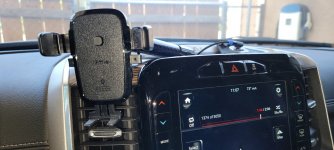
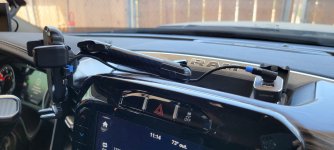
Like others have reported, the usb ports do not have enough power to power wireless iOttie unit so I use the 12v outlet.
I changed the 12v outlet from battery to ignition by moving fuse 90 to the 91 slot.
I'm changing from the single BulletPoint mount to the double so I can add a passenger iOttie wireless.
Beranimus, I tried the ZeeHoo and liked it. It was too snug on my phone with case. The iOttie opens a bit wider and holds my phone with its front flap case better.
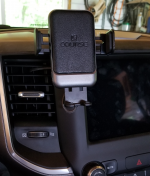
It looks like the BulletProof base gives some more flexibility on where to put it. With the Direct Fit one, it is not adjustable (other than the little bit you can adjust from the swivel ball). Here is the view for me - as you can see it blocks just the top left corner of the radio. Not the end of the world and you don't have to move much to see it - but just something to note. For me that is where I look a lot to switch from AM to FM and also to see my climate temp if the sync option is not on between driver and passenger

John Jensen
Well-Known Member
- Messages
- 1,274
- Reaction score
- 1,154
- Points
- 113
Buy a 1" to 20mm ball adapter and use your Ram mounts on the Bulletpoint.I wish Bulletpoint had a 1" ball. Then I could use their mount with my Ram Mounts stuff.
I got a 20mm to 17mm to use my misc phone mounts on the Bulletpoint
Doesn't that just adapt the Bulletpoint arms though? Maybe I am missing something, I have a bunch of Ram Mount arms and mounts now.Buy a 1" to 20mm ball adapter and use your Ram mounts on the Bulletpoint.
I got a 20mm to 17mm to use my misc phone mounts on the Bulletpoint
John Jensen
Well-Known Member
- Messages
- 1,274
- Reaction score
- 1,154
- Points
- 113
Not sure what you are asking.Doesn't that just adapt the Bulletpoint arms though? Maybe I am missing something, I have a bunch of Ram Mount arms and mounts now.
The adapter 20mm end mounts to the Bulletpoint and provides the 1"ball to mount your Ram mounts to
I would like to see the two balls on the dash-mounted Bulletpoint tray be 1". Then all my Ram arms and device mounts would cleanly work without any adaptors. I may just end up making my own tray. This is what I did for my jeep tray mount.Not sure what you are asking.
The adapter 20mm end mounts to the Bulletpoint and provides the 1"ball to mount your Ram mounts to
DieselJack
New Member
- Messages
- 8
- Reaction score
- 1
- Points
- 3
It looks like the BulletProof base gives some more flexibility on where to put it. With the Direct Fit one, it is not adjustable (other than the little bit you can adjust from the swivel ball). Here is the view for me - as you can see it blocks just the top left corner of the radio. Not the end of the world and you don't have to move much to see it - but just something to note. For me that is where I look a lot to switch from AM to FM and also to see my climate temp if the sync option is not on between driver and passenger
Thanks for the picture. How is the ball attached to the bracket?
Would I be able to make a small plate to move the ball an inch or so to the left so it won't obscure the screen?
fwiw, I have the proclip iphone 11 pro max mount on the arm and it does not obscure my 12 screen at all. It does obscure the temp up button but I don’t need to see that button to use it.Thanks for the picture. How is the ball attached to the bracket?
Would I be able to make a small plate to move the ball an inch or so to the left so it won't obscure the screen?
2022 3500 Laramie I just picked up has OEM Qi charger. It only charges 1 phone at a time and is slow. Dealer is checking it out. Ram mechanic friend says his is awesome in his truck and charges 3 phones at a time. I believe it is supposed to be 15amp. By the way, Carplay connects wirelessly in 2022 and is great.My new 2500 is getting delivered in a week or two. I did not order it with the built in wireless phone charging. I would like to know what people have done to add wireless charging after the fact - something that is NOT the Ram wireless charger. For example, has anyone ordered an aftermarket wireless charger from Amazon and mounted it somewhere? Or do I have to bite the bullet and order the Ram wireless charger and install it - something I really don't want to do.
I tried doing a search and all the wireless charger topics I found dealt with installing the Ram wireless charger after the fact... wondering if there is something more simple (and cheaper) out there.
This is similar to what I was planning on doing. Rumor has it new iPhones will not have charging ports so you will need some other solution eventually.
Does carplay work without being connected via charge cable? I'm assuming Apple will address that before going completely wireless though.
Terrylincecum
New Member
- Messages
- 3
- Reaction score
- 0
- Points
- 1
Anyone here use Bulletpoint mounts? They use the existing screws in the tray above the radio. They make a magnetic one and a traditional one
View attachment 13824
I have that sitting in my workshop waiting to be installed when my truck arrives from Ram. I can attest to how well it’s made and solid.