What's new
Ram Heavy Duty Forum

Register a free account today to become a member! Once signed in, you'll be able to participate on this site by adding your own topics and posts, as well as connect with other members through your own private inbox!

AlfaOBD

Yeah, so my wife has been poking throught all the settings that she could find on her 2020 Jeep Grand Cherokee Loredo 4x4 and she could find changing the door unlock all with the keyfob, but with the passive entry it only unlocks the door that she is standing infront of and she could not find anything to change it to all ... By that I mean, if she walks up to the passenger side, she can passive entry unlock the passenger side, if she walks up to the driver side she can unlock the driver, if she uses the keyfob it unlocks all doors ... Now I will say that we do not have the lowest trim but also nowhere near the fanciest of them all, so perhaps the changability is trim level dependent? She has the smallest touch screen in all the jeeps and it is nicer than the 5" that came in my 19 2500 with the touch screen, but when we had a rental 2020 Jeep with the bigger screen it had way more options you could mess with
According to the manual I found online for a 2020 GC:

If “Unlock All Doors 1st Press” is programmed all doors will unlock when you grab hold of the front driver’s door handle. To select between “Unlock Driver Door 1st Press” and “Unlock All Doors 1st Press,” refer to “Uconnect Settings” in “Multimedia” for further information.

Sounds like even though it looks like it may only be changing it for use of the fobik, it will behave the same for your passive entry as well.
 
Yeah, so my wife has been poking throught all the settings that she could find on her 2020 Jeep Grand Cherokee Loredo 4x4 and she could find changing the door unlock all with the keyfob, but with the passive entry it only unlocks the door that she is standing infront of and she could not find anything to change it to all ... By that I mean, if she walks up to the passenger side, she can passive entry unlock the passenger side, if she walks up to the driver side she can unlock the driver, if she uses the keyfob it unlocks all doors ... Now I will say that we do not have the lowest trim but also nowhere near the fanciest of them all, so perhaps the changability is trim level dependent? She has the smallest touch screen in all the jeeps and it is nicer than the 5" that came in my 19 2500 with the touch screen, but when we had a rental 2020 Jeep with the bigger screen it had way more options you could mess with
On ALL FCA vehicles with passive entry, when radio > settings > doors&locks > remote door unlock, lock/first press of key fob unlocks is set to “all doors”, then all doors will unlock no matter which passive entry handle is grasped, no matter the trim level. If this is not how yours behaves, then there’s something wrong with the system.
 
On ALL FCA vehicles with passive entry, when radio > settings > doors&locks > remote door unlock, lock/first press of key fob unlocks is set to “all doors”, then all doors will unlock no matter which passive entry handle is grasped, no matter the trim level. If this is not how yours behaves, then there’s something wrong with the system.
Well thats good to know that something is wrong with the system ... I do love FCA Quality. At least itll be a warranty fix
 
Several members have asked if someone could provide instructions on how to do a BCM backup using the Windows version of AlfaOBD. I've searched and can't find it. Could someone please provide. It would be greatly appreciated.
 
Several members have asked if someone could provide instructions on how to do a BCM backup using the Windows version of AlfaOBD. I've searched and can't find it. Could someone please provide. It would be greatly appreciated.
-Connect to the BCM like you normally would.
-Click on faults/status tab
-Click read system ID, let the list fully populate
-Click read system status, let the list fully populate
-Click view log
-In that new window that pops up with the log, click file, and save it wherever you want on your laptop.

*NOTE*- Each time you do this, the new read status/ID will get added onto the end of the previous ones in the same log- (example, if you read the system status and ID 5 consecutive times, you will have a single file with 5 logs to scroll through from old to new). If you want a single current status/ID each time you read the BCM, click clear log before you read the system status/ID.
 
*NOTE*- Each time you do this, the new read status/ID will get added onto the end of the previous ones in the same log- (example, if you read the system status and ID 5 consecutive times, you will have a single file with 5 logs to scroll through from old to new). If you want a single current status/ID each time you read the BCM, click clear log before you read the system status/ID.

Thanks, @Jimmy07 I was wondering about the log after saving a couple of appended logs like that.
 
Does anyone make a Security Gateway bypass for a 2021 model that does NOT require you to un-plug it anytime you need to take the truck to the dealer? We have some Z-Automotive models on our 2018 Laramie 2500 but we just added a 2021 Limited Longhorn 2500 to our fleet and I need to add one to it but I'd like one that doesn't require us to unplug it, or has some sort of easy way to do it. Right now on our 2018s we have to take the entire screen out to get to the plug to unplug the Z-Automotive bypass and plug the harness back into the Security Gateway otherwise the dealer says they can't do anything.

Also, is the security gateway still in the same place (behind the touch screen) on the 2021 models as it is on the 2018s or have they moved it?
 
Does anyone make a Security Gateway bypass for a 2021 model that does NOT require you to un-plug it anytime you need to take the truck to the dealer? We have some Z-Automotive models on our 2018 Laramie 2500 but we just added a 2021 Limited Longhorn 2500 to our fleet and I need to add one to it but I'd like one that doesn't require us to unplug it, or has some sort of easy way to do it. Right now on our 2018s we have to take the entire screen out to get to the plug to unplug the Z-Automotive bypass and plug the harness back into the Security Gateway otherwise the dealer says they can't do anything.

Also, is the security gateway still in the same place (behind the touch screen) on the 2021 models as it is on the 2018s or have they moved it?
On 2019+ HD Rams, the security gateway module is behind the instrument cluster.
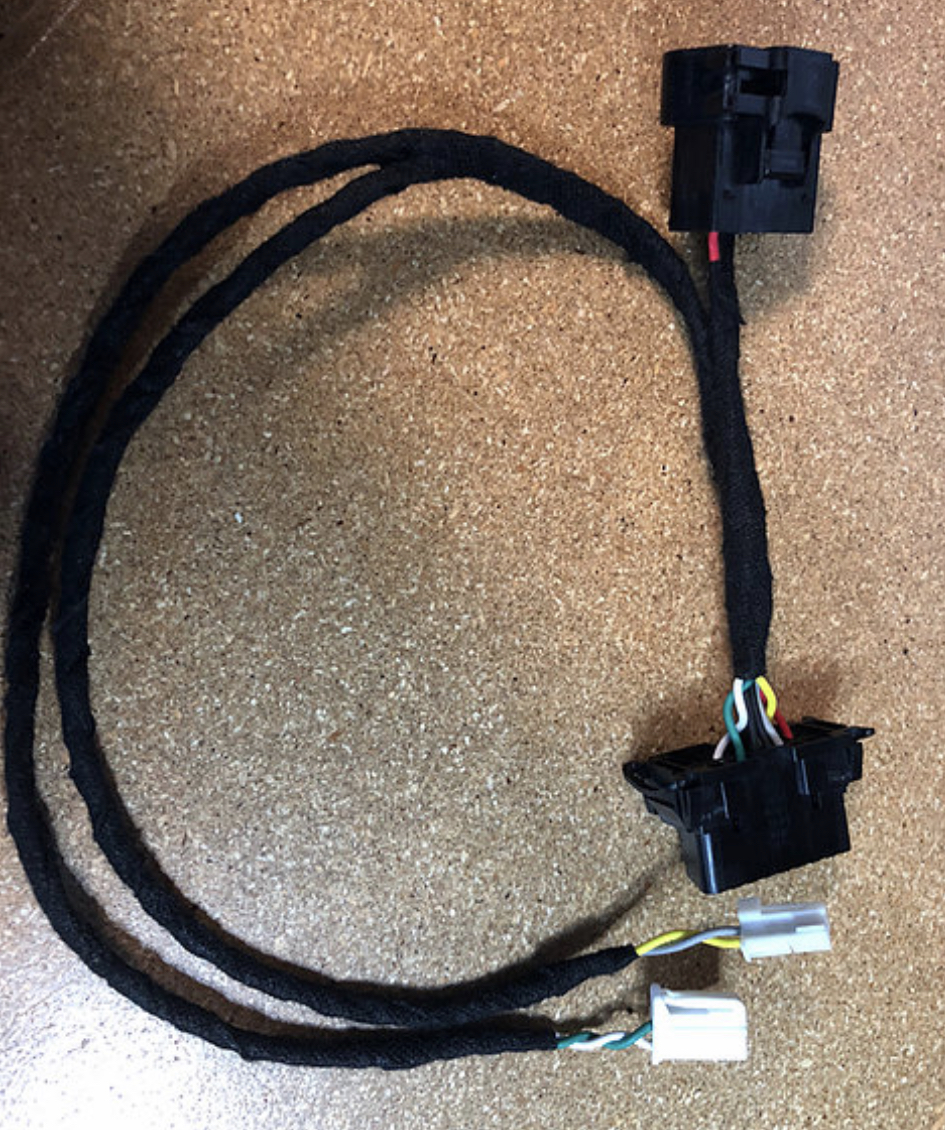
The closest you can get a bypass to not be (completely) unplugged for a dealer visit is the the kaodtech style bypass-
RTEQWzw.jpg

With this bypass, you only need to disconnect the pass through from the original OBD port, and you can leave the two can connectors plugged in, and tuck the bypass up out of the way. In order for the dealer scan tool to connect to the truck, the security gateway must be in place, and the tool must be plugged into the original OBD port. The only way to have a bypass that you don’t have to disconnect for the dealer is if you custom build a harness with it’s own female OBD port for the interface, separate from the vehicle’s OBD port, that plugs into the canbus junction blocks, and receives it’s own power and ground.
 
Last edited:
^ edited the above post because I accidentally hit post reply before I was done.
 
Thanks, how hard is it to disconnect it from the original port?

Just looking at it in pics it looks almost like it replaces the original...


On 2019+ HD Rams, the security gateway module is behind the instrument cluster.
The closest you can get a bypass to not be (completely) unplugged for a dealer visit is the the kaodtech style bypass-

With this bypass, you only need to disconnect the pass through from the original OBD port, and you can leave the two can connectors plugged in, and tuck the bypass up out of the way. In order for the dealer scan tool to connect to the truck, the security gateway must be in place, and the tool must be plugged into the original OBD port. The only way to have a bypass that you don’t have to disconnect for the dealer is if you custom build a harness with it’s own female OBD port for the interface, separate from the vehicle’s OBD port, that plugs into the canbus junction blocks, and receives it’s own power and ground.
 
Since you mentioned it was behind the instrument cluster (and my first assumption was that you'd have to remove the cluster to get to it) but I went and looked up videos and just found a video that makes it look like you can actually unplug the wires without removing the cluster by just looking up from the floorboard, is that correct? If so then our Z-Automotive ones are fine. I just don't like having to remove something like the radio or cluster to get to it.

Can anyone confirm that the below video is an accurate representation of the SGM location for a 2021 model 2500 ... ?


Since you mentioned it was behind the instrument cluster (and my first assumption was that you'd have to remove the cluster to get to it) but I went and looked up videos and just found a video that makes it look like you can actually unplug the wires without removing the cluster by just looking up from the floorboard, is that correct? If so then our Z-Automotive ones are fine. I just don't like having to remove something like the radio or cluster to get to it.

Can anyone confirm that the below video is an accurate representation of the SGM location for a 2021 model 2500 ... ?


That is the 5th gen 1500, and the gateway on those is located down behind the knee bolster. On the 2019+ HDs, you must remove the cluster to get to it. Now, once you do that, you can free up just enough slack on the harness so the two connectors will hang low enough to plug the gateway back in without removing the cluster again. You still have to reach way up around some stuff, though.
Thanks, how hard is it to disconnect it from the original port?

Just looking at it in pics it looks almost like it replaces the original...
v8yA6cK.jpg

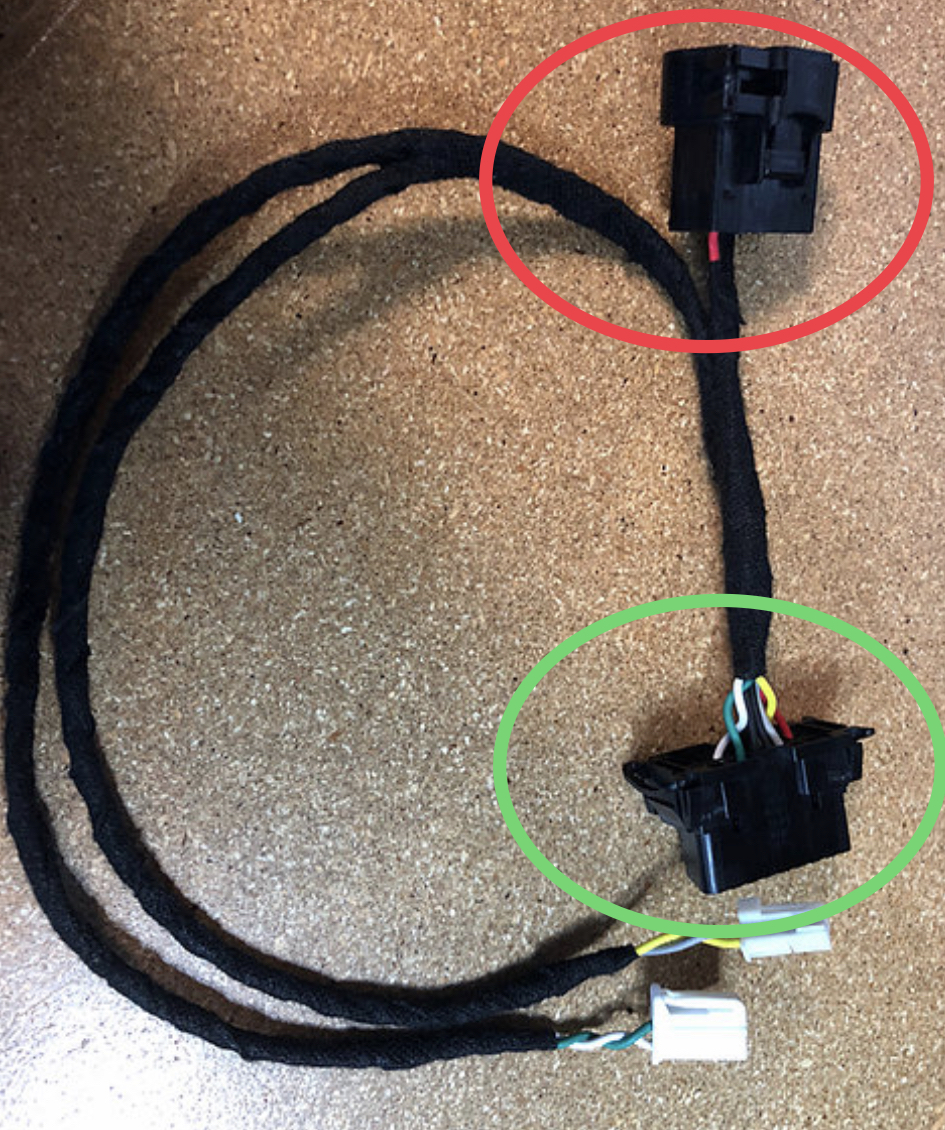
The red circled end plugs into the OBD port. Then the interface plugs into the green circled end. The other two connectors plug into the canbus junction blocks directly behind the headlight switch.
 
I've got a '21 3500 on the way. Is there any advantage to the windows version vs android other than being able to force a newer MY? I've read that the android version is more user friendly, and it might be nice to have on my phone if there's no reason to go with windows. I could always get a windows version in the future if MY2022 would give me some new options.
 
Jimmy07 is in the ballpark for the SGW and harness on the 2019+ HD. I installed my Tazer Ram bypass harness last night in my 2021 Power Wagon. First, shave off the little "key tab" from the green plug. Next, grab the right side of the light switch assembly next to the steering wheel. Give it a tug and the whole light control assembly pops right out. Once you look in the hole, you can see the Star connector ports. Plug the white cable into the closest one to the door and the green one with the now shaved off key-tab into the port nearest the firewall. They are about a half inch apart, but different port-blocks. Then, plug the male and female OBD ports into the right places and the Tazer Ram into the correct harness port. The bigger problem I had was trying to find a place to zip tie the wiring to keep it all out of the way. I ended up using the metal brace above where my left foot rests and a long zip tie to keep it all up there.

EDIT: I found the post with the pictures that showed me what to do. https://hdrams.com/forum/index.php?...module-location-for-programmer.440/post-26099
 
Last edited:
I've got a '21 3500 on the way. Is there any advantage to the windows version vs android other than being able to force a newer MY? I've read that the android version is more user friendly, and it might be nice to have on my phone if there's no reason to go with windows. I could always get a windows version in the future if MY2022 would give me some new options.

Just get both. ;-)

50% off the second one.
 
So I am new to AlfaODB. Hope this isnt a stupid question. I have the correct bypass cable from Kaodtech for my 21 PW. I plugged the connecter labeled wht/grn into the white and green block, and the one labeled blk/grn into the black and green block. Plugged in the original ODB connector to the female end of the harness and away I go. However, when try to connect with AlfaODB I get the below error. Did I miss something? I have the ODBLink MX+.

To be clear, I get this when I try to connect to the body computer
 

Attachments

  • Error.JPG
    Error.JPG
    92.4 KB · Views: 84
So I am new to AlfaODB. Hope this isnt a stupid question. I have the correct bypass cable from Kaodtech for my 21 PW. I plugged the connecter labeled wht/grn into the white and green block, and the one labeled blk/grn into the black and green block. Plugged in the original ODB connector to the female end of the harness and away I go. However, when try to connect with AlfaODB I get the below error. Did I miss something? I have the ODBLink MX+.

To be clear, I get this when I try to connect to the body computer
Just click continue
 
Back
Top