

Thanks Jimmy, I went ahead and set that as well but it didn't change anything that I could see. No errors were present. I'll leave it in this state for awhile and see if it starts working on its own like some others have reported.On a power wagon with off road camera, CustSetMenu 3: Forward Facing Camera Gridlines CSM Present is also set to YES. This setting is set to NO on a surround view truck, so make sure you change that setting also. If there are no faults stored in the CVPM, I would think you should be good, as a fault would immediately be thrown if it doesn’t like the VehConfig 8 setting.
Ram Heavy Duty Forum
You are using an out of date browser. It may not display this or other websites correctly.
You should upgrade or use an alternative browser.
You should upgrade or use an alternative browser.
AlfaOBD
- Thread starter MEZZ2006
- Start date

Skooter76
Well-Known Member
Yes. That is what I did and it worked.On a power wagon with off road camera, CustSetMenu 3: Forward Facing Camera Gridlines CSM Present is also set to YES. This setting is set to NO on a surround view truck, so make sure you change that setting also. If there are no faults stored in the CVPM, I would think you should be good, as a fault would immediately be thrown if it doesn’t like the VehConfig 8 setting.

Thanks Jimmy, I went ahead and set that as well but it didn't change anything that I could see. No errors were present. I'll leave it in this state for awhile and see if it starts working on its own like some others have reported.
It takes a while, several key cycles for the radio to pick it up. There are several options that can be enabled that do that - take time, or radio fuse pull.
I have not tried this one yet. I still want to know if I get it to work will the camera stay on indefinitely like it does on my gladiator in 4wd? The tire tracks are useless to me. I wish I could turn it off on my gladiator.Well not sure why we didn't think of this before. Quick search and list would seem to indicate it's not working on any 3500 trucks.
jsalbre 2500 Limited working
Skooter76 20 2500 Laramie L2 working
webracin 2500 Limited working
bullsandbuckshunter 20 2500 Laramie L2 working (no gridlines?)
regal2800 3500 Limited mega not working
mezz2006 19 3500 Big Horn 8.4" not working
brutal_ho 20 3500 Limited not working
HORam 19 3500 laramie L2 3500 not working
Steve_Cornell ? 3500 not working
What's the downside/risk to changing the D2 trucks to DJ?
It would operate exactly like the gladiator off road camera:I have not tried this one yet. I still want to know if I get it to work will the camera stay on indefinitely like it does on my gladiator in 4wd? The tire tracks are useless to me. I wish I could turn it off on my gladiator.
4Lo- will remain on indefinitely until you turn it off
2WD or 4HI- will remain on indefinitely under 8mph, or 10 seconds if driving over 8mph.

Steve_Cornell
Well-Known Member
20 Laramie here BrutalWell not sure why we didn't think of this before. Quick search and list would seem to indicate it's not working on any 3500 trucks.
jsalbre 2500 Limited working
Skooter76 20 2500 Laramie L2 working
webracin 2500 Limited working
bullsandbuckshunter 20 2500 Laramie L2 working (no gridlines?)
regal2800 3500 Limited mega not working
mezz2006 19 3500 Big Horn 8.4" not working
brutal_ho 20 3500 Limited not working
HORam 19 3500 laramie L2 3500 not working
Steve_Cornell ? 3500 not working
What's the downside/risk to changing the D2 trucks to DJ?
I changed the settings over the weekend and have drove over 1000 miles in the last 3 days and no change, still no surround view, front camera button is in the radio but is not lit up or function.. I'll leave it a few more days before I change it all back.... the grid lines are no big deal to me at all, I just really like to have the front camera for parking without going through the surround menu.... I really like the setup on my 17 1500, the front camera would come on any time the truck was below 12 mph.
Last edited:
I drove quite a bit today but no changes yet. A couple things I've noticed while I'm waiting and hoping for the forward tire guidelines to enable: I've lost my backup tire guidelines and my top down view did come up a couple times after a cold start but only for about a second and then it went black.
This would be one of those situations where the other type of security gateway bypass would come in handy. That way you can connect to the radio module and reset the ECU to speed things up.I drove quite a bit today but no changes yet. A couple things I've noticed while I'm waiting and hoping for the forward tire guidelines to enable: I've lost my backup tire guidelines and my top down view did come up a couple times after a cold start but only for about a second and then it went black.
Put the surround button on the lower part of the Uconnect radio display - they can be customized a little. That's what I do now anyway.20 Laramie here Brutal
I changed the settings over the weekend and have drove over 1000 miles in the last 3 days and no change, still no surround view, front camera button is in the radio but is not lit up or function.. I'll leave it a few more days before I change it all back.... the grid lines are no big deal to me at all, I just really like to have the front camera for parking without going through the surround menu.... I really like the setup on my 17 1500, the front camera would come on any time the truck was below 12 mph.

abillerbeck
Active Member
I gave the forward facing camera option a shot earlier today... changed VehConfig 8-Off-road Camera Present to "Yes" and Cust.Set.Menu 3-Forward Facing Camera Gridlines CSM Present to "Yes". Have cycled the key half a dozen times and driven about 25 miles, no forward facing button on the screen yet and I lost my 360 top view camera on the left side of the screen. No faults present on BCM. Guess I'll leave it this way for a few days and see what happens. 2021 2500 6.4 Laramie Level 2 with off road package.
Also, I'm using the windows version of AlfaOBD and couldn't figure out how to backup the BCM configuration... where is that option? I don't see any tools button.
Also, I'm using the windows version of AlfaOBD and couldn't figure out how to backup the BCM configuration... where is that option? I don't see any tools button.
I changed mine on Tuesday and it's still not working. I did a lot of driving with a lot of cycles too. I'm ready to throw in the towel and change back the settings, it's been almost a week.I gave the forward facing camera option a shot earlier today... changed VehConfig 8-Off-road Camera Present to "Yes" and Cust.Set.Menu 3-Forward Facing Camera Gridlines CSM Present to "Yes". Have cycled the key half a dozen times and driven about 25 miles, no forward facing button on the screen yet and I lost my 360 top view camera on the left side of the screen. No faults present on BCM. Guess I'll leave it this way for a few days and see what happens. 2021 2500 6.4 Laramie Level 2 with off road package.
abillerbeck
Active Member
Bummer... that doesn't give me much hope seeing as how we have practically the same truck. Did you ever even get the button on the screen for the forward camera?
I gave it the old college try but I finally gave up after a week. Add my 2500 to the didn't work list. My top view and rear guidance lines came back as soon as I switched it back.
Did you check the vehicle ID to verify it's set to DJ?
I didn't. I'll give it a look when I get a chance.Did you check the vehicle ID to verify it's set to DJ?
abillerbeck
Active Member
Where do you find that information on the windows platform? Also, how do you create a backup on the windows platform?
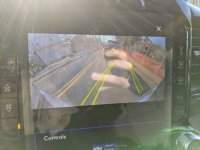
I saw this conversation last night and decided to give it a try this morning thinking maybe the front guide lines might help make it easier to line up the plow. Turned on the off-road camera and the guide lines, after a few short trips around town, the front camera showed up a little after lunch time and everything seems to work fine. 2019 2500 tradesman 6.7 with retrofitted 360 view system.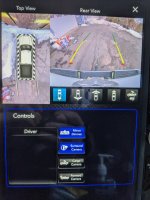

Rockcrawlindude
a rock crawlin’ dude
Pay attention you’re fixin’ to go off the road!I saw this conversation last night and decided to give it a try this morning thinking maybe the front guide lines might help make it easier to line up the plow. Turned on the off-road camera and the guide lines, after a few short trips around town, the front camera showed up a little after lunch time and everything seems to work fine. 2019 2500 tradesman 6.7 with retrofitted 360 view system.View attachment 12751
View attachment 12750