What's new
Ram Heavy Duty Forum

Register a free account today to become a member! Once signed in, you'll be able to participate on this site by adding your own topics and posts, as well as connect with other members through your own private inbox!

AlfaOBD

**Note** If you do not see the above 2014 CBC setting, then use this one:
2014 CBC Config I/O & Feat. Truck bed lighting feature- NOT PRESENT **

Update: So day later the right signature light is off left still remains on...hopefully left turns off soon
 
Update: So day later the right signature light is off left still remains on...hopefully left turns off soon
It won’t until you disable pin A7.
Is there a setting you see that says 2014 CBC connector A pin 7 snow plow? Try setting that to not present.
 
It won’t until you disable pin A7.
Is there a setting you see that says 2014 CBC connector A pin 7 snow plow? Try setting that to not present.
There is a snow plow A7 left turn/spare hsd: already set to NOT PRESENT, other choices feature A, B OR C.
Right still off, left still on only after changing bed lighting as directed. Not sure if should try A7 A, B or C features as i dont know what else impacts, what do you think?
 
There is a snow plow A7 left turn/spare hsd: already set to NOT PRESENT, other choices feature A, B OR C.
Right still off, left still on only after changing bed lighting as directed. Not sure if should try A7 A, B or C features as i dont know what else impacts, what do you think?
You might have to try each option, and take the truck for a drive cycle for each one to see if it goes off.
 
You might have to try each option, and take the truck for a drive cycle for each one to see if it goes off.
Put couple hours driving on each selection and no change; still only left signature light on( looks like GM product to oncoming traffic). Maybe give each mode a overnight at this point... has anyone actually successfully done this on a simular truck? I cant be first... anyone....lol
 
Put couple hours driving on each selection and no change; still only left signature light on( looks like GM product to oncoming traffic). Maybe give each mode a overnight at this point... has anyone actually successfully done this on a simular truck? I cant be first... anyone....lol
You have to get that left light circuit disabled in the bcm. Do you have, or can you get, the windows version?
 
You have to get that left light circuit disabled in the bcm. Do you have, or can you get, the windows version?
I dont have windows verision, maybe could get it but wondering if worth spending even more $ wih no real definitive proof it will work. I turned off "truck bed lighting"to get my right front signature light to turn off...maybe theres something i am missing? Is there some kind of system diagrams or logic map avaliable somewhere to follow? Thanks again for all your help/time with this, thought this had been done before and would be easier.
 
I dont have windows verision, maybe could get it but wondering if worth spending even more $ wih no real definitive proof it will work. I turned off "truck bed lighting"to get my right front signature light to turn off...maybe theres something i am missing? Is there some kind of system diagrams or logic map avaliable somewhere to follow? Thanks again for all your help/time with this, thought this had been done before and would be easier.
The windows version will definitely work, because you can force a different BCM setting list to show up. The Android version automatically connects to whatever BCM it thinks you have, and that is the settings list you get. You need the list from a 2020 powernet. To show you what I mean, open alfaOBD on your device, and without connecting to your truck, choose 2020 body computer, go to car configuration change, and you’ll find those settings in that list. The developer charges half price for a second version if you already have one version.
 
Could someone please share what all is needed for Alfa OBD for my 2020 3500 HO and where to purchase?
Thanks!
The Android app from google play store, or windows download from AlfaOBD.com. (Windows version strongly recommended)
A Bluetooth interface such as OBD link MX+ (preferred) available at Amazon
And a bypass harness to bypass the security gateway module so changes can be made- https://www.kaodtech.com/product-page/security-module-bypass
I have a couple bypass harnesses laying around also, so PM me if you need one.
 
OBDLink LX is cheaper than the MX+ if you don't need iOS support (AlfaOBD is Windows/Android only) or use on Ford or GM (MX+ comes with a choice).
 
The windows version will definitely work, because you can force a different BCM setting list to show up. The Android version automatically connects to whatever BCM it thinks you have, and that is the settings list you get. You need the list from a 2020 powernet. To show you what I mean, open alfaOBD on your device, and without connecting to your truck, choose 2020 body computer, go to car configuration change, and you’ll find those settings in that list. The developer charges half price for a second version if you already have one version.
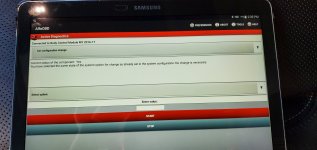
When I connect to my 2020 truck using android version, it thinks it's a 2016-17 body computer. I tried emailing alfaobd about getting the windows version at a discount since I already have the android version. Unfortunately I got no response on it. That was few weeks ago now. Maybe others will have better luck. 20210115_143937.jpg20210115_143915.jpg
 
When I connect to my 2020 truck using android version, it thinks it's a 2016-17 body computer. I tried emailing alfaobd about getting the windows version at a discount since I already have the android version. Unfortunately I got no response on it. That was few weeks ago now. Maybe others will have better luck. View attachment 10645View attachment 10646

After you connect to the BT reader, you're scrolling to and selecting MY2020 PowerNet before hitting Connect?

I've had trouble from time to time on Android releases with the scrolling and the BCM detection. FYI, it's also one of the apps I have set to not auto-update. I prefer to let them bake until I see others are not having issues.

Odd that Alex isn't responding to an email. I'd try again.
 
The Android app from google play store, or windows download from AlfaOBD.com. (Windows version strongly recommended)
A Bluetooth interface such as OBD link MX+ (preferred) available at Amazon
And a bypass harness to bypass the security gateway module so changes can be made- https://www.kaodtech.com/product-page/security-module-bypass
I have a couple bypass harnesses laying around also, so PM me if you need one.
I was looking for a usb obd adapter is there any that wont work or does it have to be Bluetooth? My gaming laptop does not have bluetooth id rather not buy a bluetooth adapter for the laptop if i dont need to
 
I was looking for a usb obd adapter is there any that wont work or does it have to be Bluetooth? My gaming laptop does not have bluetooth id rather not buy a bluetooth adapter for the laptop if i dont need to
There are usb cables, also, if you don’t want a Bluetooth dongle. The OBD Link EX or SX will work as USB interfaces.
 
There are usb cables, also, if you don’t want a Bluetooth dongle. The OBD Link EX or SX will work as USB interfaces.
Ok thanks for the info i was looking at the ex but it showed it as ment for forscan for fords
 
Well this is frustrating.

Using the latest Windows version 2.2.5.0 and it refuses to stay on MY2020 PowerNet in advanced. As soon as I connect to BCM, it shows connected to MY2016-17.

Oddly enough, The Android version (one rev back @2.1.9.5) is not currently doing the same thing, it detects MY2020 PowerNet just fine.
 
Last edited:
Well this is frustrating.

Using the latest Windows version 2.2.5.0 and it refuses to stay on MY2020 PowerNet in advanced. As soon as I connect to BCM, it shows connected to MY2016-17.

Oddly enough, The Android version (one rev back @2.1.9.5) is not currently doing the same thing, it detects MY2020 PowerNet just fine.
Whatever AlfaOBD initially connects to as MY BCM, it will always stay that way throughout the connection. When you go into advanced mode to choose a BCM from the list, you aren’t actually “switching connections”, but rather just switching the BCM settings list that you see in active diagnostics. I’m not sure how the software actually detects what BCM it connects as between the two versions. I’m going to be emailing him a bunch of requests (mainly, to just put every setting from all vehicles into all BCM powernet settings lists), and I’ll ask him about how that works. It’s getting frustrating with everyone trying to enable features that some can see, and some can’t.
 
Back
Top